How to Write Cold Emails That Get Recruiters to Reply
Write concise, personalized cold emails recruiters will read—subjects, tailored intros, role-focused achievements, CTAs, and follow-ups.

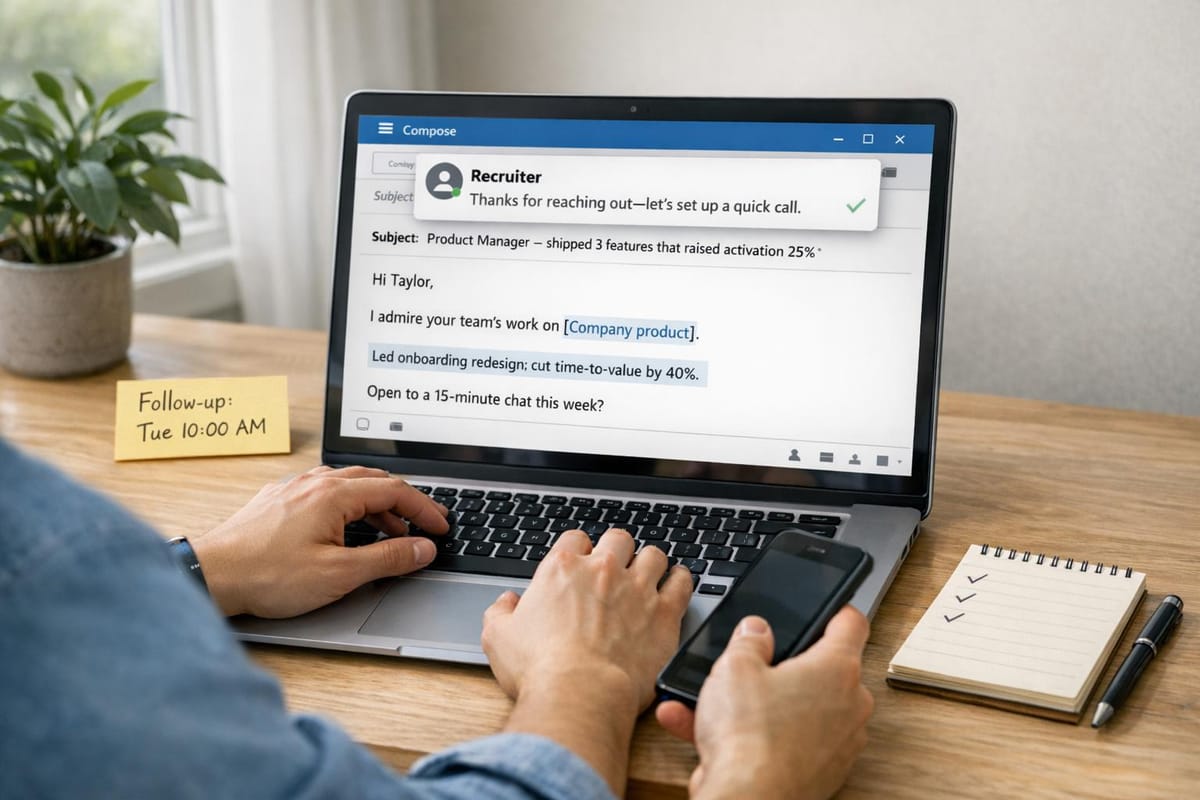
Recruiters receive an average of 122 emails daily, and most are ignored within 5 seconds. To stand out, your cold email must be highly personalized, concise, and directly relevant to the recipient. Generic messages or automated tools often fail, with response rates as low as 3–8%, while personalized emails can achieve 20–35% or higher.
Here’s how you can craft cold emails that recruiters will notice:
- Subject Lines Matter: Use the recruiter’s name, job title, or reference recent achievements. Keep it under 10 words to ensure it’s visible on mobile devices.
- Start Strong: Mention mutual connections, shared interests, or specific company updates to build rapport.
- Showcase Relevant Skills: Highlight measurable achievements using proven resume writing hacks and align them with the company’s needs.
- Be Brief and Clear: Keep your email between 50–125 words with a clear call to action.
- Follow Up Strategically: Wait 3–5 business days before sending a polite follow-up.
Services like Scale.jobs can help tailor your outreach with human-written emails and ATS-optimized resumes, offering better results than automated platforms. If you’re struggling to get responses, switching to a personalized approach could make a significant difference.
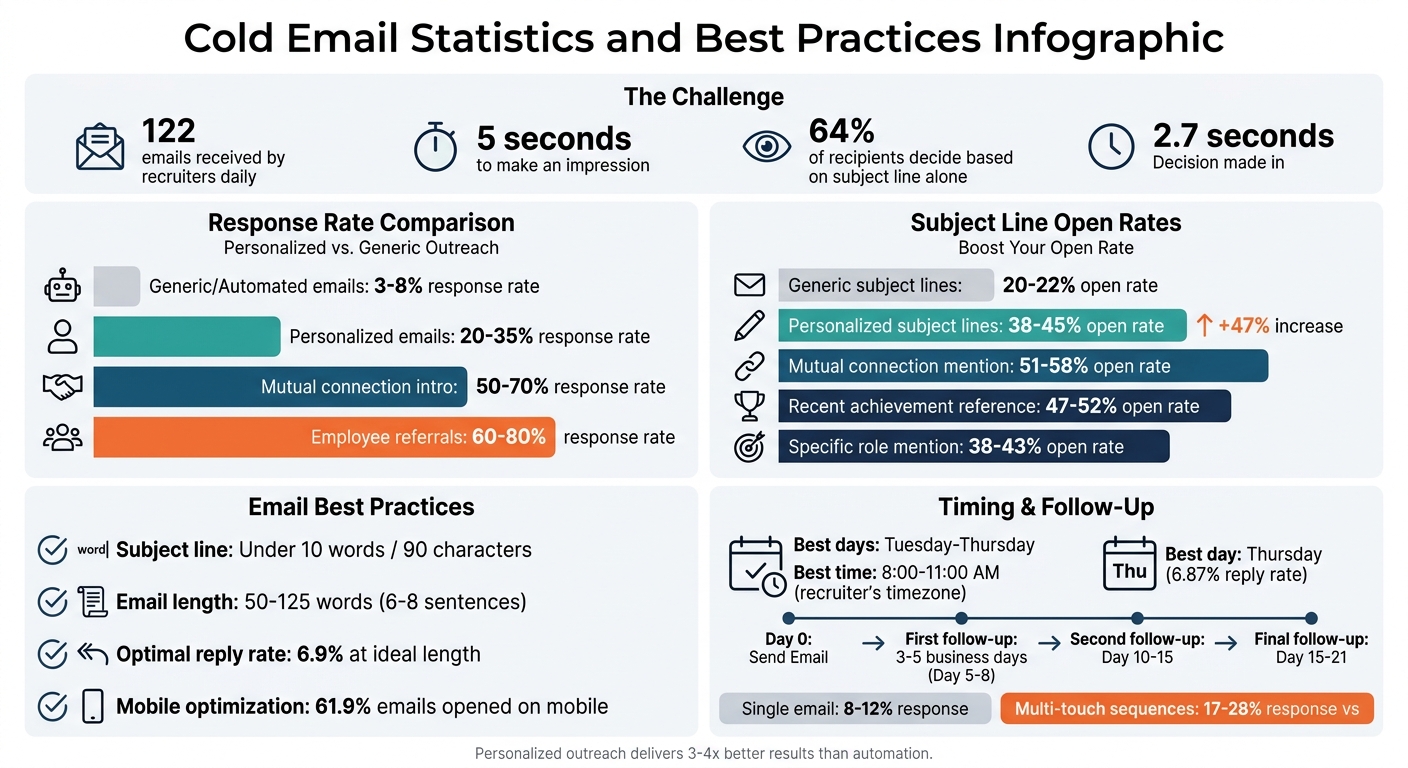
Cold Email Best Practices: Response Rates and Timing Guide
Writing Cold Email for Job? (Watch This Video Before Hitting Send)
sbb-itb-564272e
Step 1: Write Subject Lines That Get Opened
In a world full of generic emails, your subject line is your golden ticket to standing out. 64% of recipients decide whether to open or delete an email based solely on the subject line, and they make this decision in just 2.7 seconds. If your subject line doesn’t grab attention immediately, your email will likely end up ignored.
The impact of a personalized subject line versus a generic one is huge. Personalized subject lines boast 38-45% open rates, while generic ones struggle at 20-22%. This means your priority isn’t just to showcase your qualifications - it’s to prove you’re not sending out mass emails.
Include the Recruiter's Name or Job Title
Using the recruiter’s name or the specific job title signals that your message is tailored. Personalization can boost open rates by 47%, making this a reliable strategy for creating engagement.
The best-performing subject lines reference something specific about the recruiter or their role. For example, "Quick question about your time at Google" tends to pull 35-41% open rates because it shows you’ve done your homework. If applying for a particular position, try "[Role] opportunity - [Name]" to catch attention among active job seekers.
If you share a mutual connection, mention it right away. Subject lines like "James Chen recommended I reach out" achieve the highest open rates, ranging from 51-58%. This works because warm introductions carry far more weight than cold outreach.
Highlight a Specific Skill or Achievement
Recruiters are inundated with vague subject lines like "Exciting opportunity at a fast-growing company." These are the email equivalent of "Dear Sir/Madam" - impersonal and likely to be deleted.
Instead, focus on something specific about your skills or achievements that aligns with the recruiter’s needs. For instance, "Python role - thought of you after your GitHub post" achieves about 45% open rates, as it demonstrates both an understanding of the role and the recruiter’s interests. Similarly, "Sarah, your talk at DevConf caught our attention" garners 47-52% open rates by showing awareness of their work.
Keep your subject line concise - under 10 words or 90 characters. Since 61.9% of emails are opened on mobile devices, longer subject lines risk being cut off, losing their impact. Avoid misleading tactics like fake "Re:" or "Fwd:" prefixes; not only do recruiters see through them, but they can also violate CAN-SPAM regulations.
If creating personalized emails for multiple recruiters feels overwhelming, consider using a resume writing service for software engineers to ensure your outreach is professional. These services include expertly crafted cold email templates that save you time while maximizing your chances of getting noticed. Unlike automated tools like LazyApply, Scale.jobs relies on human expertise to ensure each email reflects genuine personalization.
To ensure you don't lose momentum after the initial open, it's vital to avoid ghost replies with a structured approach. Next, we’ll dive into how to craft a personalized introduction that builds rapport and keeps the recruiter engaged.
Step 2: Start With an Opening Line That Builds Rapport
Recruiters typically decide in just 5–6 seconds whether to continue reading your message. That means your opening line has to stand out and show you've done more than just copy-paste a generic template.
Personalization is the key here. In fact, adding a tailored trigger can increase response rates by 47% compared to generic outreach. Let’s explore two effective strategies to make your opening impactful: referencing mutual connections or shared interests and clearly stating your purpose.
Mention a Mutual Connection or Shared Interest
Bringing up a mutual connection can transform cold outreach into a warm introduction. Here's why it works: Outreach with a mutual connection introduction sees response rates of 50–70%, and referrals from employees can push that number to 60–80%. Compare this to the much lower 3–8% response rates for generic LinkedIn messages, and it’s clear why this approach matters.
If you don’t share a connection, referencing something specific about the recruiter’s work can be just as effective. For instance, you might mention, “I saw your talk at DevConf on scaling engineering teams,” or “I’ve been following your team’s work on the new AI-powered search feature.” This shows you’ve done your research and sets you apart from automated messages.
Another great option is to highlight recent company news. Whether it’s a product launch, funding announcement, or new initiative, tying it back to your skills shows genuine interest. For example, “Congratulations on your recent funding round - I’d love to contribute to your team’s next phase of growth.”
State Your Purpose Clearly
Once you’ve captured their attention, get straight to the point. Whether you’re applying for a job, asking for advice, or requesting a conversation, clarity is crucial. Keep your email short - messages between 50–125 words tend to get the best response rates - and state your purpose within the first two sentences.
Avoid vague requests like, “I’d love to connect.” Instead, be specific: “I’m reaching out about the Senior Product Manager role (Job ID: 12345),” or “Would you be open to a brief conversation about opportunities on your data engineering team?” Calls-to-action that express interest, like “Would you be open to a brief conversation?” can double your chances of success compared to more demanding requests for meetings.
Unlike automated tools such as LazyApply, a well-crafted, personalized opening showcases your genuine effort and insight - qualities that set scale.jobs apart.
| Personalization Type | Opening Hook Example | Open Rate Impact |
|---|---|---|
| Recent Achievement | "I saw your talk at [Conference]..." | 47–52% |
| Mutual Connection | "[Name] recommended I reach out..." | 51–58% |
| Company Project | "I've been following [Company]'s work on [Project]..." | 35–41% |
| Specific Role | "I saw you're hiring for [Role] and noticed..." | 38–43% |
Step 3: Highlight Skills and Achievements That Match the Role
After crafting a strong introduction, it's time to show how your skills and accomplishments align with the specific role. Focus on measurable achievements that directly address the company's needs, rather than providing a generic overview of your past responsibilities.
Take a moment to dig into the company's recent updates - check their blog, press releases, or LinkedIn activity. For instance, if the company has recently announced a transition to microservices, and you’ve led a similar project, you could say something like:
"I spearheaded a monolith-to-microservices migration at my previous role, cutting deployment time by 40% and boosting system reliability."
This kind of targeted example is far more impactful than a broad statement about your experience.
Whenever possible, quantify your achievements in a way that grabs attention. Instead of saying you "managed marketing campaigns", try something like:
"Increased organic traffic by 100,000+ views through strategic SEO efforts"
or
"Reduced time-to-fill by 20% across 15 roles."
Research shows that cold emails with specific, quantifiable results are 47% more likely to get a response, as they immediately stand out during a recruiter's quick 5–6 second scan.
Additionally, tailor your examples to the company's technology stack or specific requirements. For example, if they’re looking for a React developer, you might say:
"Built a React/TypeScript dashboard that serves 50,000+ users."
Recruiters are 2.1 times more likely to engage with candidates when the outreach highlights role-specific skills and benefits over generic qualifications.
Finally, keep your email structured and clear, with a strong focus on achievements and a direct call to action to guide the next steps.
Step 4: Structure Your Email and Add a Clear Call to Action
Keep Your Email Short and Focused
Recruiters typically skim emails in under 5 seconds, so every word must serve a purpose. A well-crafted cold email follows a simple four-part structure: introduce yourself, explain why you’re reaching out to this specific company, highlight a key accomplishment, and end with a clear call to action. This concise format keeps your email between 50 and 125 words, a range shown to generate the best response rates.
To make your email easy to read, use short paragraphs or bullet points, ensuring it’s scannable - especially on mobile devices. Aim for 6 to 8 sentences in total, as research suggests this length achieves a 6.9% reply rate. Avoid attaching your resume in your initial outreach; instead, offer to provide more details if the recruiter is interested. Adopt a conversational tone, as 40% of candidates find this approach more engaging than overly formal language.
Once your email is streamlined, focus on crafting a call to action that guides the recruiter toward the next step.
End With a Specific Next Step
Your call to action plays a critical role in whether your email gets a response or ends up ignored. Avoid vague requests like "confirm a 15-minute call." Instead, use specific, low-pressure phrasing that encourages a reply. For example, an interest-based ask like "Would you be open to a 15-minute call this week?" can double your success rate compared to a direct meeting request.
Make it easy for the recruiter to respond positively by suggesting a timeframe or offering an alternative if they’re not the right contact. For instance, saying "Happy to be pointed to whoever handles hiring if that's not you" reduces friction and often elicits a reply, even if you’ve reached the wrong person. Unlike LazyApply's automated approach, Scale.jobs emphasizes genuine, personalized outreach to achieve better engagement. If you’re finding it challenging to craft tailored emails at scale, professional resume writing services can help you create templates that balance efficiency with the personal touch recruiters value.
| CTA Strategy | Example Phrasing | Why It Works |
|---|---|---|
| Interest-Based | "Would you be open to a 15-minute call?" | Doubles success rate compared to demanding meetings |
| Referral-Seeking | "Happy to be pointed to the right person if that's not you." | Low-pressure and often gets a response |
| Specific Inquiry | "Is there someone I should follow up with about the role?" | Encourages a clear, low-commitment reply |
With your email now designed to grab attention and prompt action, it’s time to learn how to follow up effectively in Step 5.
Step 5: Follow Up Without Being Pushy
After sending your email, a thoughtfully timed follow-up can be the final step to grab a recruiter's attention without overstepping boundaries.
Wait 3–5 Business Days Before Following Up
Recruiters often need a few days to sort through applications and coordinate with hiring teams. Waiting around 3–5 business days before following up shows patience and professionalism. On the other hand, reaching out every couple of days can come across as overly eager, while waiting too long might cause your email to get buried under newer ones.
Timing also plays a critical role in increasing your chances of a response. Research shows Thursdays have the highest reply rate at 6.87%, making it a great day to send your follow-up email. Aim to send your message between 8:00 AM and 11:00 AM in the recruiter's local timezone, as this is when they’re most likely to check their inbox. Limit yourself to no more than three follow-ups. Why? Because spam complaints jump from 0.5% on the first email to 1.6% by the fourth, and unsubscribe rates spike after three attempts. These strategies help your follow-up stand out without overwhelming the recipient.
Send a Concise, Polite Reminder
A good follow-up email should provide a reason to re-engage rather than just "bumping" the original message. For example, you could share a recent professional accomplishment, highlight a skill you didn’t mention earlier, or reference a relevant team success. Data suggests that multi-touch email sequences perform three times better than single emails, with response rates ranging from 17% to 28%, compared to just 8%–12% for one-off messages. Keep your follow-up short, and use the "Re:" subject line to maintain the flow of the conversation.
For your first follow-up, you might use a gentle resurface tactic like: "Just following up in case this slipped through." This acknowledges the recruiter's busy schedule without sounding pushy. By the final follow-up, opt for a softer tone with something like: "Last note - happy to connect whenever the timing is right." This approach respects their time while keeping the door open for future communication. If crafting personalized and effective follow-ups feels overwhelming, consider using a job application service to create tailored templates that strike the right balance.
| Follow-Up Stage | Timing | Content Focus |
|---|---|---|
| First Follow-Up | 3–5 business days (Day 5–8) | Polite reminder: "Just following up in case this slipped through." |
| Second Follow-Up | Day 10–15 | Add value: mention a recent project, achievement, or relevant context |
| Final Follow-Up | Day 15–21 | Final sign-off: "Happy to connect whenever the timing is right." |
This structured approach ensures your follow-ups feel thoughtful and professional, reinforcing the personalized effort from earlier steps.
LazyApply vs Scale.jobs: Why Human-Written Emails Get More Replies
When it comes to personalized outreach for job applications, the debate often boils down to automation versus human touch. Let’s take a closer look at two popular options: LazyApply and scale.jobs, and why the latter’s human-powered approach tends to deliver better results.
If you’ve tried LazyApply or similar tools to send cold emails to recruiters, chances are you’ve noticed a lack of responses. That’s because recruiters can easily spot automated emails, and generic templates often end up ignored or flagged as spam. While LazyApply is great for sending out a high volume of applications at an affordable price, its automated nature comes at the expense of the personalization needed to get noticed.
On the other hand, scale.jobs takes a different approach by relying on human expertise for your job search. Instead of using algorithms to blast out emails, professionals at scale.jobs research companies, tailor resumes for ATS compatibility, and craft emails that reference specific details like recent projects or company news. This attention to detail pays off: personalized emails typically see response rates of 20–35%, compared to just 3–8% for automated messages. That’s the difference between landing interviews or being met with silence.
Why Scale.jobs Stands Out Over Automated Tools
Unlike automation-heavy platforms, scale.jobs prioritizes human oversight and customization. While LazyApply offers speed, speed means little if your emails don’t even get opened. Here’s where scale.jobs excels: human-written emails bypass the bot-detection systems that often flag automated messages as spam. If your email domain gets blacklisted, even legitimate outreach can fail to reach recruiters. By using real people to craft every message, scale.jobs ensures your sender reputation remains intact.
Additionally, scale.jobs provides ATS-optimized resumes tailored to each job, which is a step beyond the generic documents that often get rejected automated tools attach to every application. You also receive screenshot proof for every submission, so you know exactly when and where your materials were sent. With direct WhatsApp support and a one-time payment model, scale.jobs eliminates the hassle of email tickets and recurring subscription fees.
Comparing Features: LazyApply vs Scale.jobs
Here’s a side-by-side breakdown of what each service offers:
| Feature | LazyApply (Automated) | scale.jobs (Human-Assisted) |
|---|---|---|
| Email Quality | Generic templates or AI-generated | Human-written, highly personalized |
| Response Rate | 3–8% | 20–35% |
| Resume Handling | Standardized documents | ATS-optimized and customized per role |
| Transparency & Proof of Work | Often no verification | Screenshot proof for every application |
| Spam Risk | High; risk of domain blacklisting | Low; avoids bot-flagging |
| Support | Email-only or ticket system | Direct WhatsApp support |
| Pricing | Subscription-based | One-time payment |
Who Should Use LazyApply?
LazyApply is a good fit for those who need to submit a large number of applications quickly and don’t mind lower response rates. It’s also a viable option for job seekers on a strict budget who are testing the waters.
Who Should Choose Scale.jobs?
If you’re targeting specific roles where quality matters more than quantity, scale.jobs is the way to go. It’s ideal for anyone frustrated with spam filters or automation tools that leave them in the dark about whether their applications were even seen. For those who want expert help crafting personalized outreach, scale.jobs offers a clear advantage. Need ATS-friendly resumes and proof of submission? This service has you covered.
Switch to scale.jobs if:
- You’ve sent over 200 automated applications with minimal responses.
- Your email domain has been flagged or blacklisted.
- You’re applying for competitive roles that require tailored resumes.
- You want time-stamped screenshots showing exactly what recruiters received.
Decision Summary
- Choose LazyApply if you prioritize speed and volume over response quality and prefer a low-cost subscription.
- Choose scale.jobs if you need higher response rates, customized materials, proof of work, and a one-time payment model that avoids recurring fees.
Try Scale.jobs Free: First 5 Applications on the House
To help you decide, scale.jobs offers your first 5 applications for free - no credit card required, no hidden costs. This trial allows you to test the human-assisted approach and compare it to automated tools. After the trial, you can select a flat-fee package based on your needs, with unused credits refundable. Every application includes time-stamped screenshots, so you’ll know exactly when and what recruiters received.
Conclusion: Write Cold Emails That Get Recruiter Responses
Getting recruiters to respond to your emails comes down to three key elements: personalization, brevity, and persistence. Start with subject lines that mention specific skills or even the recruiter's name. Keep your message concise - ideally between 50 and 125 words - and clearly explain why you're reaching out to that particular company. Personalized emails have an impressive response rate of 20–35%, far outpacing the 3–8% response rates of generic LinkedIn messages or automated tools like LazyApply. Unlike these automated options, platforms like scale.jobs focus on personalized, human-driven outreach to achieve better results.
Timing and follow-ups are equally important. Aim to send emails on Tuesday, Wednesday, or Thursday mornings between 8:00 AM and 11:00 AM in the recruiter's timezone. If you don’t hear back, wait 3–5 business days before sending a polite follow-up. Interestingly, follow-up emails often receive more positive responses than the initial outreach, so don’t mistake silence for rejection.
If the thought of crafting tailored emails for multiple roles seems daunting, there’s help available. Services like scale.jobs take care of the research, writing, and application process for you. While many automated tools fail to deliver results, scale.jobs stands out by offering a human-assisted approach. This includes ATS-optimized resumes tailored to each job, screenshot proof of every application, and direct WhatsApp support - no frustrating email tickets or hidden fees. For those needing expert help, professional resume writing services can save you over 20 hours a week while improving your chances of landing responses.
Consider switching to scale.jobs if:
- Your current tool sends generic emails that rarely get replies
- You’ve applied to over 200 roles without securing interviews
- You want ATS-friendly resumes, proof of effort, and real-time support
Try scale.jobs with 5 free applications - no credit card required - and see how personalized outreach can open doors to the hidden job market. With up to 60% of roles filled before they’re posted on job boards, direct and tailored communication gives you a real edge over the competition.
FAQs
How can I quickly find a real personalization hook?
To make your email stand out, start with a personalized hook by researching the recipient's background, their company, or recent accomplishments. Look for details such as a significant milestone, a notable project, or even a mutual connection to create a meaningful and relevant opening line. Steer clear of overused, generic phrases like "I’m interested in opportunities at your company." Taking the time to craft a thoughtful, tailored introduction demonstrates genuine interest and effort, which can significantly boost your chances of getting a response.
What should I include instead of attaching my resume?
When applying for a role, rather than attaching your resume, consider including a brief summary of your key skills, accomplishments, or examples of your work directly in the body of your application. This method immediately showcases your qualifications to recruiters, ensuring your value is clear from the start. Plus, it helps sidestep any potential problems with ATS systems that might miss or misinterpret attached files.
What if I get no reply after three follow-ups?
If you’ve sent three follow-ups without receiving a response, it’s time to rethink your strategy. First, make sure your emails are tailored to the recipient, brief (under 125 words), and directly address their needs or interests. Timing can also make a difference - emails sent early in the morning or on Tuesdays often see better open rates. If you’re still not hearing back, consider refining your message’s value proposition or exploring other ways to reach out, such as a phone call or LinkedIn message. Persisting without making changes can reduce your chances of success.