How to Write a Resume Summary That Gets Past ATS in 2026
Craft a 40–75 word resume summary with exact job titles, 3–7 keywords, measurable achievements, and ATS-safe plain formatting.


In 2026, getting your resume past Applicant Tracking Systems (ATS) is non-negotiable if you want to stand out in a competitive job market. ATS platforms like Workday, Taleo, and iCIMS filter resumes before recruiters see them, analyzing your resume summary for keyword relevance, job titles, and achievements. A well-crafted summary can boost your chances of being shortlisted, while vague or generic statements can leave you overlooked.
To create an ATS-friendly summary:
- Use keywords directly from the job description, including job titles, skills, tools, and certifications.
- Highlight quantifiable achievements like “Delivered $1M+ projects on time and under budget.”
- Avoid overloading keywords or using formatting (like tables or graphics) that ATS can’t read.
- Stick to plain text formatting and keep your summary concise - around 40–75 words.
This guide explains step-by-step how to optimize your resume for ATS while keeping it appealing to recruiters. Whether you're applying for full-time jobs or using a job search platform, these strategies ensure your resume gets noticed.
What ATS Actually Looks for in a Resume Summary
Core Signals ATS Software Scans For
Applicant Tracking Systems (ATS) like Workday, Taleo, Greenhouse, iCIMS, and Lever are designed to analyze resumes by extracting key information and comparing it to the job description. Your resume summary is one of the first sections these systems evaluate, making it a critical part of your application. Recruiters often rely on keyword searches within this section to filter candidates effectively.
Here’s a breakdown of the key signals ATS software looks for in your summary:
| Signal | How ATS Detects It | Example Summary Snippet |
|---|---|---|
| Job title match | Checks for exact or close matches to the job title | "Senior Software Engineer with 9+ years building scalable APIs." |
| Years of experience | Identifies numeric patterns paired with "years" | "8+ years of experience in enterprise SaaS sales." |
| Hard skills and tools | Matches keywords for required skills or tools | "Skilled in SQL, Python, Tableau, and Power BI for data visualization." |
| Certifications | Searches for exact acronyms or full names | "Certified Public Accountant (CPA) with Big Four experience." |
| Industry/domain terms | Matches sector-specific language | "B2B SaaS", "healthcare compliance", "FinTech", "K–12 education" |
These signals should guide you in tailoring your summary by matching resume keywords to job descriptions. For example, using the exact job title from the posting is crucial. If the job specifies "Senior Product Manager" and your summary says "Product Leader", the ATS may rank you lower, even if your qualifications match perfectly. Stick to the exact title or a close variant.
Certifications should also stand out. Many ATS systems are programmed to filter for required credentials. If a position mandates a certification like PMP or RN, ensure it appears in your summary in both its full form and abbreviation, such as "Project Management Professional (PMP)."
By focusing on these signals, you can craft a summary that effectively aligns with ATS requirements while still appealing to human recruiters.
Common ATS Red Flags to Avoid
Formatting errors often trip up even the most qualified candidates. Avoid placing your summary in text boxes, tables, or graphics, as many ATS tools cannot process these elements. If the ATS can’t read your summary, it may appear blank in the system.
Steer clear of vague phrases like "results-oriented professional." These generic terms add little value and don’t align with ATS scoring. Instead, use specific, quantifiable achievements. For example, "increased qualified pipeline by 35%" is far more effective than "drove sales growth."
Another pitfall is keyword stuffing. Overloading your summary with a long list of skills in a comma-separated format can raise red flags for both ATS software and recruiters. Modern systems are designed to detect unnatural keyword density. Instead, incorporate your top 3–6 skills into concise, meaningful sentences. For instance, rather than listing "SQL, Python, Tableau, Power BI", write something like, "Skilled in SQL, Python, and Tableau for advanced data analytics."
If you’re unsure whether your summary strikes the right balance, consider using a professional resume writing service to fine-tune it for the specific job posting. This can help ensure your resume stands out while remaining ATS-friendly.
sbb-itb-564272e
How to Write an ATS-Friendly Resume in 2026
How to Write an ATS-Friendly Resume Summary
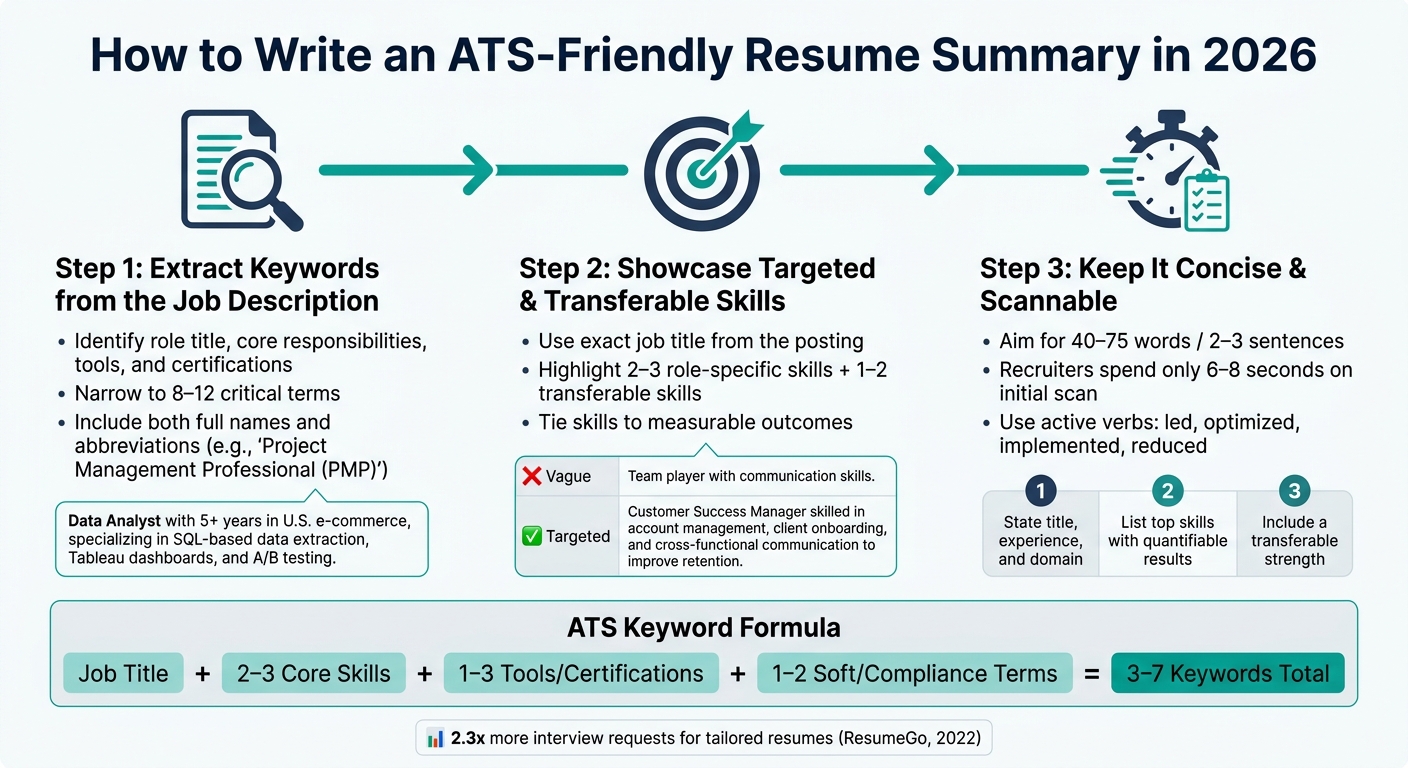
How to Write an ATS-Friendly Resume Summary in 2026
Creating a resume summary that passes ATS filters and grabs the attention of recruiters requires a strategic approach. Follow these steps to craft a summary that works for both.
Step 1: Extract Keywords Directly from the Job Description
Start by reviewing the job posting carefully. Look for repeated terms under sections like "Requirements", "Must-Haves", or "Qualifications." Group these keywords into categories such as role title, core responsibilities, tools/software, and certifications. Narrow the list to 8–12 critical terms. For instance, if you're applying for a Data Analyst position, focus on keywords like SQL, Tableau, KPI dashboards, A/B testing, and Google Analytics. These terms make your resume ATS-friendly and improve its compatibility.
Once you have your list, integrate the keywords naturally into short, impactful sentences. For example:
Data Analyst with 5+ years in U.S. e-commerce, specializing in SQL-based data extraction, Tableau dashboards, and A/B testing.
For certifications, include both the full name and abbreviation - such as "Project Management Professional (PMP)" - since ATS platforms may match differently depending on the format.
After embedding the right keywords, your next goal is to emphasize skills that appeal to both ATS systems and human recruiters.
Step 2: Showcase Targeted and Transferable Skills
Start by using the exact role title from the job posting, along with your years of experience and primary domain. For example, if the job title is "Senior Financial Analyst", don't substitute it with "Finance Professional", as the ATS may not recognize the variation.
After your title, highlight 2–3 role-specific skills and 1–2 transferable skills, such as stakeholder management or cross-functional collaboration. Be specific and avoid vague descriptions. Consider this comparison:
| Approach | Example |
|---|---|
| Vague | "Team player with communication skills." |
| Targeted | "Customer Success Manager skilled in account management, client onboarding, and cross-functional communication to improve retention." |
Whenever possible, tie your skills to measurable outcomes. For example:
"Increased lead-to-opportunity conversion by 22% using Salesforce and HubSpot automation."
This not only enhances ATS compatibility but also gives recruiters concrete achievements to evaluate. If you're unsure about aligning your skills effectively, consider using a job application service to refine your resume for specific roles.
Step 3: Keep It Concise and Scannable
Your summary should be brief and easy to read, as recruiters typically spend only 6–8 seconds on an initial scan. Aim for 40–75 words or 2–3 concise sentences. Avoid dense paragraphs, even if they're packed with keywords, as they can be overwhelming.
Use a three-part structure for clarity:
- State your title, experience, and domain.
- List your top skills with quantifiable results.
- Include a transferable strength.
Use active verbs like "led", "optimized", "implemented", and "reduced" to create impact. Keep sentences short, and format numbers clearly, such as "$1.2M budget", "35% reduction in processing time", or "200+ clients served monthly."
This structured approach aligns with the methodology of platforms like scale.jobs, which focus on creating summaries that are both recruiter-friendly and ATS-compatible, outperforming competitors like Jobscan and LazyApply.
ATS Formatting Rules for Resume Summaries
After fine-tuning your keywords, it's crucial to ensure your resume summary is properly formatted for ATS (Applicant Tracking System) readability. Even the best keywords won't matter if the ATS can't interpret your summary. Follow these guidelines to make sure every word is picked up by the system.
Use Plain Text Formatting
Avoid using tables, text boxes, graphics, icons, or multi-column layouts in your summary section. These elements can confuse ATS parsers, causing them to read the text out of sequence or skip it altogether. Similarly, graphics and icons are treated as images, making them invisible to the system.
Instead, format your summary as plain, left-aligned text in a single-column layout. Stick to standard fonts like Arial, Calibri, or Times New Roman in sizes 10–12 pt. Bold text can be used for headings or role titles, but avoid colored text, script fonts, or underlining, as these can interfere with ATS parsing.
Stick to standard section headings
The heading you choose for your summary plays a key role in how the ATS categorizes it. Use widely recognized labels such as "Summary", "Professional Summary," or "Summary of Qualifications." These are universally understood by ATS platforms like Workday, Greenhouse, and Taleo. Avoid creative headings like "My Story", "About Me", or "Career Snapshot", as these may not be mapped correctly and could result in your summary being misclassified or overlooked.
Keep the heading bold and place your summary text directly below it without adding any decorative elements or unconventional formatting.
Check Compatibility After Exporting
A resume that looks flawless in your word processor might not translate well when exported. After saving your file as a PDF or .docx, perform a quick check by copying and pasting the content into a plain-text editor. Ensure that the "Professional Summary" heading and its accompanying text appear in the correct order and as a single, uninterrupted block.
If you're applying via a portal that accepts both PDF and .docx formats, test both options. While most modern ATS platforms handle text-based PDFs well, older systems may work better with .docx files. Whichever format you choose, avoid password-protecting the file - if you can't copy the text, neither can the ATS. For extra peace of mind, consider using a resume writing and application service to ensure your documents are fully ATS-compatible before submission.
Which Keywords to Put in Your Resume Summary
Crafting a keyword-optimized resume summary is a game-changer when competing against platforms like Jobscan or LazyApply, especially as automated hiring systems continue to evolve. Applicant Tracking Systems (ATS) are designed to compare your resume against job-specific terms, and aligning your language with the job posting can significantly boost your chances. Research from Jobscan highlights keyword alignment as a top factor in ATS success, with nearly all Fortune 500 companies relying on these systems.
Job Function and Role-Specific Keywords
Start by including the exact job title from the posting in your summary. ATS platforms prioritize precise matches, and a 2022 ResumeGo study revealed that resumes tailored to job-specific terminology received 2.3 times more interview requests compared to generic ones.
Incorporate key responsibilities from the job description into your summary, but frame them as achievements. For instance, if a sales role lists "manage full sales cycle and maintain a $1M+ pipeline", you could write: "B2B Account Executive managing full sales cycle, consistently achieving 120%+ quota attainment while overseeing a $1M+ pipeline in U.S. mid-market accounts." This approach reflects the job requirements while showcasing your accomplishments.
Additionally, ensure the summary includes technical tools and certifications critical for ATS filtering.
Software, Tools, and Certifications
Technical skills often act as ATS gatekeepers, meaning their absence can disqualify your resume before it’s even reviewed. Include the 3–6 most important tools mentioned in the job listing, using their exact names. Examples might include "Salesforce", "Tableau", "QuickBooks", or "AWS." If a tool is commonly abbreviated, include both the full name and acronym, such as "Amazon Web Services (AWS)."
Certifications are equally important, especially in regulated industries. Credentials like "Certified Public Accountant (CPA)", "Registered Nurse (RN)", or "CISSP" should appear prominently in your summary if they are required for the role. Avoid burying these details in other sections of your resume. If you're unsure whether your resume meets these standards, consider using a resume writing and application service to ensure alignment with the job description.
Soft Skills and Compliance Terms
Modern ATS systems also assess soft skills and compliance-related language. With the rise of skills-based hiring, soft skills like "stakeholder management", "executive communication", and "cross-functional collaboration" are now frequently included in ATS filters. LinkedIn's 2023 Global Talent Trends report noted a 20% increase in job postings explicitly listing required skills, making it essential to integrate these terms naturally into your summary.
Compliance terms are especially relevant in specialized fields. For example, instead of simply listing "HIPAA", you could write: "Ensured HIPAA-compliant documentation for a caseload of 60+ patients daily." This approach appeals to both ATS systems and human reviewers. Common compliance terms include SOX controls and GAAP for finance, GDPR and CCPA for data-related roles, and OSHA standards for operational and safety-focused positions.
To strike the right balance, aim to incorporate 3–7 keywords in your summary. These should include the job title, 2–3 core skills, 1–3 tools or certifications, and 1–2 compliance or soft-skill terms. Keep your summary concise - ideally 2–4 sentences - ensuring it remains keyword-rich without feeling overloaded. This approach not only helps you pass ATS filters but also makes your resume clear and compelling for recruiters.
ATS Resume Summary Checklist Before You Submit
Using the ATS formatting and keyword strategies outlined earlier, this final checklist ensures your resume summary is ready for submission. Many rejections at the ATS stage stem from small but crucial issues, like mismatched titles, missing keywords, or formatting that disrupts parsing - not necessarily from your qualifications.
Check That Your Role Title Matches the Posting
Make sure the job title in your summary matches the one in the job posting exactly. For instance, if the listing says "Senior Data Analyst", avoid abbreviating it to "Sr. Data Analyst." ATS platforms like Workday, Taleo, and iCIMS often rely on exact string matching when recruiters filter by title.
Additionally, double-check that the seniority level aligns. For example, if the role is listed as "Project Manager", and your summary states "Senior Project Manager", some ATS filters might flag you as overqualified, potentially screening you out before a recruiter even reviews your application. Use the exact wording from the job posting, including any specific modifiers like "Clinical Research Coordinator" or "Revenue Cycle Analyst."
Review Keyword Placement
Refer back to the job description and identify the top 5–10 keywords, such as the role title, required skills, tools, and certifications. Make sure these keywords appear naturally in your summary, ideally once or twice. Avoid keyword stuffing, but ensure they are integrated into complete sentences rather than presented as a list.
For an extra layer of assurance, consider using a job application service to review your resume and summary for alignment with specific job postings.
Confirm the Formatting Is ATS-Safe
Once your file is ready, paste your summary into a plain-text editor like Notepad (Windows) or TextEdit in plain-text mode (Mac). This will help you spot any formatting issues, such as text appearing out of order or missing entirely. If problems arise, remove elements like tables, text boxes, or columns.
Stick to a .docx or plain-text PDF format, using standard fonts like Arial or Calibri, in a single-column, left-aligned layout. Label the section above your summary as "Professional Summary" or simply "Summary." Avoid unconventional headings like "My Story" or "Career Snapshot", as many ATS systems won’t recognize these. Lastly, eliminate any icons, skill bars, or decorative bullets near your summary, as these can confuse ATS parsing and cause your content to be skipped.
This checklist serves as a final step to bridge the gap between crafting your summary and confidently submitting your application. A well-prepared, ATS-friendly summary can make all the difference in getting your resume seen by a recruiter.
Conclusion: Put These ATS Summary Tips to Work
Every step in this guide is designed to help you craft a resume summary that not only passes ATS filters but also catches the attention of recruiters. Unlike competitors such as Jobscan and LazyApply, Scale.jobs combines human expertise with ATS-optimized documents to ensure your resume summary truly stands out. Here's how you can fine-tune your summary for success:
Open the job posting alongside your resume and extract the 8–10 most crucial keywords - this includes the role title, required tools, and core skills. Then, weave these into 3–5 concise lines that showcase your strongest qualifications. This approach ensures your summary aligns with the job while remaining compelling to recruiters.
Why Scale.jobs Stands Out
Here’s a breakdown of how Scale.jobs differs from alternatives like Jobscan and LazyApply:
- Human Expertise: Real professionals customize your summary for each job posting, offering a level of precision automated tools can't match.
- ATS-Optimized Resumes: Each document is designed to pass ATS filters while appealing to human recruiters.
- One-Time Payment: No recurring fees - just a single payment for expert support throughout your job search.
- Dedicated WhatsApp Support: Get personalized guidance and answers at every stage of the process.
- Transparent Process: You’ll know exactly what was done, when, and why - no guessing or hidden automation.
| Feature | Jobscan / LazyApply | Scale.jobs |
|---|---|---|
| Human Involvement | None (fully automated) | Dedicated human assistants |
| Resume Customization Depth | Template-based or keyword scoring | Tailored per job posting |
| ATS Handling | Automated keyword matching | Human-reviewed, ATS-optimized |
| Application Execution | Self-serve or auto-apply bots | Managed by human assistants |
| Transparency and Proof of Work | Limited reporting | Full proof-of-work visibility |
| Pricing Model | Subscription-based | One-time payment |
Crafting a Winning Summary
A generic summary like "Hardworking professional with experience in marketing and communications looking for a challenging role" won’t get you far. Instead, aim for something specific and results-driven, such as:
"Digital Marketing Specialist with 5+ years managing paid social, SEO, and email campaigns for B2C brands. Increased ROAS by 25% and drove $250,000+ in annual incremental revenue using Google Ads, Meta Ads Manager, and HubSpot."
This version aligns with the job posting, quantifies achievements, and remains natural for a recruiter to read.
Final Checklist Before Submitting
Ensure your summary meets these key criteria:
- The job title in your summary matches the posting exactly.
- Your top 5 keywords are included in the summary itself, not just hidden in bullet points.
- The section is labeled clearly as "Summary" or "Professional Summary."
- The file format is .docx or an ATS-compatible PDF, avoiding tables, columns, or graphics near the summary.
If you can check off all these points, your resume is ready to go.
Key Takeaway
Optimize for ATS to get your resume noticed, but write with a human recruiter in mind to land interviews. While keyword density is important, readability is just as critical. If your summary feels robotic when read aloud, it’s likely to put off recruiters, even if it passes ATS checks.
Remember, your summary is a living document - update it for each role, focusing on the title and key terms.
Decision Time: If you’re looking for a low-cost, automated option and are comfortable managing the process yourself, Jobscan or LazyApply might be a fit. But if you want expert-driven, ATS-compliant documents, personalized support, and complete transparency, Scale.jobs is the way to go. Use these strategies to refine your approach and decide if Scale.jobs aligns with your job search goals.
FAQs
How can I tailor one resume summary for multiple similar job postings without rewriting it every time?
To create a resume summary that works for multiple similar job postings, start with a core version that highlights your most important skills, accomplishments, and relevant experience. Then, tweak this summary for each specific role by incorporating job-specific keywords, mirroring the language used in the job description, and focusing on achievements that align with the employer's needs. You can also use a virtual assistant for job seekers or tools like an AI resume builder to streamline this process. This approach not only ensures your resume is optimized for ATS (Applicant Tracking Systems) but also saves time by keeping the foundation consistent while tailoring it for each job application.
Should I use a PDF or .docx for the best ATS parsing in 2026?
When it comes to ensuring the best ATS parsing in 2026, PDFs are generally the preferred format. They preserve the layout and structure, reducing the chances of parsing errors. That said, a well-organized, ATS-friendly .docx file can also perform well, provided it avoids intricate formatting or design elements that might confuse the system.
How can I include keywords naturally without getting flagged for keyword stuffing?
To seamlessly integrate keywords into your resume, draw directly from the job description and incorporate the terms into your listed achievements and experiences. Highlight skills, tools, or technologies you've used in a way that feels natural and relevant to your work history. Be mindful not to overuse keywords, as this can make your resume sound forced and reduce its readability. Instead, use variations of the terms where appropriate. Additionally, ensure your resume is ATS-friendly by using standard fonts, clear section headers, and simple formatting. This approach helps maintain a balance between keyword optimization and a professional, readable layout.