PDF vs Word Resume: Which Format ATS Actually Reads Correctly
Word (.docx) is best for ATS portals; PDFs suit direct recruiter emails—learn parsing pitfalls and how to make resumes ATS-friendly.

When applying for jobs, selecting the correct resume format is critical for ensuring your application reaches recruiters. Applicant Tracking Systems (ATS), used by 98% of Fortune 500 companies, scan resumes to extract key details like contact information, job history, and skills. If the ATS cannot process your resume correctly, you risk being filtered out, even if you're qualified.
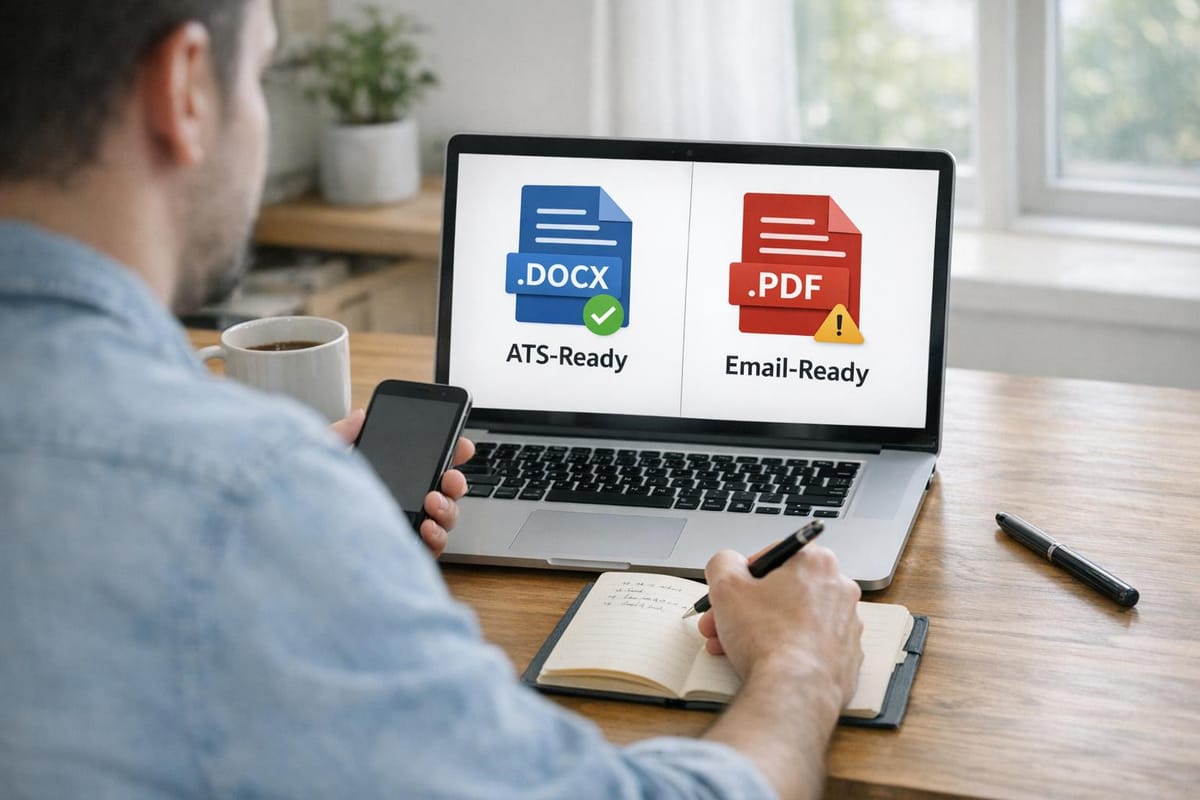
Key takeaway: Use a Word (.docx) file for most online job applications, as it’s more compatible with ATS. PDFs, while visually consistent, often cause parsing issues, especially if they include complex layouts or design elements. Here’s when to use each format:
- Word (.docx): Best for ATS portals like Workday, Taleo, and Greenhouse.
- PDF: Ideal for emailing recruiters directly or when explicitly requested.
Platforms like scale.jobs ensure your resume is ATS-friendly by tailoring formats for each employer and testing for compatibility. This approach reduces parsing errors and improves your chances of landing interviews. Learn how to optimize your resume for ATS systems below.
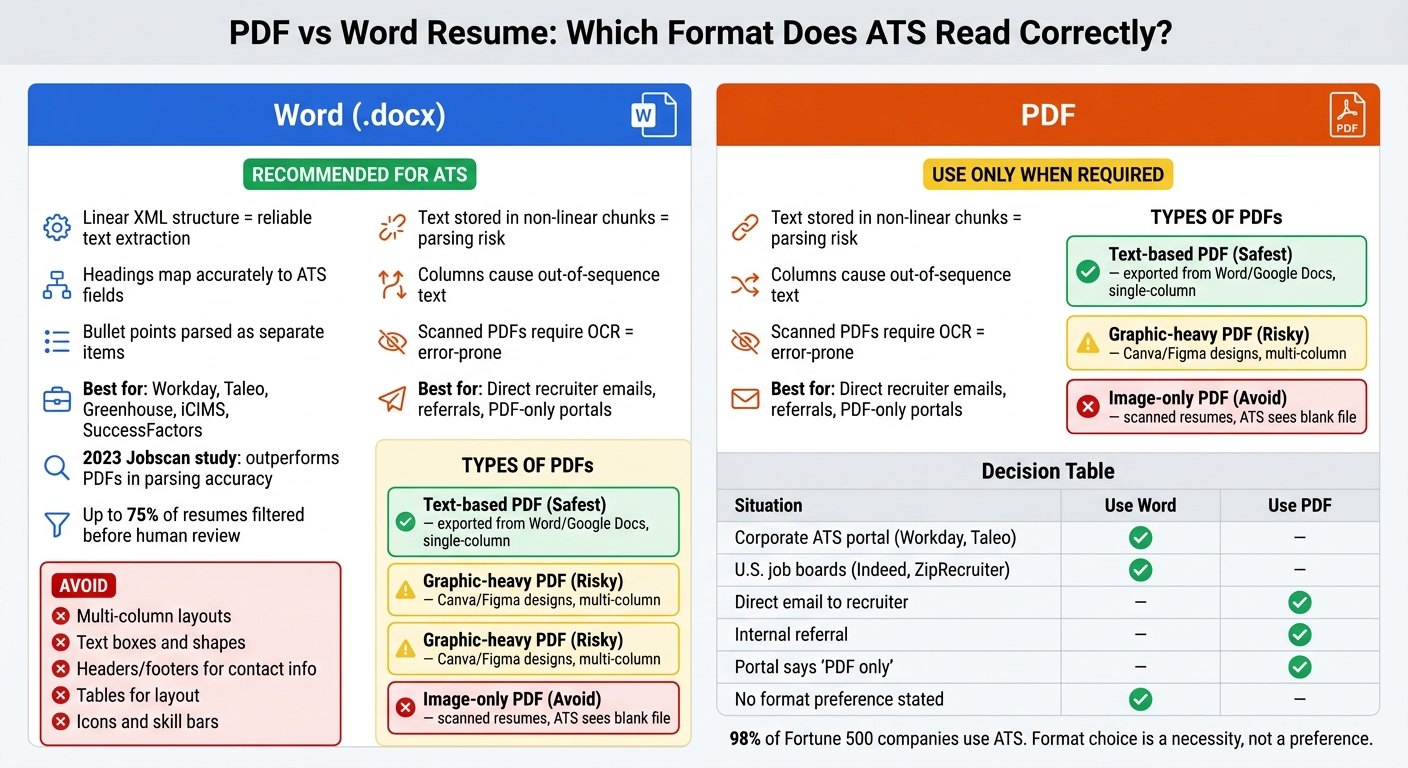
PDF vs Word Resume: ATS Compatibility Comparison Chart
How ATS Reads PDF vs Word Resumes
How ATS Parses PDF and Word Files Differently
When deciding between PDF and Word formats for your resume, it's important to understand how Applicant Tracking Systems (ATS) process these files. ATS software converts uploaded resumes into plain text and then organizes that text into structured fields like your name, contact information, job titles, dates, and skills. The way your resume is formatted internally can significantly impact how accurately this information is captured.
Word (.docx) files rely on XML formatting, which allows text to flow in a logical, linear sequence. This makes it easier for ATS to interpret sections like headings, bullet points, and paragraphs in the intended order. PDFs, on the other hand, are designed as a "final-layout format" that looks consistent across devices but isn’t inherently machine-readable. Text within a PDF might be stored in non-linear chunks - for instance, column by column or element by element - causing the ATS to misinterpret the order of your information.
These structural differences create unique challenges for each format, which are explored in more detail below.
Parsing Problems Specific to Each Format
PDF-specific challenges are often more severe. Resumes created in tools like Canva or Adobe InDesign may look polished but can confuse ATS systems. These files might store text as isolated snippets, leading to issues like the ATS reading a skills sidebar before job titles, merging unrelated lines, or skipping entire sections. Scanned PDFs are even more problematic, as they rely on Optical Character Recognition (OCR) to extract text, which introduces errors.
Word-specific challenges tend to be less disruptive but can still cause problems. Common issues include the use of text boxes, tables, or headers and footers, which ATS systems often ignore. For instance, if your contact information is in a header or footer, it might not be captured. Similarly, while tables can organize skills neatly, they often fragment during parsing, leading to incomplete or jumbled information.
Both formats can also run into trouble if non-standard headings, such as "My Journey" instead of "Experience", are used. This makes it harder for ATS to correctly categorize sections.
The following comparison table highlights how these formats stack up against each other in ATS performance.
PDF vs Word for ATS: Format Comparison Table
| Criterion | Word (.docx) | |
|---|---|---|
| Parsing reliability | Linear XML structure ensures easier text extraction | Parsing depends on how the PDF was created |
| Heading recognition | Styled headings map accurately to ATS fields | Bold text may work, but sidebars often cause errors |
| Bullet point handling | Bullet lists parse as separate items | Bullets can merge into a single block of text |
| Table support | Tables may fragment or drop content | Same issue, but worsened by complex layouts |
| Column handling | Multi-column layouts disrupt text flow | Columns are a major cause of out-of-sequence text |
| Risk of data loss | Partial data loss is common | Design-heavy or image-based PDFs risk losing entire sections |
| Best use case | Ideal for ATS submissions via online portals | Best for direct recruiter emails or clean, single-column exports |
If you're collaborating with a professional for resume creation - whether through resume writing services or a job application service - the format they deliver is as critical as the content itself. Even a perfectly written resume can fail to make an impact if the ATS cannot read it correctly. Platforms like Scale.jobs ensure your resume meets ATS formatting requirements, increasing the likelihood of accurate data extraction and better chances of getting noticed by recruiters.
sbb-itb-564272e
When Word Resumes Are the Better Choice
Why Word Is the Default Safe Format for ATS
Many leading Applicant Tracking Systems (ATS) - like Workday, Taleo, iCIMS, Greenhouse, and SuccessFactors - were initially designed to work seamlessly with Word documents. This legacy is significant because these systems have been extensively tested to accurately parse .docx files. As a result, key details such as job titles, employers, dates, and contact information are more reliably captured when using Word compared to PDFs.
A 2023 analysis by Jobscan found that Word
.docxfiles consistently outperformed both simple and complex PDFs in parsing accuracy. The study also highlighted that up to 75% of resumes are filtered out by ATS systems before they ever reach human eyes, making the choice of format a practical necessity rather than a stylistic preference.
The takeaway? If you're submitting your resume through an online application portal - especially for large organizations like Fortune 500 companies, government contractors, or healthcare systems - opt for a Word document. However, it's equally important to avoid common formatting errors that can undermine this advantage.
Word Resume Formatting Mistakes That Hurt ATS Parsing
The benefits of using a Word resume can be negated by design-heavy or unconventional formatting. Here are some common issues that can disrupt ATS parsing:
- Multi-column layouts: ATS systems tend to read content horizontally, causing sections like skills and experience to become jumbled.
- Tables for layout purposes: These can result in missing or misaligned content, such as job titles not matching their corresponding dates.
- Text boxes and shapes: Parsers often ignore content placed in floating text boxes, which means critical details like contact information can be lost.
- Headers and footers: Information in these areas, particularly contact details, is frequently overlooked by ATS systems that focus on the main body text.
- Icons, skill bars, and graphics: Visual elements like icons or skill-rating bars are not recognized as text, meaning key skills may not be indexed.
To ensure your Word resume is ATS-friendly, stick with a single-column layout, use standard section headings (e.g., "Professional Experience", "Education", "Skills"), and rely on plain bullet points. Fonts like Calibri or Arial in 10–12 pt size work best, and U.S. date formats (e.g., June 2022 – May 2024) help maintain proper sequencing. Always place critical information, such as contact details, within the main body of the document.
How scale.jobs Builds ATS-Safe Word Resumes
Unlike tools like Rezi.ai or LazyApply, scale.jobs takes a tailored approach to ensure your resume is fully compatible with ATS requirements. Addressing the challenges outlined above, scale.jobs starts with an ATS-compliant Word template that includes sections like Summary, Skills, Experience, Education, and Certifications. Design elements that can confuse ATS systems - such as tables, text boxes, SmartArt, or graphics - are intentionally avoided. Instead, the focus is on clean formatting with bold section headings, plain bullet points, and text-based skill descriptions like "Advanced" or "Intermediate."
From there, human experts refine your resume to match the specific job posting. This includes quantifying achievements (e.g., "Increased efficiency by 35%"), integrating keywords from the job description, and ensuring compliance with U.S. spelling and formatting standards. Before delivery, each .docx file is tested against ATS-like parsers to confirm that essential details like contact information, job titles, dates, and skills are accurately extracted.
If you're considering investing in professional resume writing, remember that the format of your resume is just as important as the content. Even the most well-written resume will fail to make an impact if it’s in a template that ATS systems can’t process.
When PDF Resumes Work and When They Fail
PDF Types and How Each Affects ATS Parsing
PDF resumes come in three main forms - text-based, image-only, and graphic-heavy - and each type interacts with Applicant Tracking Systems (ATS) differently. Understanding these distinctions is key to ensuring your resume is processed correctly.
A text-based PDF - created by exporting directly from tools like Word or Google Docs using "Save as PDF" - is the safest option for ATS parsing. Systems like Workday, Greenhouse, and Lever are generally equipped to handle these files. They can accurately read section headers, bullet points, and contact details as long as the layout is simple, single-column, and avoids complex formatting.
An image-only PDF, on the other hand, is problematic. These are usually created by scanning a printed resume or exporting from design tools that flatten the content into a single image. ATS software without Optical Character Recognition (OCR) capabilities will see these files as blank. Even when OCR is used, errors are common - names, numbers, and other key details are often misinterpreted.
Graphic-heavy PDFs - designed in tools like Canva or Figma - pose their own challenges. While the text within these files is technically selectable, the use of multi-column layouts, icons, and decorative elements often disrupts the reading order. ATS systems may jumble job titles, skills, and other critical information, making the resume incoherent and reducing its effectiveness.
Each of these risks can lead to predictable parsing failures, which can significantly impact how your application is processed.
Documented ATS Parsing Failures with PDFs
The challenges with PDF resumes aren’t hypothetical - they’re well-documented and can seriously hinder your job search.
According to TopResume's ATS guide, resumes that include text within images, charts, or icons - a common feature of visually appealing PDF templates - often result in "blank" or incomplete profiles in ATS systems. This happens because the software only reads embedded text, ignoring graphical elements.
Common issues include:
- Misreading contact information: When contact details are placed in header images, ATS systems often fail to extract them correctly.
- Jumbled sections: Multi-column layouts confuse the reading order, merging unrelated sections like skills and job titles into unreadable strings.
- Dropped content: Information placed in sidebars, such as skills like "SQL, Tableau, Power BI", may never appear in the parsed output, leading to missed keywords.
- Custom fonts and icons: Decorative fonts or unique bullet styles often render as random characters, disrupting keyword matching and making the resume less effective.
These problems highlight why careful preparation is essential when submitting PDF resumes.
How scale.jobs Manages PDF Resume Submissions
While Word documents remain the preferred format for most ATS systems, scale.jobs takes a tailored approach to ensure PDF resumes succeed when they’re the best choice.
Each submission is evaluated by human assistants who check whether the employer’s portal explicitly supports PDFs, whether the organization uses legacy ATS software, or if the resume will be sent directly to a hiring manager. For situations where a PDF is appropriate - such as direct recruiter outreach, modern ATS platforms that confirm PDF compatibility, or roles where design matters - scale.jobs ensures the file is optimized.
Steps include:
- Using a clean, text-based export with a single-column format.
- Avoiding text boxes, headers, or graphic elements that might interfere with parsing.
- Testing each PDF through ATS simulation to confirm accurate extraction of key details like section headers, work history, and contact information.
For job seekers who want their resume to perform well in every scenario, professional resume writing through scale.jobs offers both an ATS-friendly Word file and a polished PDF. This ensures you’re always prepared with the right format for any application, eliminating guesswork and maximizing your chances of success.
Choosing the Right Platform for ATS Resume Handling
Tool Comparison: LazyApply, Jobscan, Resume.io vs scale.jobs
The platform you choose for managing your resume and job applications can directly impact whether an ATS (Applicant Tracking System) processes your file correctly - or rejects it outright. Each tool has a distinct approach, and understanding these differences is key to picking the right one for your job search needs.
LazyApply focuses on automating bulk applications by submitting your uploaded resume as-is. However, it doesn't check for ATS compatibility. For example, if you upload a Canva-designed PDF, LazyApply submits the same file across all applications, potentially causing widespread parsing errors.
Why scale.jobs outperforms LazyApply:
- Human assistants ensure every resume is tailored for ATS compliance before submission.
- Offers a one-time flat fee without recurring subscriptions, along with dedicated WhatsApp support.
- Provides proof of submissions through time-stamped screenshots and real-time updates.
- Customizes resumes per job to target specific keywords and formats.
- Fixes parsing issues proactively, avoiding common ATS resume rejection reasons like formatting errors.
Jobscan is a DIY tool that analyzes your resume using an ATS-like parser, identifying issues such as missing keywords or formatting problems. While useful for diagnosing problems, it leaves the actual corrections and submissions up to you.
Why scale.jobs outperforms Jobscan:
- Human oversight ensures parsing issues are resolved without requiring your intervention.
- Decides between Word or PDF formats based on the employer's ATS, so you don't have to.
- Handles the entire application process, from optimization to submission.
- Keeps you updated via WhatsApp with proof of submissions, eliminating the need for manual tracking.
Resume.io simplifies resume building with templates designed for ATS compatibility. However, visually complex templates or PDF exports can still lead to parsing failures, and the platform doesn't flag these issues before submission.
Why scale.jobs outperforms Resume.io:
- Goes beyond template selection by customizing resumes for each job.
- Chooses the appropriate format (Word or PDF) based on the specific employer's ATS requirements.
- Manages the entire application process, ensuring your resume is submitted correctly.
Find My Profession specializes in creating professional, ATS-optimized resumes, particularly for senior or executive candidates. However, it focuses on delivering a polished resume rather than managing ongoing applications.
Why scale.jobs outperforms Find My Profession:
- Offers continuous application management rather than just one-time resume creation.
- Provides per-job customization and real-time updates for every submission.
- Combines professional resume writing with hands-on ATS management and application execution.
scale.jobs integrates what these other platforms handle separately. It offers a comprehensive service where human assistants create and maintain an ATS-optimized Word master resume, decide the best format for each employer, tailor resumes for individual roles, and manually submit applications. If something goes wrong - like a mis-parsed section - it's corrected by a human before submission. If you're considering whether a professionally written, ATS-optimized resume is worth the investment, scale.jobs includes that and more, handling the full application process for you.
Who Should Use Each Platform
Each platform serves a specific purpose, depending on your job search needs. Here's a breakdown:
- Jobscan: Ideal for early-career professionals who want to self-manage their job search and understand how their resume performs in ATS systems. Pair it with a clean Word resume for best results.
- Resume.io: Perfect for those needing a quick resume to apply on their own. Stick to simple, single-column layouts and export as .docx for ATS submissions.
- LazyApply: Suitable for high-volume applications with minimal effort, provided your resume is already ATS-friendly in Word format.
- Find My Profession: Best for senior or executive candidates seeking a professionally crafted resume and willing to handle their own applications.
- scale.jobs: Designed for mid-career professionals, such as software engineers or product managers, who want high-quality, ATS-compliant applications submitted at scale without doing the work themselves.
scale.jobs vs Competitors: Feature Comparison Table
| Feature | scale.jobs | LazyApply | Jobscan | Resume.io | Find My Profession |
|---|---|---|---|---|---|
| Human involvement | Full end-to-end human execution | None (fully automated) | None (DIY tool) | None (DIY builder) | Resume writing only |
| Resume customization depth | Per-job tailoring by human assistants | Static upload, no customization | User-driven keyword edits | User-driven template edits | One-time professional write |
| ATS handling quality | Human-verified, Word-first decisions | Pass-through; no checks | Strong DIY parsing feedback | Template-level guidance | ATS-safe Word deliverable |
| Default resume format | ATS-safe .docx master; PDF when needed | Whatever you upload | Accepts Word and PDF | PDF-first; Word optional | .docx primary |
| Application method | Human-managed manual submissions | Automated bot | User submits manually | User submits manually | User submits manually |
| Proof of work | Screenshots, WhatsApp updates, dashboard | Basic application count | Scan reports | None | Finished document delivery |
| Pricing model | Flat-fee packages from $199 | $149–$299 (one-time/subscription) | ~$49.95/month | $2.95–$24.95/month | $395–$795+ per resume |
| Best for | Delegated, high-volume, ATS-safe search | Volume-first automation | DIY ATS optimization | Quick resume creation | Executive branding |
Decision Summary:
- Early-career professionals who prefer a hands-on approach should consider Jobscan with a clean Word resume.
- Those needing a quick resume for self-submission will find Resume.io adequate.
- For high-volume applications with minimal effort, LazyApply works - if your resume is ATS-ready.
- Senior candidates focused on premium resume quality should choose Find My Profession.
- Mid-career professionals seeking ATS-safe, tailored applications managed end-to-end should go with scale.jobs.
Evaluate your needs carefully to determine if scale.jobs aligns with your job search strategy.
ATS Resume Formatting Rules That Actually Matter
Essential Formatting Rules for ATS Resumes
Applicant Tracking Systems (ATS) scan resumes in a linear fashion to extract details like job titles, dates, and skills. Any design element that disrupts this flow can lead to parsing errors. According to Jobscan, over 98% of Fortune 500 companies rely on ATS, and resumes with improper formatting can result in missing or incomplete candidate profiles. This means crucial details, such as your job titles and employment dates, may not show up in recruiter searches, leaving you out of consideration.
To ensure your resume is compatible with ATS, stick to a single-column layout and use standard fonts like Arial, Calibri, or Times New Roman in sizes 10–12pt. Label sections with standard headings such as "Work Experience", "Education", "Skills," and "Certifications." Avoid creative or non-traditional headings like "My Journey", as ATS systems may not recognize them. Place your name and contact information in plain text at the top of the document - steer clear of headers, footers, or text boxes for these details, as they often fail to parse correctly.
Additionally, avoid using tables to organize your experience, embedded graphics, icons, colored sidebars, or custom bullet points. A quick way to test if your resume is ATS-friendly is to copy and paste it into Notepad. If the formatting and flow remain logical, your resume is likely safe for ATS systems.
When to Use Word vs. PDF Based on the Situation
The choice between Word and PDF formats depends on how you're submitting your resume. Use Word (.docx) when applying via an ATS portal - platforms like Workday, Taleo, Greenhouse, and iCIMS handle Word files more effectively. Many ATS systems recommend .docx files to minimize parsing errors. On the other hand, use a PDF when emailing a recruiter directly, submitting through a referral, or when the employer specifies PDF as the preferred format. PDFs preserve your layout exactly as intended, which is ideal for human review.
Always follow the employer's instructions regarding file format. If no instructions are provided, choose Word for ATS submissions and PDF for direct communication with recruiters.
How scale.jobs Applies These Formatting Standards
scale.jobs takes ATS compatibility seriously by creating and maintaining an ATS-friendly Word master resume for every client. Unlike competitors that rely on generic templates or AI tools, scale.jobs employs human assistants to meticulously review and optimize resumes according to ATS guidelines. This includes removing problematic design elements like tables, text boxes, and decorative fonts while ensuring that section headings, keyword placement, and date formats meet ATS expectations.
Additionally, scale.jobs tailors resumes to match specific ATS requirements for each employer. If you're considering professional help to streamline your resume creation and application process, scale.jobs' resume writing and application service offers a one-time flat fee with no recurring subscriptions. By adhering to these formatting rules, scale.jobs not only eliminates parsing errors but also sets the foundation for a more effective job application process.
Conclusion: PDF vs Word Decision Summary and When to Use scale.jobs
When to Submit PDF vs Word: A Quick Reference
Based on the ATS formatting insights discussed earlier, here's a simple guide to help you decide which file type to use for your resume. The choice depends on whether your resume will be reviewed by an automated system or a person first. For corporate portals using systems like Workday, Taleo, Greenhouse, or iCIMS, stick with a .docx file. These systems are designed to work seamlessly with Word documents, making it easier to extract details like job titles and contact information. On the other hand, if you're sending your resume directly to a recruiter, through a referral, or via LinkedIn, PDF is the better option - it ensures your formatting stays intact regardless of the device or software used to open it.
| Situation | Recommended Format |
|---|---|
| Corporate ATS portal (Workday, Taleo, Greenhouse) | Word (.docx) |
| U.S. job boards (Indeed, ZipRecruiter, CareerBuilder) | Word (.docx) |
| Direct email to recruiter or hiring manager | |
| Internal referral forwarding your resume | |
| Portal explicitly says "PDF only" | |
| No format preference stated | Word (.docx) |
Unlike automated tools like LazyApply or Jobscan, scale.jobs combines human expertise with technology to ensure the best format is chosen for each application. When formatting alone isn't enough to make your resume stand out, scale.jobs provides a tailored approach to boost your chances.
Consider scale.jobs if…
Managing multiple applications across different ATS systems can be overwhelming, especially if you're unsure about formatting or keyword optimization. Scale.jobs' resume writing and application service might be a game-changer for you if:
- You've sent out 50+ applications with little to no response - Parsing errors or missing keywords can prevent your resume from ever reaching a recruiter’s desk.
- You regularly apply to jobs through different systems - With varying requirements across corporate portals, staffing agencies, and niche job boards, manually adjusting your resume each time can be exhausting and prone to mistakes.
- Your resume might not be ATS-friendly - Resumes with columns, icons, or Canva-style templates often fail to parse correctly, leaving key sections like Work Experience or Skills overlooked.
- You want proof of accurate application submissions - Scale.jobs provides time-stamped screenshots and a live application dashboard, so you can be confident your resume has been submitted correctly.
With scale.jobs, human experts ensure your resume is formatted appropriately, keywords are strategically placed, and the submission process is tailored to each portal. This means your application is not only ATS-compliant but also optimized for success.
Decision Summary: Use Word (.docx) for ATS portals and job boards, and switch to PDF when communicating directly with recruiters or when explicitly required. For those who need consistent ATS compliance, personalized adjustments, and a streamlined application process, scale.jobs offers a reliable and effective alternative to automated tools. This approach ensures your resume reaches its audience in the best possible light, giving you a competitive edge in your job search.
Should you upload your resume as a PDF or Word Document?
FAQs
How can I tell if my PDF is truly ATS-readable?
To ensure your PDF is compatible with ATS (Applicant Tracking Systems), it’s important to run it through a plain text or ATS scan test. Steer clear of using tables, graphics, text boxes, or unconventional section headers, as these elements can disrupt how ATS systems read your resume. Tools such as the Scale.jobs ATS Score Checker are handy for spotting formatting issues and identifying keyword gaps, helping you optimize your resume for better processing and visibility.
Does uploading both a Word file and a PDF improve my chances?
When applying for jobs, uploading both a Word file and a PDF version of your resume might seem like a good idea, but it usually doesn’t increase your chances. Applicant Tracking Systems (ATS) are designed to work most effectively with straightforward, ATS-friendly formats such as DOCX or text-based PDFs. Submitting multiple formats can sometimes lead to parsing errors or confusion within the software. To avoid potential issues, it’s best to stick to a single, well-optimized file format.
What’s the safest way to test how an ATS parses my resume?
The best way to ensure your resume is ATS-friendly is by using ATS simulation tools. These tools scan your resume for structural, keyword, and formatting issues that might create problems during the parsing process. Another simple method is the plain text test: copy and paste your resume into a .txt file. If the text appears jumbled, misaligned, or incomplete, it’s a sign that ATS systems may struggle to read it. By addressing these issues early, you can improve your chances of passing through Applicant Tracking Systems successfully.