ATS Resume Scanner Tool: What Your Score Really Means
Understand how ATS resume scores are calculated, common scanner pitfalls, and practical fixes to pass recruiters' filters.

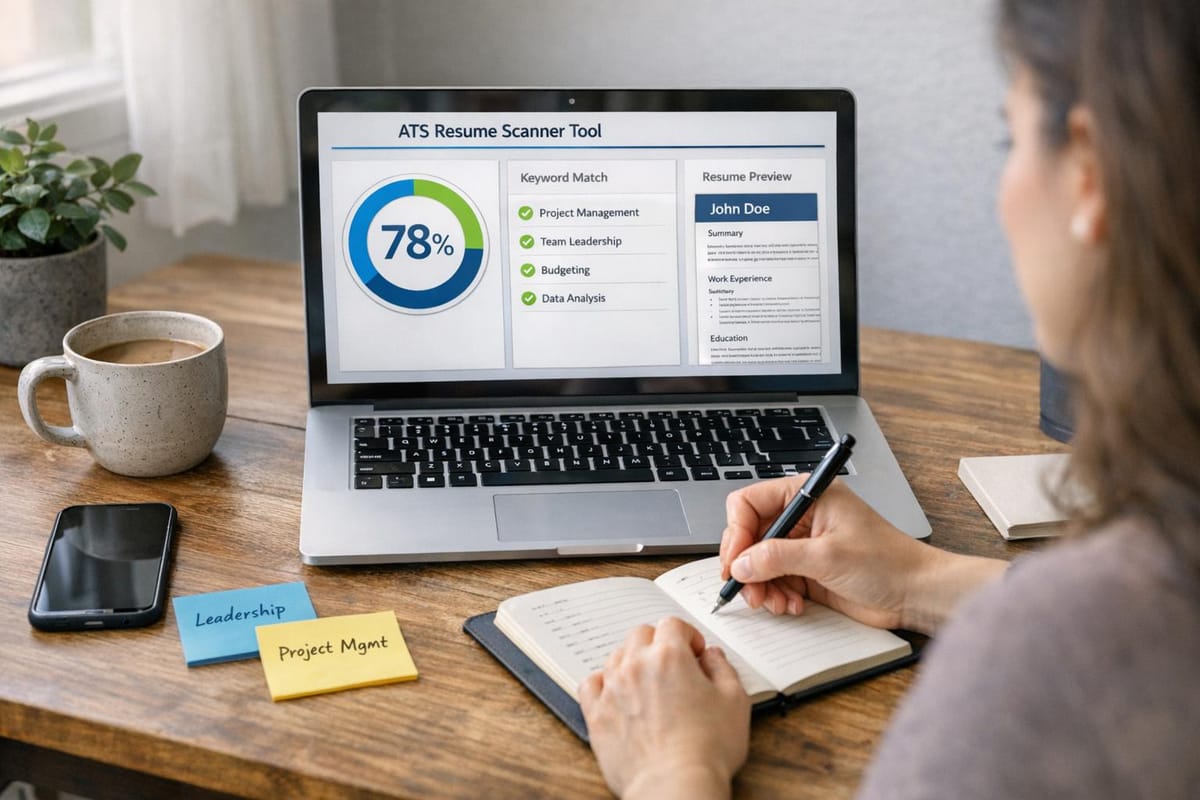
Did you know that 98.4% of Fortune 500 companies use Applicant Tracking Systems (ATS) to screen resumes? Even more striking, 75% of resumes are rejected before a recruiter ever sees them. Your ATS score - often provided by tools like Jobscan.co - plays a crucial role in determining whether your application makes it through this automated filter. If your score is below 80%, your resume may not even reach human eyes.
Here’s the reality: ATS scores measure keyword relevance, formatting, section completeness, and file compatibility. But these tools aren’t perfect - they may flag common formatting issues or encourage keyword stuffing, which could hurt your chances with recruiters. While platforms like Jobscan.co provide keyword suggestions, they leave the burden of revisions on you. In contrast, services like Scale.jobs offer tailored, human-assisted solutions to make your resume both ATS-friendly and recruiter-ready.
Curious about how ATS systems work, common pitfalls, and ways to improve? Keep reading for actionable tips and a comparison between automated tools like Jobscan.co and managed services like Scale.jobs.
How to Check If Your Resume Is ATS Friendly (Free Resume Parser Tool)
sbb-itb-564272e
What ATS Resume Scanner Scores Actually Measure
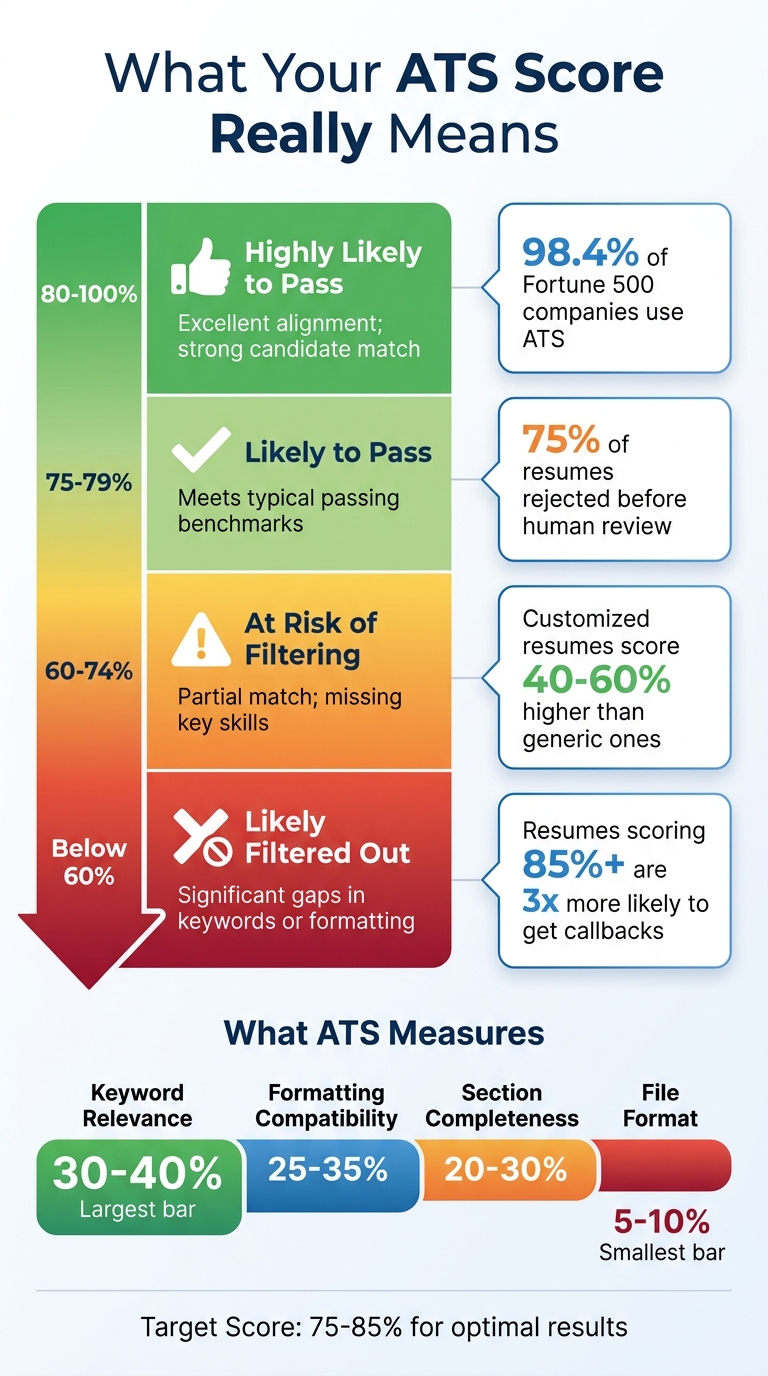
ATS Resume Score Ranges and Outcomes: What Your Score Means for Job Applications
When you upload your resume to an ATS (Applicant Tracking System) scanner, the system evaluates how well your resume aligns with specific technical criteria. These factors include keyword relevance, formatting, and the completeness of your document's sections. Understanding how these elements contribute to your score can help you refine your resume and improve its performance.
Core Factors in ATS Scoring
ATS systems rely on weighted criteria to analyze resumes. Here's a breakdown of the key factors:
- Keyword Relevance (30-40%): This is the most critical factor. The system scans for job-specific terms such as hard skills (e.g., "Python" or "Salesforce"), certifications, and role-specific keywords. For instance, if the job description mentions "Project Management" but your resume uses "PM", the system may not recognize the match, potentially lowering your score.
- Formatting Compatibility (25-35%): Proper formatting ensures the ATS can parse your resume into structured data. Issues like multi-column layouts, tables, or graphics can confuse the system, leading to errors in how your information is categorized. For best results, use a simple .DOCX format instead of image-based PDFs or uncommon file types.
- Section Completeness (20-30%): ATS platforms look for standard headings such as "Experience", "Education", and "Skills." Using unconventional headings like "My Journey" can confuse the system, preventing it from categorizing your details effectively.
- File Format (5-10%): The file format you choose affects how well the ATS can initially process your resume. A poorly supported format can result in parsing failures, making your resume unreadable.
Here’s a quick summary of these factors:
| Factor | Estimated Weight | Impact on Score |
|---|---|---|
| Keyword Match | 30-40% | Determines relevance to the job description |
| Formatting | 25-35% | Critical for accurate parsing |
| Section Completeness | 20-30% | Ensures proper categorization of data |
| File Format | 5-10% | Affects parsing success |
A resume that fails to parse correctly cannot be scored.
How Your Score Affects Application Outcomes
Your ATS score plays a direct role in whether your resume reaches a recruiter. Many companies set a minimum score threshold - usually around 75-80%. Resumes that fall below this mark are often filtered out automatically. In competitive hiring scenarios, even a score in the low 70s might not be enough to advance.
Resumes scoring 85% or higher are about three times more likely to lead to interview callbacks compared to those scoring below 50%. This isn’t just a measure of qualifications - it’s an indicator that your resume successfully passed through the ATS, making it visible to recruiters.
Tailored resumes also tend to perform much better. On average, customized resumes score 40-60% higher than generic ones. This means taking the time to align your resume with the specific job description can make a significant difference.
What Score You Need to Pass
Most ATS systems and tools like Jobscan.co recommend aiming for a score between 75-85%. This range signals that your resume aligns well with the job description without overloading it with unnecessary keywords. Here’s a breakdown of what different score ranges typically indicate:
| Score Range | Likely Outcome | What It Signals |
|---|---|---|
| 80-100% | Highly likely to pass | Excellent alignment; strong candidate match |
| 75-79% | Likely to pass | Meets the typical passing benchmarks |
| 60-74% | At risk of filtering | Partial match; missing key skills |
| Below 60% | Likely filtered out | Significant gaps in keywords or formatting |
If your score is 80–100%: Your resume is technically cleared. Stop editing the resume, you're past the machine. The bottleneck is now human: your bullet points need to show impact, not just responsibilities. Shift focus to application volume and targeting. Make sure you're applying to roles where your experience matches, not just where keywords match.
If your score is 75–79%: You're at the passing threshold, but in a competitive pool, this margin can cost you. Identify the 2–3 missing keywords flagged by the checker, add them naturally into your Work Experience bullets, not as a standalone list. One targeted 30-minute edit can push you to 82+.
If your score is 60–74%: This is fixable but requires deliberate work. Start with formatting, run the copy-paste test (paste your resume into Notepad). If it looks scrambled, your layout is blocking the parser before keywords are even evaluated. Fix the structure first, then layer in keywords.
If your score is below 60%: Don't apply yet. A score below 60 almost always means a structural problem, tables, columns, graphics, or a non-standard file type are preventing parsing entirely. A keyword-perfect resume inside a broken format will still score 45. Fix the container before fixing the content.
ATS systems are primarily tools for filtering and organizing applications. Rejections occur because your application doesn’t meet the specified criteria.
Problems with ATS Resume Scanners
ATS scanners can be a helpful tool for identifying missing keywords in your resume, but they aren’t perfect. These systems simulate the behavior of applicant tracking systems used by employers, but they can’t replicate every filter or nuance specific to individual companies. This creates challenges for job seekers who rely too heavily on automated scoring tools.
Where Automation Falls Short
One major limitation of ATS scanners is their difficulty in processing anything beyond plain text. Resumes with multi-column layouts, tables, or graphics often confuse these systems. For instance, a two-column format can lead to jumbled content, making it unreadable. Similarly, contact details placed in headers or footers are often ignored because many ATS systems don’t scan those sections.
"There is no more sure-fire way to get your resume lost in an ATS than to clutter your resume with graphics, tables, and creative fonts." - Jazlyn Unbedacht, Resume Writer
Another issue is that ATS scanners can’t identify knockout questions - those yes/no filters that screen for critical criteria like work authorization, location, or specific certifications. A single negative response to such a question can result in automatic rejection. Additionally, non-standard date formats (e.g., using '21 instead of 2021 or omitting months) can confuse the system, making it harder to categorize your information accurately.
These challenges highlight the importance of strategic formatting and keyword placement when crafting your resume.
The Keyword Stuffing Trap
Trying to achieve a perfect ATS match score can actually hurt your chances. Tools like Jobscan suggest aiming for around 80% rather than striving for 100%, as higher scores often indicate keyword stuffing. Modern AI systems are now sophisticated enough to detect when keywords are overused or placed out of context.
Here’s an important consideration: recruiters typically spend just 7.4 seconds on an initial resume review. They look for more than just keywords - they want to see recognizable employers, clear career progression, and measurable accomplishments. A resume overloaded with keywords might pass through an ATS but fail to impress a recruiter during this brief glance.
To strike the right balance, use keywords for humans and automation thoughtfully. Include essential terms in a dedicated "Skills" section for visibility, and then integrate them naturally into your accomplishment statements. This dual approach ensures your resume works for both ATS systems and human recruiters. Unlike tools that may encourage keyword stuffing, platforms like scale.jobs focus on creating resumes that perform well in both automated systems and manual reviews.
| Match Score Range | What It Means | Risk Level |
|---|---|---|
| Under 60% | Missing core requirements or language | High – requires significant revisions |
| 60-75% | Covers key skills but may need refinement | Moderate – depends on competition |
| 75-85% | Ideal range – focus on achievements over synonyms | Low – strong balance |
| 85-100% | Likely overstuffed with keywords | High – may deter human reviewers |
How to Improve Your ATS Score
To get your resume past the ATS (Applicant Tracking System) filters, you need to make some precise adjustments. Many resumes fail to make it to a human recruiter because of formatting issues - 58% to be exact. The good news? These problems are often easy to fix. Below, we’ll go over the key strategies to make your resume ATS-friendly.
Resume Formatting That ATS Can Read
The first step is to stick to a single-column layout. ATS systems process resumes in a left-to-right, top-to-bottom order, so multi-column designs can confuse the system. Choose standard fonts like Arial, Calibri, Helvetica, Times New Roman, or Georgia. Avoid decorative or script fonts, as they might turn into unreadable symbols during the parsing process.
Use simple and recognizable section headings such as "Work Experience", "Education", "Skills", and "Certifications." Creative headings like "My Journey" or "Professional Highlights" might not be interpreted correctly by the ATS. Additionally, avoid using tables, text boxes, graphics, or images. Many ATS systems either skip these elements entirely or misinterpret the data as gibberish. Stick to basic bullet points (•, –, or *) to ensure proper readability and keyword detection.
When saving your resume, use a Standard PDF format to maintain text readability. Avoid "Optimized for Print" PDFs, which may embed text as images that ATS systems can’t read. If a job posting requests a .docx file, save your resume in that format instead. To double-check your formatting, perform a "Copy/Paste Test": copy all the text from your resume and paste it into a plain-text editor like Notepad. If the text appears out of order or jumbled, the ATS will likely face the same issue.
Adding Keywords Without Stuffing
Keywords are critical for ATS compatibility, but overloading your resume with them can hurt rather than help. Start by identifying the top 10 terms from the job description. Focus on tools (e.g., SQL or Tableau), role-specific skills, and deliverables (e.g., dashboards or project roadmaps). Use the "Twice" rule: include each keyword once in your Skills section and once in your Work Experience section.
Instead of simply listing keywords repeatedly, connect them to measurable achievements. For instance, instead of writing "SQL, SQL, SQL", you could say, "Created SQL queries to automate monthly reporting, reducing manual effort by 30%." This approach not only satisfies ATS keyword detection but also makes your resume more engaging for recruiters, who spend an average of 7.4 seconds scanning resumes.
Also, use the exact language from the job description. If the employer says "stakeholder management", use that phrase instead of alternatives like "client relations", provided it accurately represents your experience. Focus on meeting the job’s must-have requirements rather than aiming for an artificial 100% keyword match.
Using ATS-Optimized Templates
ATS-optimized templates can save you time and minimize formatting errors. Tools like JobShinobi’s LaTeX-powered templates or platforms like Resumly can help you identify and fix issues such as hidden metadata or problematic tables. Before finalizing a template, run the Copy/Paste Test to confirm that the reading order remains intact.
| Formatting Do's | Formatting Don'ts |
|---|---|
| Use single-column layouts | Avoid tables or text boxes |
| Stick to standard section headings | Don’t include headshots or graphics |
| Save as Standard PDF or .docx | Avoid font sizes smaller than 10 pt |
| Integrate keywords naturally | Don’t stuff unrelated terms |
Jobscan.co vs Scale.jobs: Which Handles ATS Better?
When choosing between Jobscan.co and Scale.jobs, you're weighing two distinct approaches to improving your resume's compatibility with applicant tracking systems (ATS). Jobscan.co focuses on AI-driven keyword analysis and match-rate scoring, while Scale.jobs leans on human expertise to refine resumes and manage applications. Both aim to tackle ATS challenges, but their methods and benefits cater to different job-seeking needs. Here's a closer look at how these platforms compare.
Where Jobscan.co Shines
Jobscan.co is a go-to option for those who prefer a do-it-yourself approach. With its automated keyword analysis, you can upload your resume and job description to instantly receive a match score and recommendations for missing keywords. This tool is especially practical for job seekers applying to a handful of roles weekly, as it provides quick, actionable insights without requiring significant onboarding.
Its parsing capabilities are compatible with popular ATS platforms like Workday and Greenhouse, ensuring accurate keyword suggestions. Jobscan's subscription model, available on a monthly or yearly basis, allows unlimited scans during your job search, making it a budget-friendly choice for those who enjoy self-managing their applications.
Why Scale.jobs Stands Out
Scale.jobs takes a more hands-on approach, offering personalized resume tailoring and application management through trained virtual assistants. Instead of just receiving keyword suggestions, your resume and cover letter are customized for each role, typically within 24 hours. Additionally, the platform handles application submissions, navigating everything from niche job boards to intricate ATS portals that automated tools might struggle with.
One of its standout features is the real-time updates via WhatsApp, along with time-stamped screenshots for full transparency. The pricing is straightforward: a one-time flat fee based on the number of applications ($199 for 250, $299 for 500, $399 for 1,000), with unused credits refunded. For job seekers applying to 10+ roles daily or dealing with visa-related complexities, Scale.jobs can save over 20 hours per week, ensuring your applications are both ATS-friendly and recruiter-ready. This level of human involvement makes it a strong choice for those seeking a reliable, managed solution.
Feature Comparison: Jobscan.co vs Scale.jobs
Here's a side-by-side breakdown of their key differences:
| Feature | Jobscan.co | Scale.jobs |
|---|---|---|
| Human Involvement | Minimal (AI-driven) | High (virtual assistants) |
| Resume Customization | Automated keyword suggestions | Tailored by VAs for each role |
| ATS Handling | Match-rate scoring only | Optimized for ATS and recruiters |
| Application Execution | DIY (user submits applications) | Fully managed by VAs |
| Communication | Automated emails/dashboard | Real-time updates via WhatsApp |
| Proof of Work | None | Time-stamped screenshots provided |
| Pricing Model | Monthly/yearly subscription | One-time flat fee |
Who Should Use Jobscan.co
Jobscan.co is a solid choice for job seekers applying to a limited number of positions each week. If you're comfortable refining your resume based on AI-generated feedback and prefer a subscription model that allows unlimited scans, this tool is a cost-effective option. It's particularly useful for those who want quick insights into keyword gaps without needing additional support for application submissions.
Who Should Opt for Scale.jobs
Scale.jobs is tailored for active job seekers managing high-volume applications or dealing with complex requirements. If you're applying to 10+ roles daily, need real-time updates, or want proof of submission, Scale.jobs provides a comprehensive, human-driven solution. It's especially beneficial for those navigating visa sponsorships or industries with intricate application processes. The one-time payment model and dedicated support ensure a seamless and efficient experience.
When to Switch to Scale.jobs
Consider switching to Scale.jobs if you encounter any of these challenges:
- ATS rejections persist despite keyword adjustments and resume tweaks.
- Application prep consumes too much time, leaving little room for networking or interview preparation.
- You need proof of submission and real-time updates to ensure applications are completed accurately and on time.
- High-volume applications (10+ daily) require tailored resumes and cover letters without compromising quality.
- Complex application processes - like visa sponsorships or industry-specific portals - demand a hands-on, managed approach.
For job seekers looking to streamline their process while maximizing ATS compatibility, Scale.jobs offers a practical and transparent alternative to DIY tools like Jobscan.co. Whether you're aiming for efficiency or peace of mind, the human touch can make all the difference.
Which Platform Fits Your Job Search?
When deciding between Jobscan.co and Scale.jobs for your job search, it’s all about understanding your specific needs. Factors like the number of applications you plan to submit, the time you can dedicate to tailoring resumes, and whether you need end-to-end assistance play a big role in making the right choice. The platform you select can significantly impact your ATS score and overall success in landing interviews.
When to Use Jobscan.co
Jobscan.co is ideal if you’re applying to 5-10 jobs per week and are comfortable tailoring your resume manually. The platform provides a match score and keyword suggestions almost instantly, but you’ll handle the edits and submissions yourself. This approach works well for those on a budget who prefer a subscription model - Jobscan.co offers unlimited scans for $49.95 per month.
One of Jobscan.co’s strengths is its focus on ATS systems like Workday and Greenhouse, which are widely used by Fortune 500 companies. With over 37% of Fortune 500 companies relying on Workday, understanding how these systems evaluate keywords can give you a competitive edge. However, it’s worth noting that Jobscan.co doesn’t address knockout questions, such as those about work authorization or location, which can lead to automatic rejections regardless of your keyword match.
When to Choose Scale.jobs
Scale.jobs is designed for job seekers submitting 10 or more applications daily or navigating challenges like visa sponsorships. The platform takes a hands-on approach by using trained virtual assistants to tailor your resume and cover letter for each role. It even submits applications on your behalf - up to 30 per day. This service is particularly valuable if you’re seeing rejections despite strong ATS match scores or need help managing a high volume of applications.
While Jobscan.co’s $49.95 monthly subscription is a good fit for those with lower application volumes, Scale.jobs offers one-time packages starting at $199 for 250 applications, with larger options available for up to 1,000 applications. Unused credits are refundable, and the platform provides detailed proof of submission, including time-stamped screenshots and updates via WhatsApp. If you’re dealing with H-1B sponsorships, complex application portals, or simply want to free up over 20 hours a week for networking and interview prep, Scale.jobs’ human-driven process can be a game-changer.
For those seeking a middle-ground solution with professional resume writing and limited application support, Scale.jobs also provides resume writing packages starting at $199, which include up to 25 expertly handled applications.
These differences should help clarify which platform aligns with your job search strategy and goals.
Making Your Decision
When deciding between automated keyword feedback tools and human-powered services, it's essential to weigh your specific needs. Factors like the number of applications you submit and the type of support you require - whether it's resume feedback or full-service application management - should guide your choice. For instance, Jobscan.co offers a quick keyword match score and targeted suggestions, but you'll need to manually update your resume and submit each application yourself. On the other hand, scale.jobs provides trained human virtual assistants who handle everything from tailoring your resume to navigating complex ATS systems, managing up to 30 applications a day. This approach allows you to focus on networking and interview preparation. Below are some challenges to consider when deciding if scale.jobs is the right fit for you.
Switch to scale.jobs If You're Facing These Issues
You might find scale.jobs a better option if you're dealing with any of the following:
- High Rejection Rates: If you're consistently rejected despite achieving strong ATS scores, it could indicate issues like strict knockout criteria that require more than just keyword adjustments.
- High Application Volume: Applying to more than 50 jobs a month can easily take over 20 hours weekly if you're manually customizing and submitting applications.
- Complex Application Portals: Some ATS systems involve lengthy manual data entry, which automated tools may struggle with, potentially triggering bot-detection systems.
- Visa or Specific Requirements: For those needing H‑1B sponsorship or other visa-related assistance, human virtual assistants can identify sponsorship-friendly employers and address nuanced application questions that automated tools often overlook.
- Keyword Stuffing Problems: Over-relying on scanner feedback can lead to resumes that are overly stuffed with keywords, making them less appealing to recruiters. Human oversight ensures your resume remains both ATS-friendly and engaging.
In addition to application management, scale.jobs also offers professional resume writing services starting at $199, which include a custom-tailored resume and further application support.
Quick Decision Guide
Here’s a simplified guide to help you decide:
- Choose Jobscan.co if you apply to fewer than 10 jobs per week, have the time to manually manage each application, and need a tool focused on keyword optimization.
- Go with scale.jobs if you’re applying to over 50 jobs monthly, struggling with high rejection rates despite strong ATS scores, dealing with complex application portals or visa-related challenges, or simply want to save time for networking and interviews. Scale.jobs offers one-time packages starting at $199 for 250 applications. Plus, the first 5 applications are free, so you can test the process before committing.
Decision Summary: Use Jobscan.co for low-volume, self-managed applications that require keyword guidance. Opt for scale.jobs for high-volume, full-service support, where human expertise and comprehensive application management can make a difference.
FAQs
Why do ATS scores differ between scanner tools and employer systems?
ATS scores can differ because tools like Resume Worded or Jobscan rely on general guidelines, such as keyword usage, formatting, and overall compatibility. However, these tools don't perfectly align with the specific algorithms and filters used by individual employers' ATS systems. This disconnect often results in variations in scoring.
Should I submit a PDF or a .docx to avoid ATS parsing errors?
Submitting a DOCX file is often the safer choice for Applicant Tracking Systems (ATS). This format minimizes the risk of parsing errors, which can occur more frequently with PDFs, particularly if they include intricate layouts or graphics. To avoid potential compatibility problems, it's best to stick with DOCX whenever you can.
How can I add keywords without hurting readability for recruiters?
To seamlessly incorporate keywords into your resume, weave them naturally into descriptions of your skills and accomplishments. Prioritize clarity by avoiding keyword stuffing, as it can make your resume hard to read and may even flag spam filters. Instead, highlight specific, measurable achievements that reflect those skills. This approach ensures your resume stays engaging for recruiters while remaining optimized for Applicant Tracking Systems (ATS).