What Recruiters Notice in the First 7 Seconds of a Resume
See which resume elements recruiters spot in the first 7 seconds—name, headline, skills, and recent roles—and how to format for quick scans and ATS.

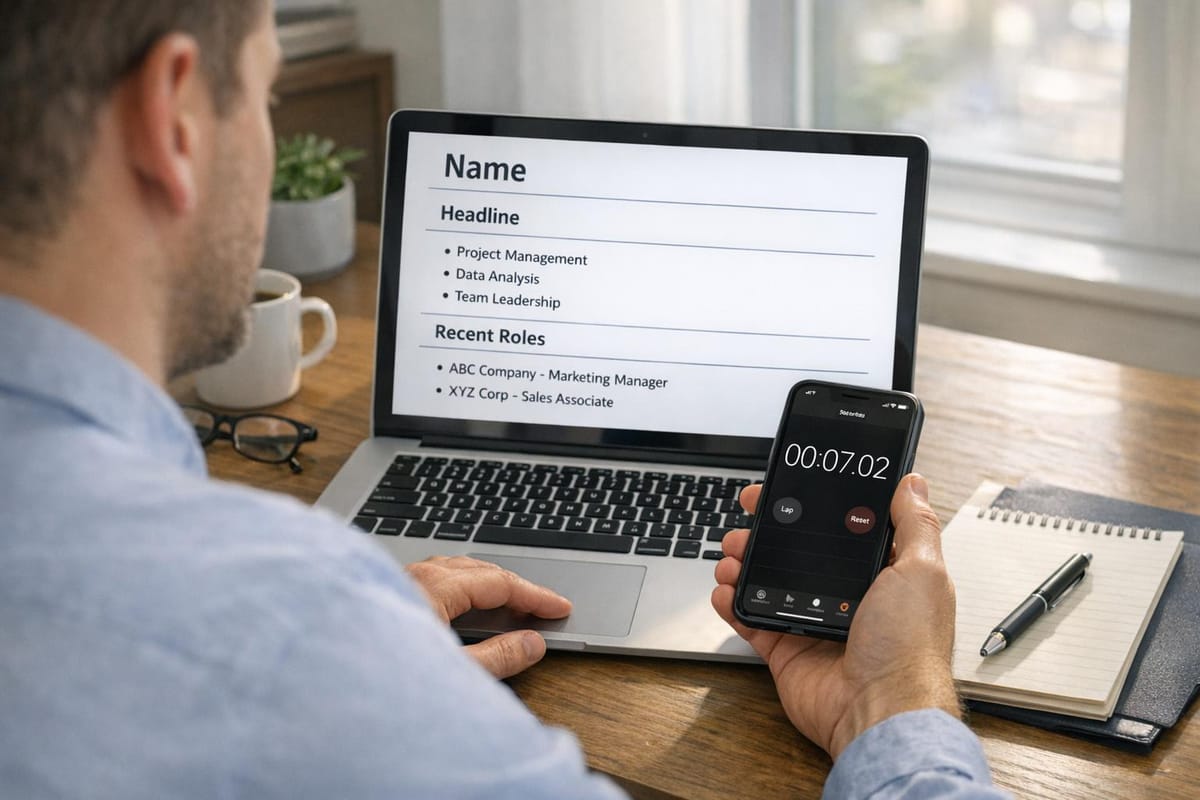
Recruiters spend an average of 7.4 seconds scanning resumes during the initial review, focusing on key details like your name, current and previous roles, employment dates, and skills. With hundreds of applicants per job, your resume must highlight relevant information quickly and clearly. Eye-tracking studies show recruiters follow predictable patterns, often skipping cluttered layouts and dense text. To pass this "7-second test", design your resume with an AI resume builder for a clean format, strong summary, and job-specific keywords.
Key Takeaways:
- Focus Areas: Name, contact info, summary, core skills, and job history.
- Top Layout Tips: Use clear headings, bold job titles, and single-column design.
- Keyword Strategy: Match terms from the job description to improve ATS compatibility.
- Quick Wins: Add certifications to your name, use quantifiable metrics in bullet points, and ensure your LinkedIn URL is included.
By aligning with recruiter habits and optimizing for both humans and ATS, you can increase your chances of securing a detailed review. For high-volume job searches, tools like scale.jobs offer tailored application management to save time and improve outcomes.
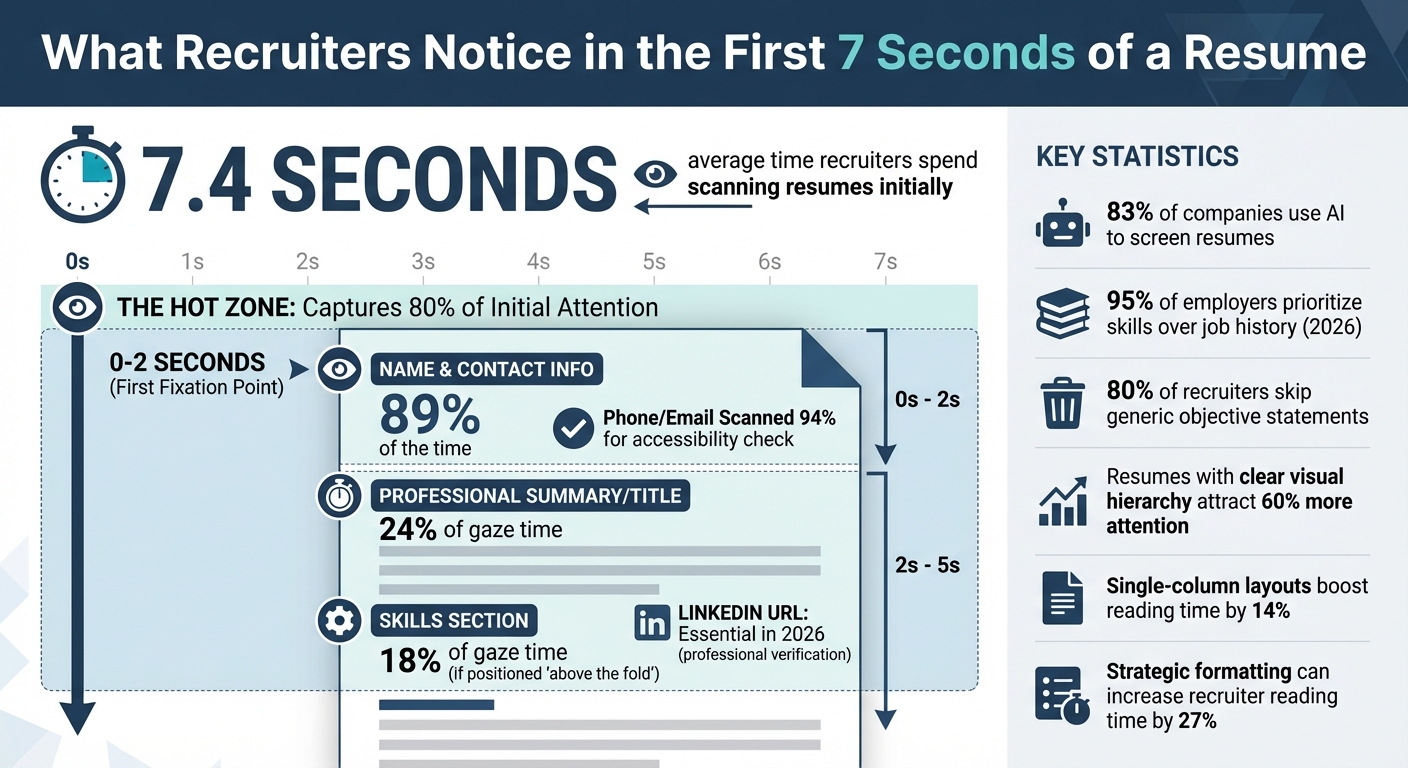
What Recruiters Look at in the First 7 Seconds of Your Resume
Give me 11 minutes, and I’ll make your resume 57% better
What Recruiters Look at First
Recruiters don’t spend time reading your resume word for word during their initial scan. Instead, they focus on three key areas that help them decide if you’re worth further consideration. Knowing these focal points can help you design a resume that aligns with their natural scanning habits.
Name and Contact Information
In the first 0–2 seconds, recruiters zero in on your name and contact details. This section is reviewed 89% of the time to confirm the type of document and assess its overall layout. It needs to answer three key questions: Who are you? How can I contact you? Are you located in a viable area for this role?
To make your name stand out, include any high-level certifications (e.g., “Sarah Chen, CPA” or “Marcus Williams, PMP”) and use a font size between 18–22pt. Ensure your phone number, email address, and LinkedIn URL are prominently displayed, ideally at the top-left or center-top of the page.
In 2026, a LinkedIn URL is a must-have - not just a nice addition. Recruiters rely on it as a verification tool, so leaving it out could hurt your chances. Including your city and state is also important, as it helps recruiters assess your flexibility for remote work or willingness to relocate. When saving your file, use your name in the filename (e.g., Sarah.Chen.Resume.docx) rather than a generic title like resume.doc.
Once you’ve established your identity, the next step is to highlight your professional value with a tailored summary.
Professional Summary or Title
Generic objectives are largely ignored - recruiters skip them 80% of the time because they don’t add value. Instead, focus on a Summary + Headline section, which captures 24% of gaze time when done effectively. A strong summary is specific and quantifiable, such as: “Product Manager with 6 years’ experience scaling B2B SaaS platforms from $2M to $15M ARR.”
In 2026, a competency header is a smart addition. This is a bolded block of 3–5 core technical skills placed directly below your contact information. It aligns with the modern “layer cake” scanning pattern, where recruiters scan resumes in horizontal bands rather than the traditional F-pattern. Use the first 10–15 words to highlight your target job title and key accomplishments to ensure they stand out.
“The first 11 seconds determine whether you get the next 90 seconds of attention. Front-load your most impressive metrics and most relevant skills above the fold.” - Mike Simpson, The Interview Guys
Your title should align closely with the role you’re applying for. This creates an immediate connection and signals relevance. If crafting a compelling summary feels overwhelming, consider using a resume writing service to ensure this section shines.
Once the headline establishes role fit, recruiters quickly assess your skills to see if they meet the job’s requirements.
Skills and Core Competencies
Recruiters dedicate around 18% of their gaze time to the skills section, but only if it’s positioned “above the fold.” Skills buried at the bottom often go unnoticed during the initial scan. With 83% of companies now using AI to screen resumes, it’s essential to include exact keywords from the job description to pass automated ATS filters and reach a human reviewer.
Place a “Core Competencies” or “Technical Skills” section at the very top of your resume, just below your header. Use precise, technical terms such as “Salesforce CRM Administration” rather than vague phrases like “team player” or “good communicator,” which recruiters tend to ignore. Reflecting the exact language from the job posting can trigger matches for both AI systems and human readers.
In 2026, skills-first hiring dominates, with 95% of employers prioritizing your abilities over your job history. Avoid using graphics or multi-column layouts, as these can confuse AI systems and disrupt readability. Stick to a single-column format with clean, scannable text.
With only seconds to grab attention, your skills section must be clear, concise, and packed with relevant keywords.
| Element | Recruiter Action |
|---|---|
| Name | First fixation point (0–1 seconds) |
| Phone/Email | Accessibility check (scanned 94% of time) |
| LinkedIn URL | Professional verification (essential in 2026) |
| Summary/Title | Role fit assessment (24% of gaze time) |
| Skills Section | Keyword matching (18% of gaze time) |
Formatting That Works in 7 Seconds
Your resume has just 7 seconds to make a lasting impression on a recruiter. A 2018 eye-tracking study by TheLadders revealed that recruiters spend an average of 7.4 seconds scanning resumes initially. The study also highlighted that resumes with simple layouts, clear section headers, and bold job titles performed better. These elements, paired with an engaging contact and summary section, can significantly boost your chances of standing out.
Font, Margins, and Page Layout
Choosing the right font and layout can make all the difference. Stick to professional fonts like Arial, Calibri, or Helvetica in 10–12 point size. These fonts ensure readability for both humans and Applicant Tracking Systems (ATS). If you’re looking for a slightly modern touch, Georgia is also a good option. However, steer clear of decorative or script fonts, as they can confuse recruiters and ATS alike.
Set your margins between 0.5 and 1 inch to avoid overcrowding the page. A cramped resume can be off-putting and hard to read. Use a single-column layout instead of multi-column designs. Single-column formats align with natural vertical scrolling, making it easier for recruiters to scan your resume - boosting reading time by 14%.
Consistency is key. Align job titles and dates along the same vertical axis, preferably on the left side of the page. Use bold text for section headers and job titles to create visual anchors that guide the reader’s eye. A clean format with strategic white space enhances readability and keeps the focus on your key accomplishments.
White Space and Section Organization
White space isn’t just about aesthetics - it’s a functional tool that improves readability and structure.
"If your resume looks like a gray blob when squinted, it will feel like a gray blob to a scanning recruiter." - Raman M., Software Engineer & Career Coach, ResumeFast
A quick squint test can reveal if your resume is too cluttered. If it appears as one indistinct block of text, it’s time to add more white space and refine your layout. Resumes with a clear visual hierarchy attract 60% more attention to key details compared to cluttered ones.
Use bullet points that are concise - ideally 1–2 lines long. Dense paragraphs can overwhelm recruiters, leading them to skip over your content. Start each bullet point with impactful metrics or action verbs, as the first 2–3 words grab the most attention during a quick scan.
Spacing between sections is equally important. Ensure there’s enough room to guide the reader’s eye naturally. Focus on the top third of your resume, often referred to as the "Hot Zone", as it captures 80% of attention during the initial scan. This area should prominently display your name, current title, and most recent role.
Screen Readability on Different Devices
With resumes being reviewed on devices ranging from smartphones to large monitors, your formatting needs to be adaptable. A single-column layout is the best choice for readability across all screen sizes. It aligns with vertical scrolling on mobile devices and eliminates the confusion that multi-column layouts can cause.
Ensure that your name, current title, and most recent company are visible "above the fold" on mobile screens. Graphics, text boxes, progress bars, and icons should be avoided, as they can break on different devices and may not be ATS-friendly. Left-aligning all text and headers supports natural scanning and ensures consistency across devices.
Key Formatting Practices at a Glance
| Formatting Element | Best Practice | Impact on Scan Time |
|---|---|---|
| Font | Arial, Calibri, or Helvetica (10–12 pt) | Readable on all devices |
| Margins | 0.5–1.0 inch | Prevents overcrowding |
| Layout | Single-column, left-aligned | Enhances readability by 14% |
| Headers | Bold text for section titles and job titles | Creates visual focus points |
| White Space | Generous spacing between sections | Boosts attention by 60% |
Using Job-Specific Keywords
Once you've fine-tuned your resume's layout and structure, the next step is to align it with job-specific keywords. These keywords do more than just help your resume pass through applicant tracking systems (ATS); they also immediately signal to recruiters that you're a strong match for the role. When a recruiter scans your resume, they compare your language to the job description, and the closer the match, the more likely they are to keep reading.
Finding the Right Keywords
Start by carefully analyzing the job description. Look for terms or phrases that are repeated multiple times. For instance, if "Salesforce CRM Administration" shows up frequently, it’s a key term to include. Similarly, phrases like "B2B SaaS" or "Series A experience" should be used verbatim instead of opting for general alternatives like "software sales" or "startup experience."
Pay special attention to the "must-have" qualifications section. These terms are often non-negotiable and are the first things recruiters look for. Identify a mix of hard skills (e.g., Python, Tableau, Agile methodology) and soft skills (e.g., cross-functional leadership, adaptability). Additionally, match the job posting's action verbs exactly - if it says "optimized", use that instead of synonyms like "improved."
"ATS systems are literal, not interpretive." - Executive Career Upgrades
To ensure you're covering industry-standard terminology, review at least 10 job postings for similar roles. This helps you identify common keywords and phrases. Include both acronyms and their full forms, such as "Search Engine Optimization (SEO)", to ensure ATS systems recognize the skill no matter how it's searched. Avoid using overly creative job titles like "Marketing Ninja" and stick to standard titles like "Marketing Officer." This precise language not only helps with ATS but also makes your resume more appealing to human recruiters.
Where to Put Keywords
Once you've identified the right keywords, the next step is to strategically place them where they’ll make the most impact. The top third of your resume - often called the "Hot Zone" - is prime real estate since it typically gets up to 80% of a recruiter's attention during an initial scan. Include a block of 3–5 core competencies directly below your header to immediately highlight your most relevant skills.
Incorporate keywords naturally into your bullet points. For example, instead of saying, "Responsible for managing Agile project teams", you could write, "Led Agile project teams, achieving milestones 10% under budget." This not only integrates keywords but also demonstrates measurable results.
Distribute keywords throughout your resume, including the header, summary, skills, and experience sections. In the experience section, aim to include key terms within the first two bullet points for each role. This ensures that recruiters notice your qualifications right away and see how your skills align with the job requirements.
Is TopResume Worth It? Reviews & Alternatives
You've polished your resume for that crucial 7-second recruiter scan, and now you’re debating whether to navigate the application process solo or enlist professional help. TopResume is a well-known name in resume writing, offering ATS-friendly documents crafted by experts. But if you’re applying to numerous roles, a one-time resume overhaul might not cut it, especially when each application demands customization and quick action.
Let’s see how TopResume compares to scale.jobs and other options.
Why scale.jobs Stands Out Over TopResume
TopResume provides a professionally written resume designed to pass ATS filters, but scale.jobs takes things further by managing the entire application process for you. Here’s what makes scale.jobs a better fit for job seekers aiming for high-volume applications:
- Comprehensive application management: scale.jobs assigns human assistants to apply for up to 30 jobs daily on your behalf. They tailor your resume and cover letter for each position, ensuring your qualifications are front and center. TopResume finishes your resume and leaves the rest to you.
- Full transparency: With scale.jobs, you get time-stamped screenshots of every submission, real-time updates via WhatsApp, and a dashboard to track progress. TopResume doesn’t provide insights into the actual application process.
- Flat-fee pricing: scale.jobs offers packages starting at $199 for 250 applications, with no recurring costs. TopResume typically uses tiered pricing or subscription models for continued access to tools.
- Broad compatibility: scale.jobs assistants handle applications across all major ATS platforms, niche job boards, and company career pages, ensuring maximum reach.
While scale.jobs offers a hands-off, end-to-end service, TopResume and its competitors excel in crafting resumes for those who prefer to manage their own applications.
Strengths of TopResume and Other Competitors
TopResume, Resume Genius, and Jobscan specialize in creating polished, ATS-friendly resumes. Their services focus on formatting, keyword optimization, and using industry-specific language to craft a strong foundational document. If you’re looking for a professional resume and prefer to handle the application process yourself, these platforms deliver solid value. Jobscan’s ATS scanner is particularly handy for fine-tuning your resume before submission.
The key difference lies in the scope of services. These platforms focus solely on creating resumes that can pass ATS filters, leaving the time-intensive tasks of tailoring and submitting applications up to you. If you’re applying to 50+ roles across various industries, you’ll still need to customize each resume and track submissions manually. scale.jobs eliminates this burden by managing the entire workflow, saving you 20+ hours per week to focus on networking and interview preparation.
Feature Comparison: scale.jobs vs. TopResume & Similar Services
| Feature | scale.jobs | TopResume & Competitors |
|---|---|---|
| Human Involvement | Dedicated assistants for every application | One-on-one writing or automated tools |
| Resume Customization | Tailored for each job | One-time optimization |
| ATS Handling | Customized per role | Optimized templates |
| Application Execution | Assistants submit applications for you | Self-managed submissions |
| Transparency | Screenshots, updates, and tracking | Document delivery only |
| Pricing Model | Flat-fee ($199–$1,099) | Tiered or subscription-based |
When to Choose TopResume: Opt for TopResume if you’re applying to a small number of roles (5–10) and need a professional resume as your base document. It’s a good choice if you have the time to customize and submit applications on your own and want expert input on creating resumes that shine.
When to Choose scale.jobs: scale.jobs is ideal if you’re applying to 50+ roles, don’t have the time to tailor resumes for each position, or want to skip the repetitive work of filling out applications. It’s particularly useful for recent graduates, professionals navigating layoffs, and anyone needing to maximize application volume without sacrificing quality. If you’re dealing with visa requirements like H1B or F1, or need professional resume writing services combined with application management, scale.jobs offers a complete solution.
Consider scale.jobs if:
- You’re applying to 30+ roles weekly and can’t keep up with manual resume edits.
- You want proof that your applications are being submitted (not lost in the void).
- You need resumes tailored to individual job descriptions, not a generic version.
- You prefer a one-time payment over ongoing subscription fees.
- You want to save 20+ hours weekly for networking, interview prep, or skill-building.
Key Takeaway: If you need a professional resume and have time to manage your own applications, TopResume or Resume Genius are good options. For high-volume job searches and a fully managed application process, scale.jobs offers better value with its transparent, flat-fee pricing and hands-off approach.
Conclusion: Create a Resume That Gets Noticed
Recruiters spend an average of 7.4 seconds scanning resumes, focusing on six critical details: your name, current title and company, dates of employment, previous title and company, and education. To grab their attention and secure a more thorough review, your resume must immediately demonstrate how you meet the job requirements.
Start by using the "Squint Test." Blur your resume until only the section breaks and white space are visible. This helps you identify whether your layout directs attention to the most important content. Place your strongest achievements and key skills in the top third of the page - this "hot zone" is where 80% of initial attention lands. Make every bullet point count by starting with action verbs, following up with measurable results, and incorporating specific numbers or outcomes in at least 80% of your entries.
"The first 11 seconds determine whether you get the next 90 seconds of attention. Front-load your most impressive metrics and most relevant skills above the fold." - The Interview Guys
If you're applying to multiple roles weekly and find it challenging to tailor each resume, a professional resume writing service can help. Services like scale.jobs specialize in optimizing documents and managing applications, ensuring your resume is ATS-friendly and tailored to each job. Their human-assisted approach and transparency set them apart from competitors like TopResume. Whether you choose to customize resumes yourself or rely on a service, the objective remains the same: use those crucial first 7 seconds to showcase your strongest qualifications where recruiters are most likely to look.
Quick Tips to Boost Your Resume's Impact:
- Break up dense paragraphs into concise bullet points.
- Left-align job titles and company names for easy readability.
- Stick to standard fonts like Arial or Calibri in sizes 10–12 pt.
- Replace outdated "Objective" statements with a targeted headline.
These adjustments can increase a recruiter's reading time by up to 27%, turning a quick skim into a more detailed review. By making these changes, you can transform your resume into a document that commands attention. Compare tools like scale.jobs with other industry options to find the best fit for your needs, especially if you're managing a high volume of applications.
FAQs
What should I put in the top third of my resume?
The top portion of your resume is prime real estate and should immediately grab attention. Include your name, current job title, company, and a clear, targeted headline that showcases your value and aligns with the role you're applying for. This area is crucial for creating a strong first impression and ensuring recruiters quickly recognize your relevance to the position.
How do I add keywords without keyword stuffing?
When tailoring your resume, align it with the job description by naturally weaving in relevant keywords. Focus on terms such as specific job titles, essential skills, and tools commonly mentioned in the listing. These can be seamlessly incorporated into sections like your skills, experience, and summary. For instance, instead of generic statements, you could say something like: "Managed cross-functional teams to execute three product launches utilizing Agile methodology."
Be mindful of balance - overloading your resume with keywords can make it sound forced or robotic. A good test is to read it aloud; if it feels repetitive or unnatural, consider rephrasing for a smoother flow. A well-optimized resume not only passes Applicant Tracking Systems (ATS) but also appeals to human recruiters. Tools like an AI resume builder can help you refine this process efficiently.
What resume formatting choices hurt ATS scanning?
When it comes to formatting your resume for ATS (Applicant Tracking Systems), certain design choices can cause problems. Avoid using tables, text boxes, or images, as these elements often interfere with how ATS parses your document. Additionally, inconsistencies like varying date formats - such as "March 2023" in one section and "03/2023" in another - can create confusion. Non-standard fonts, overly creative section headers, or placing critical information in headers or footers can also disrupt proper scanning.
To ensure your resume is ATS-friendly, stick to a simple, clean layout. Use standard fonts like Arial or Times New Roman, maintain uniform date formats throughout, and avoid flashy designs or formatting that might confuse the system. Keeping things straightforward increases the chances of your resume being read accurately by ATS software.