10 Virtual Interview Mistakes to Avoid
Avoid common virtual interview pitfalls—from tech glitches and bad lighting to poor body language and rambling answers—with practical fixes to improve your chances.


Virtual interviews dominate the hiring process in 2026, but many candidates still make avoidable mistakes that cost them opportunities. Here’s a quick rundown of the top errors and how to fix them:
- Skipping tech checks: Test your equipment and internet connection in advance to avoid glitches.
- Bad lighting or messy backgrounds: Ensure proper lighting and a clean, professional backdrop.
- Dressing too casually: Wear professional attire, even if the interview is remote.
- Ignoring the camera: Look directly at the camera to simulate eye contact.
- Poor posture or fidgeting: Sit upright and use confident body language.
- Speaking too fast, slow, or using fillers: Practice clear, measured responses.
- Multitasking: Eliminate distractions and stay fully engaged.
- Rambling or brief answers: Use the STAR method to provide concise, impactful responses.
- Not asking questions: Prepare thoughtful questions to show interest and evaluate the company.
- Oversharing or unprofessional tone: Keep responses focused and professional.
Preparation is key to standing out. Platforms like scale.jobs offer tools and personalized guidance to help you excel in virtual interviews, from predicting questions to refining your presentation. With these tips, you’ll be ready to make a strong impression.
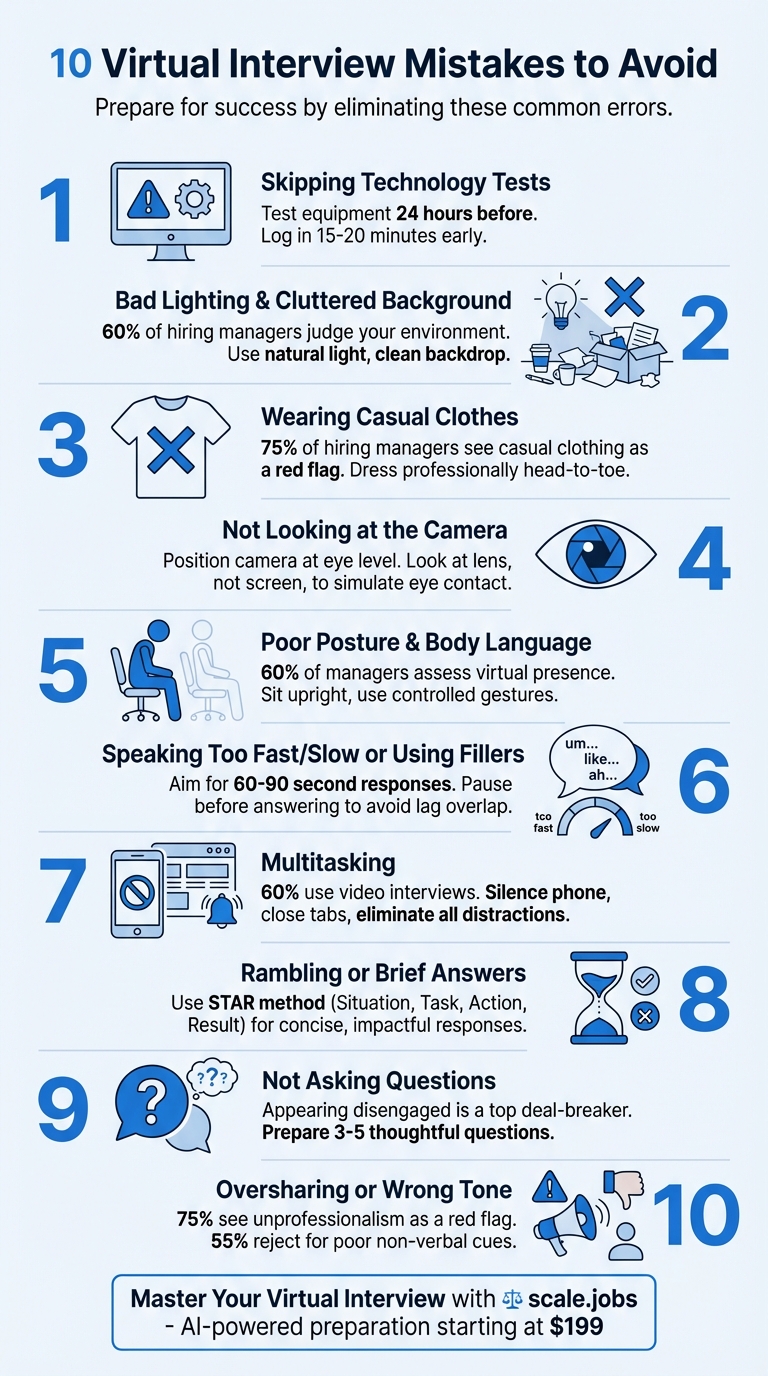
10 Virtual Interview Mistakes to Avoid - Quick Reference Guide
13 MISTAKES That KILL a Video Interview (Stop Doing These!)
1. Skipping Technology Tests Before the Interview
Technical hiccups can cost you the job. With virtual interviews becoming the norm, any tech glitch - like a frozen screen, muted audio, or lagging video - can make you seem unprepared, even if it's just bad luck. For recruiters, these issues raise doubts about your ability to navigate the digital tools essential for today’s workplace.
Samantha Goddiess, a writer at Zippia, stresses the importance of interview preparation:
You should try out the software and hardware you will be using for this interview well in advance to be sure that everything will go smoothly.
This makes it clear: a tech check isn't optional - it's essential.
Run a full rehearsal at least 24 hours before your interview. Download the interview platform (like Zoom, Microsoft Teams, or Google Meet) to avoid browser-related crashes. Set your camera at eye level for better engagement, and test your microphone through the platform’s settings. Use headphones or a headset to eliminate echo. To go the extra mile, record yourself answering a sample question - this lets you fine-tune your lighting, background, and body language.
Don’t forget to manage bandwidth during the interview. Ask others in your household to pause any high-bandwidth activities, like streaming or gaming, to prevent video lags or audio disruptions. As Naukri's Official Blog advises:
Avoid last-minute connection on an online platform the interviewer has chosen... This gives you sufficient time to check internet connectivity at your end and plan accordingly.
Always have a backup plan. Keep a fully charged backup device and a mobile hotspot handy in case your primary Wi-Fi fails. Log in 15–20 minutes early to handle any unexpected issues, like software updates or connection problems. This level of preparation shows professionalism and sets you apart from candidates who leave things to chance.
2. Bad Lighting and Cluttered Background
Your surroundings send a message before you even speak. A survey of 330 hiring managers and recruiters revealed that a messy room or a distracting background ranks high among deal-breakers that could cost candidates the job. If your face is hard to see or your background features piles of laundry, the interviewer’s attention shifts from your qualifications to your environment. To ensure you make the right impression, it’s essential to fine-tune your lighting and background.
Poor lighting can cause visibility problems. A dimly lit space or shadows that obscure your face can make you appear less professional and hinder the interviewer’s ability to read your expressions. Non-verbal cues, like facial expressions and enthusiasm, play a huge role in how you’re perceived during the interview.
Here’s how to fix it: Position yourself facing a natural light source or a well-placed artificial light. Natural light from a window is ideal, but if that’s not an option, combine ceiling lights or desk lamps to evenly illuminate your face. The goal is to ensure your features are clearly visible without harsh shadows or an overly bright, washed-out look. Test your setup at the same time of day as your interview to avoid surprises.
Keep your background simple and professional. Nadene Evans, Senior Marketing Manager at Zenefits, puts it perfectly:
You want them to focus on you - the interviewee - and what you're talking about, and how you present yourself, and not necessarily what you're surrounded by.
Choose a plain wall, a neat bookshelf, or another uncluttered space as your backdrop. Remove anything personal, like posters or knick-knacks, that might distract from your professionalism. Avoid casual settings that could undermine your credibility, and consider seeking tailored job application assistance to further refine your professional presentation. With over 60% of hiring managers conducting interviews via video, your environment has become a crucial element of your first impression.
3. Wearing Casual Clothes
Professional attire matters, even at home. According to a survey, 75% of hiring managers see casual clothing as a warning sign. Showing up in a t-shirt, hoodie, or - worse - pajamas sends the message that the interview isn’t a priority for you. First impressions happen fast, and dressing too casually can make you appear unprepared. On the flip side, wearing professional clothing not only demonstrates your seriousness but also gives your confidence and focus a boost. A business suit or a polished button-down shirt can help you feel more prepared and ready to tackle tough questions. That confidence will shine through in your answers and overall demeanor during the interview.
The golden rule: Dress as you would for an in-person interview in your field. For corporate or formal roles, this usually means a full business suit. Even in industries like tech or creative sectors where the dress code might be more relaxed, business professional attire is still your safest bet. Stick to solid, neutral colors, as patterns or stripes can create distracting effects on video. A polished look reinforces your professionalism and readiness.
A common pitfall is only dressing professionally from the waist up. Always wear professional pants or a skirt, even if you think they won’t be visible on camera. You never know when you might need to stand up to adjust something or grab a document. If pajama bottoms make an appearance, your credibility takes a hit. Plus, dressing fully professional helps you feel completely prepared, not halfway there.
Plan ahead: Test your outfit the day before. Check how the colors look under your lighting and against your background. Make sure everything is clean, wrinkle-free, and that your grooming matches workplace standards. With over 60% of hiring managers now using video interviews, your on-screen presentation is just as important as your resume.
4. Not Looking at the Camera
Eye contact matters - even in virtual interviews. If you’re watching the interviewer’s face on your screen instead of looking directly into the camera, it can come across as if you’re distracted or not fully engaged. To the person on the other side, it might seem like you’re gazing off to the side or downward. In fact, a survey of 330 hiring managers and HR professionals found that avoiding eye contact or appearing unfocused is one of the top behaviors that could cost you the job.
When you look into the camera, it creates the illusion of direct eye contact. This simple adjustment makes the conversation feel more natural and engaging. Interviewers often associate this with confidence and active listening - qualities they’re keen to see in candidates. Maintaining this "digital eye contact" helps build rapport and trust, much like in an in-person meeting. Plus, studies suggest that employers are more likely to remember your responses when you maintain consistent eye contact.
Set your camera at eye level. To ensure a professional and natural look, position your webcam at eye level. You can use a laptop stand or even stack a few books to achieve this. Avoid looking up or down at the camera, as this can feel awkward for the interviewer. Once your camera is correctly positioned, move the video conferencing window to the top-center of your screen, just below the webcam. This minimizes how much your eyes shift between the camera and the interviewer’s image.
Practice for a polished delivery. Get comfortable by recording yourself answering typical interview questions while focusing on the camera lens. Review the recordings to check your gaze and adjust as needed. You can also place a small visual cue, like a sticky note, near the camera to remind you where to look. Mock interviews with a friend over video can help you get used to the unnatural feeling of not looking at the person’s face on the screen. With practice, you’ll feel more confident keeping your focus on the camera while delivering clear and engaging answers.
5. Poor Posture and Body Language
Technical preparations and eye contact are important, but don’t underestimate the power of confident body language. Slouching, fidgeting, or seeming disengaged can raise doubts about your professionalism and enthusiasm for the role. Over 60% of hiring managers pay close attention to a candidate's virtual presence, and poor posture - whether leaning too far forward or slumping - can send the wrong message. Aim for a posture that radiates confidence and supports your verbal communication.
Choose a chair that promotes good posture - something sturdy and upright, rather than soft furniture like a couch or bed that encourages a more casual position. Position your camera to frame you from the shoulders up, leaving just a little space above your head. This setup keeps the focus on your face and upper body, which are key for non-verbal cues. As Robert Half puts it:
Even in a virtual environment, your body language still speaks volumes.
Let your gestures feel natural but stay controlled. Small hand movements can add warmth and energy to your communication, but overdoing it can be distracting, especially on a smaller screen. Keep your hands visible within the camera frame, and avoid habits like touching your face or hair. Be mindful of nervous tics - pen-clicking or desk-tapping, for example - which can be amplified by your microphone. Instead, use subtle gestures like nodding and smiling to show you're actively engaged in the conversation.
Screens can dull your personality, so use expressions to convey enthusiasm. Maintain a pleasant, engaged demeanor with intentional smiles and a focused gaze. Without these visual cues, you risk coming across as uninterested or overly stiff - traits that can make hiring managers question your interpersonal skills and how well you’d fit into their team. Your expressions and posture together can help you project confidence and a genuine interest in the role.
6. Speaking Too Fast, Too Slow, or Using Filler Words
When it comes to virtual interviews, how you speak can be just as important as what you say. Your pace, clarity, and choice of words all play a role in shaping how the interviewer perceives you. As Robert Half explains:
Speaking at a lightning pace in most cases won't deliver the impact the interviewer is looking for with your answers.
Talking too fast can make your answers hard to follow, while speaking too slowly might come across as unprepared. And let's not forget those filler words - um, like, or you know - which can quickly chip away at your credibility.
Buzzwords are another pitfall. Tossing around terms like "motivated" or "trustworthy" without offering real examples can make your responses feel rehearsed. Nadene Evans, Senior Marketing Manager at Zenefits, puts it this way:
A lot of times, using buzzwords makes a candidate come across as sounding like they're rehearsing for an interview... Instead of giving actual answers to questions.
Instead of relying on empty phrases, show your strengths with specific examples. For instance, rather than saying you're "detail-oriented", share a story about a project where your attention to detail led to measurable success. This approach not only adds authenticity but also keeps filler words to a minimum.
Virtual interviews come with their own challenges, like audio delays that can cause you to accidentally talk over the interviewer. To avoid this, pause briefly before responding. This not only helps account for potential lag but also gives you a moment to gather your thoughts and deliver a clear, thoughtful answer.
Preparation is key. Record yourself in mock interviews to catch any filler words or rushed speech. Before the big day, take a few deep breaths to calm your nerves and focus on key points rather than memorizing lengthy responses. A conversational tone is much more engaging and leaves room for flexibility.
Brief pauses during your answers are perfectly fine - they give both you and the interviewer time to process the conversation. Just as confident body language reinforces your professionalism, clear and measured speech helps you leave a lasting impression. By mastering your speaking pace and clarity, you set yourself up to stay fully engaged and make a strong impact during your interview.
7. Checking Your Phone or Doing Other Tasks
Once you've fine-tuned your tech, setup, and presentation, the next step is staying fully engaged. Every second of a virtual interview matters, and distractions can quickly derail your chances.
Few things signal disinterest as clearly as multitasking. Whether it's glancing at your phone, switching browser tabs, or checking notifications, these actions don’t go unnoticed. Interviewers can easily pick up on them, and it sends a message that their time - and the opportunity - might not be a priority for you.
With over 60% of hiring managers now using video interviews, staying focused is more critical than ever. Nadene Evans, Senior Marketing Manager at Zenefits, shared an example of a hiring manager who heard "slurping noises" while asking a question. The manager’s immediate thought was, "Is this person even paying attention?" Even something as minor as eating or drinking during the call can come across as disengaged. These moments don’t just feel awkward - they can leave a lasting, negative impression.
Distractions also cause you to miss important details, weaken your responses, and raise concerns about your level of focus and dedication. Interviewers notice wandering eyes, the sound of typing, or even the glow of a screen reflecting in your glasses as you switch windows. These signals can undermine your professionalism.
The solution? Eliminate distractions completely. Silence your phone or leave it in another room. Close out unnecessary tabs, email, and messaging apps. If you need to take notes, opt for pen and paper to avoid noisy keyboard clicks. Let others in your household know about your interview to prevent interruptions.
8. Giving Answers That Are Too Long or Too Short
When it comes to virtual interviews, the length of your answers can make or break the conversation. Long-winded responses risk losing the interviewer's attention, while one-word answers suggest you're unprepared.
This challenge is even greater in virtual settings, where reading the interviewer's body language isn't as easy. Without those nonverbal cues, candidates sometimes overcompensate by rambling to fill awkward silences, which can dominate the conversation and disengage the interviewer. To avoid this, a structured approach like the STAR method can help you strike the right balance.
The STAR method - Situation, Task, Action, Result - offers a clear framework for concise, impactful answers. For instance, instead of vaguely stating, "I'm great at Excel", you could say: "I developed spreadsheets that integrated sales data from three departments, cutting monthly reporting time by 40% and enabling leadership to make quicker decisions." This approach replaces generic statements with specific, measurable examples.
Finding the balance between clarity and brevity is essential. Take a moment to pause and organize your thoughts before responding; rushing can dilute your message. Robert Half emphasizes:
Speaking at a lightning pace in most cases won't deliver the impact the interviewer is looking for with your answers.
Practice by recording yourself and aiming for responses between 60 to 90 seconds. Review the playback to cut out filler words and fine-tune your pacing. This will help you keep the interviewer engaged while showcasing your qualifications with well-thought-out, evidence-backed examples.
9. Not Asking the Interviewer Any Questions
Engagement is key during virtual interviews, especially since non-verbal cues are harder to pick up. So, when the interviewer wraps up with, "Do you have any questions for me?" and you respond with, "No, I think you covered everything", it can come across as unprepared and uninterested. In a survey of 330 hiring managers, recruiters, and HR professionals, appearing disengaged ranks as one of the top interview mistakes - and a deal-breaker in today's virtual landscape.
Virtual interviews often serve as an early screening tool to filter candidates, and failing to ask questions can make you seem less qualified compared to those who actively engage. Amanda Augustine, Career Coach and Resume Writer at TopResume, explains:
It doesn't matter if you're participating in a phone screen, interviewing via videoconference, or meeting in-person - if you make these interview missteps, you're undermining your chances of landing the job.
Skipping the chance to ask questions not only reflects poorly on your interest but also robs you of the opportunity to evaluate the company's culture. Thoughtful questions demonstrate you've done your homework. For instance, you could ask, "What three qualities are most important for someone to succeed in this role?" or "How would you describe the work environment and daily office life?" These kinds of inquiries help you assess if the company's values and work style align with your own. Interestingly, research shows that 32% of employees who quit within the first 90 days cite company culture as their main reason for leaving.
Be prepared with a notepad to jot down important points during the interview, and research your interviewer ahead of time to craft personalized follow-up questions. This shows you're engaged and paying attention. Just avoid reading directly off your screen - it can come across as robotic and disrupt the flow of conversation.
10. Sharing Too Much Personal Information or Using the Wrong Tone
When it comes to virtual interviews, managing your tone and deciding how much personal information to share can make or break your chances. Without the benefit of physical cues, it’s easy to unintentionally cross professional boundaries. For instance, criticizing former employers in an attempt to build rapport is a major misstep. Nadene Evans, Senior Marketing Manager at Zenefits, highlights why this behavior raises concerns:
You have an instant red flag of, 'Okay, well, if they're talking this way about them, perhaps they're not loyal, perhaps they don't understand the need for disagreement.'
Actions like this not only damage your credibility but also send a message of unprofessionalism.
The statistics speak volumes: 75% of hiring managers see a lack of professionalism in virtual interviews as a serious red flag, and 55% have rejected candidates for poor body language or non-verbal cues. Behaviors such as using slang, eating during the call, or oversharing personal details can signal a lack of professional boundaries. Even seemingly minor actions, like slurping water or discussing personal problems, can derail your interview.
Instead of relying on buzzwords like "motivated" or "hardworking", focus on specific accomplishments. Evans advises that vague traits often make candidates sound rehearsed. Highlight tangible achievements - such as creating efficient Excel systems to meet business objectives - rather than relying on generic adjectives. Concrete examples demonstrate your professionalism far better than empty descriptors.
Treat your virtual interview as seriously as you would an in-person meeting. Avoid taking calls from your car or noisy environments, and always frame past challenges in a positive light. Rather than badmouthing former employers, emphasize what you learned from those experiences. The first ten seconds are crucial, so practice your introduction and body language to exude confidence and professionalism. From tech preparation to maintaining the right tone, every detail matters in leaving a strong impression during virtual interviews.
How scale.jobs Compares to InterviewKickstart and Jobscan

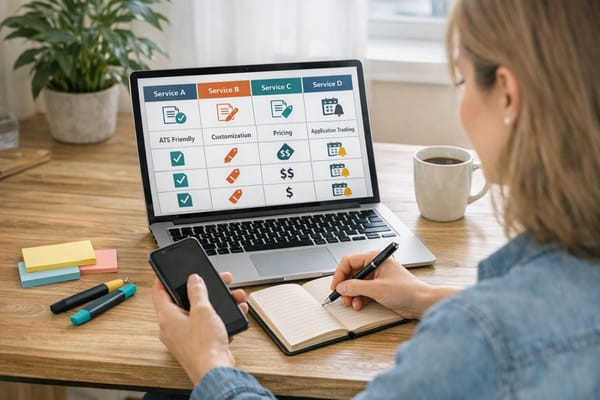
When it comes to preparing for interviews, choosing the right tool can make all the difference. InterviewKickstart and Jobscan each serve specific purposes: InterviewKickstart provides technical coaching for FAANG-level interviews, focusing on coding and system design challenges with expert guidance. On the other hand, Jobscan specializes in ATS (Applicant Tracking System) resume optimization, using automated keyword matching to help resumes pass initial screenings. These focused approaches highlight why scale.jobs stands out as a more comprehensive solution.
scale.jobs combines AI-driven tools with real human feedback, creating a platform that covers every aspect of interview preparation. The AI Interview Question Predictor identifies potential questions tailored to your specific job application, helping you craft precise and confident responses. Meanwhile, reverse recruiters provide personalized coaching on crucial non-verbal elements like posture, eye contact, and tone - areas automated systems often overlook. This blend ensures you're not only technically prepared but also present yourself confidently and professionally during interviews.
Cost is another key differentiator. InterviewKickstart's subscription fees can exceed $1,000, and Jobscan charges recurring monthly fees. In contrast, scale.jobs offers a flat fee starting at $199 for 250 applications. This one-time payment unlocks unlimited access to tools like tailored resumes, cover letters, and interview responses, allowing you to focus entirely on preparation without worrying about ongoing costs.
scale.jobs also excels in transparency and support. Features like immediate WhatsApp assistance and time-stamped proof-of-work screenshots provide quick feedback and clear progress tracking. Plus, unused-credit refunds if you secure a job early add another layer of customer-focused service - something automated platforms often lack.
Why scale.jobs Stands Out:
- Complete Interview Preparation: Unlike InterviewKickstart, which focuses solely on technical coaching, scale.jobs combines AI question prediction with live feedback to polish both technical and non-verbal skills.
- Affordable Pricing: With a flat fee starting at $199 for 250 applications, scale.jobs offers a more budget-friendly option compared to InterviewKickstart’s high costs and Jobscan’s monthly fees.
- Real-Time Support: Dedicated WhatsApp assistance and proof-of-work screenshots ensure fast, transparent communication.
- All-in-One Solution: From ATS checks and cover letter generators to personalized human support, scale.jobs covers every step of the job search process.
Whether you're entering the workforce, recovering from a layoff, or navigating visa challenges, scale.jobs provides the tools and guidance you need to succeed in virtual interviews and secure your next role.
Conclusion
Virtual interviews have become a staple in the hiring process. To succeed, it’s crucial to focus on the strategies we’ve outlined.
As Amanda Augustine emphasizes, even minor mistakes can hurt your chances. Testing your equipment, setting your camera at eye level, and practicing your responses can help you avoid common pitfalls like awkward pauses, filler words, or tech issues. Considering that over 70% of professionals feel anxious during virtual interviews and 30% face technical problems, preparation isn’t just helpful - it’s necessary.
To recap, thoughtful preparation can turn potential hurdles into opportunities. Platforms like scale.jobs simplify this process by addressing all preparation needs in one place. Start with their free Interview Questions Predictor, or take it up a notch with AI Assistant Pro for $9/month, offering instant, customized answers. For more personalized guidance, their Human Reverse Recruiter service (starting at $199 for 250 applications) provides real-time feedback on critical elements like body language and tone - areas automated tools often miss. Plus, features like WhatsApp support and proof-of-work updates keep you informed throughout.
FAQs
What are the best ways to prepare your virtual interview setup and avoid technical issues?
To make sure your virtual interview runs smoothly and avoids any technical hiccups, here are a few essential tips to keep in mind:
- Test your equipment and software in advance. Double-check your webcam, microphone, and speakers by doing a test call. Make sure your system and video conferencing app (like Zoom or Microsoft Teams) are updated to prevent any last-minute disruptions.
- Secure a stable internet connection. Whenever possible, use a wired Ethernet connection for reliability. If that's not an option, sit close to your Wi-Fi router and reduce bandwidth usage by pausing any downloads or streaming during the interview.
- Set up your space thoughtfully. Pick a quiet spot with good lighting and a neutral background. Position your camera so it’s at eye level, and ensure your face is well-lit to maintain a professional appearance.
- Be prepared with a backup plan. Have a secondary device, like a smartphone, and an alternative internet source, such as a mobile hotspot, ready to go in case something unexpected happens.
If technical issues do come up, stay calm and let the interviewer know immediately. Explain how you’re handling the situation to keep things on track. These preparations can help you present yourself as polished and professional.
What are the best ways to stay professional during a virtual interview?
To approach a virtual interview professionally, treat it with the same level of importance as an in-person meeting. Start by testing your setup ahead of time - ensure your internet connection is stable, and check that your camera, microphone, and any screen-sharing tools work properly. Pick a quiet, well-lit spot with a tidy or neutral background to minimize distractions. Dressing as you would for an in-office interview signals both respect and professionalism.
When the interview begins, sit up straight, position your camera at eye level, and maintain eye contact by looking directly at the webcam. Speak clearly and at a measured pace, and eliminate distractions by muting notifications and reducing background noise. If technical issues pop up, stay composed and address them quickly before resuming the conversation. Lastly, show your reliability by logging in a few minutes early - this small step demonstrates respect for the interviewer’s time and sets a positive tone.
What are the best questions to ask during a virtual interview?
When you're in a virtual interview, asking well-thought-out questions can demonstrate that you're engaged and genuinely interested in the role. It also helps you figure out if the position and company align with what you're looking for. Plus, hiring managers appreciate a two-way conversation - it shows you're invested.
To get ready, dig into the company's recent updates, team initiatives, and remote work practices. Use this research to come up with open-ended questions that showcase your curiosity and eagerness to learn more.
Here are some strong questions you can ask:
- What are the main responsibilities for this role, and how will success be measured?
- How does the team stay connected and collaborate while working remotely? Are there specific tools or processes you rely on?
- What are some challenges the team expects to tackle over the next six months?
- How does this position contribute to the company’s broader vision or goals?
Aim to prepare 3-5 questions that feel most relevant to you and the role. Practice asking them so they sound natural, and keep a written list nearby during the interview to stay organized and confident.