Resume Optimization Checklist Before You Apply to 50+ Jobs
Make your resume ATS-friendly and tailored: formatting, keyword matching, achievement bullets, and final checks to improve interview chances.


75% of resumes fail to pass ATS software, meaning they never even reach a recruiter. When applying to 50+ jobs, this can be a major roadblock. To increase your chances of success, your resume must be ATS-friendly, tailored to each job, and error-free. Here's how to do it:
- Use ATS-Compatible Formatting: Stick to a single-column layout, standard fonts (Arial, Calibri, Times New Roman), and avoid tables, icons, or graphics.
- Tailor Your Resume: Align your skills and achievements with job-specific keywords from the description.
- Highlight Achievements: Use measurable results and action verbs to showcase your impact.
- Proofread and Test: Check for grammar errors, test in plain text editors, and run ATS scans for feedback.
For those overwhelmed by the process, platforms like Scale.jobs offer services to optimize resumes and ensure they meet ATS and recruiter standards. Whether you're applying for full-time jobs or exploring part-time jobs near me, an optimized resume can triple your chances of landing interviews. Learn more below.
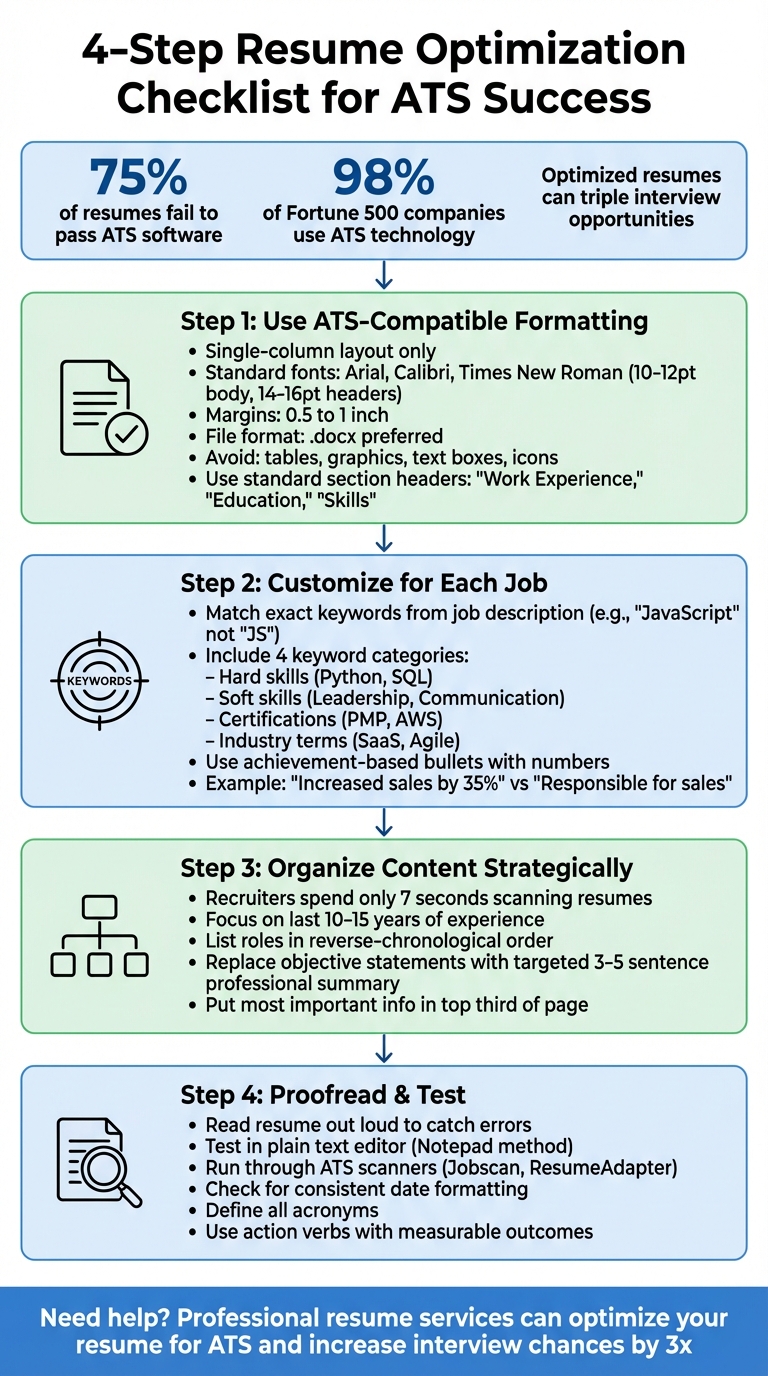
4-Step Resume Optimization Checklist for ATS Success
How To Transform Your Resume in 6 Minutes | PROVEN ATS RESUME FORMATTING HACKS
Step 1: Use ATS-Compatible Formatting
When you're submitting applications to dozens of positions, it's important to remember that your resume will first pass through an Applicant Tracking System (ATS) before reaching a recruiter's desk. Over 98% of Fortune 500 companies rely on ATS technology, and formatting mistakes that make your resume unreadable to these systems are a top reason candidates are filtered out early. While a sleek, two-column design with unique fonts might catch your eye, it won't matter if the ATS can't properly interpret your contact details, work history, or qualifications.
The difference between a resume that passes an ATS scan and one that gets rejected often boils down to small technical details. If the system struggles to identify your name, job titles, or employment dates, your application won't make it past this initial stage - no matter how qualified you are.
Formatting Guidelines for ATS Success
To ensure your resume is ATS-friendly, follow these essential rules:
- Stick to a single-column layout. Multi-column formats confuse ATS systems, often jumbling or misplacing information.
- Use standard fonts like Arial, Calibri, or Times New Roman in 10–12 point size for the body text. For your name and section headers, opt for 14–16 point size.
- Stick to conventional section headings such as "Work Experience", "Education", and "Skills." Creative alternatives like "My Journey" or "Career Highlights" can disrupt parsing.
- Keep margins between 0.5 and 1 inch on all sides for a clean, readable layout.
- Avoid placing contact details or critical information in headers or footers, as many ATS systems skip these areas entirely.
Additionally, steer clear of tables, graphics, text boxes, logos, or icons. These elements can either be ignored by the ATS or cause errors that scramble your data. For bullet points, use simple shapes like circular (•) or square symbols. When including dates, stick to standard formats such as 03/2024 or March 2024 to ensure accurate parsing.
| Feature | ATS-Friendly Requirement |
|---|---|
| Layout | Single-column only |
| File Format | .docx (preferred) or text-based PDF |
| Fonts | Arial, Calibri, Times New Roman |
| Margins | 0.5 to 1 inch |
| Body Font Size | 10–12 pt |
| Visuals | No tables, images, or text boxes |
Once you've applied these formatting rules, it's time to test your resume's compatibility.
How to Check Your Resume for ATS Compatibility
One quick way to test your resume is by using the Notepad method. Copy your entire resume and paste it into a plain text editor like Notepad. If the text appears disorganized, out of order, or missing characters, the ATS will encounter the same issues. This simple test can immediately highlight formatting problems.
For a more thorough review, consider using ATS scanning tools. scale.jobs provides a free ATS checker that flags parsing errors, identifies missing keywords, and highlights formatting issues tailored to your desired roles. Unlike tools like Jobscan, scale.jobs not only identifies problems but also offers actionable solutions. Plus, they connect you with AI resume builders to handle everything from ATS-friendly formatting to keyword optimization, saving you time and effort.
When testing your resume, prioritize fixing structural issues like broken section headers or incorrect date formats before focusing on keyword optimization. If the ATS can't parse your basic information, keywords won't make a difference. If you're using a PDF, ensure it's text-based (where the text can be highlighted and copied) rather than image-based, as ATS systems can't read scanned images. Save your file with a professional name like Firstname-Lastname-Resume.pdf to avoid upload errors.
Step 2: Customize Your Resume for Each Job Posting
Once you've ensured your resume is ATS-friendly, the next step is to tailor it for each job posting. Sending out a generic resume to dozens of positions might seem efficient, but it’s a fast track to rejection. Around 75% of resumes are filtered out by ATS systems before a recruiter even sees them, often due to a mismatch between the keywords in the resume and the job description. Customizing your resume increases your chances of getting through these filters and catching the attention of hiring managers.
Tailoring your resume means aligning your skills, experiences, and accomplishments with the specific qualifications and responsibilities mentioned in the job posting. This approach not only signals to the ATS that you’re a good fit but also demonstrates to hiring managers that you’ve taken the time to understand their needs.
Match Keywords from Job Descriptions
ATS systems heavily rely on keyword matching, so precision matters. If a job posting mentions "JavaScript", don’t abbreviate it to "JS." Similarly, if "Search Engine Optimization" is listed, include the full term alongside "SEO." Even small deviations can lower your ATS ranking or cause your resume to be filtered out.
To start, carefully review the job description and identify key terms. These typically fall into four categories:
- Hard skills: Technical abilities like Python, SQL, or Adobe Suite.
- Soft skills: Traits such as leadership, communication, or problem-solving.
- Certifications: Credentials like PMP or AWS Certified Solutions Architect.
- Industry-specific terms: Examples include SaaS, Agile Methodology, or B2B Marketing.
Incorporate these keywords naturally into your resume's professional summary, skills section, and work experience bullets. For reference, here’s a quick guide:
| Keyword Category | Examples | Recommended Placement |
|---|---|---|
| Hard Skills | Python, SQL, Project Management | Skills Section, Work Experience |
| Soft Skills | Leadership, Communication | Professional Summary, Work Experience |
| Certifications | PMP, AWS Certified Solutions Architect | Certifications Section |
| Industry Terms | SaaS, Agile Methodology, B2B Marketing | Professional Summary, Skills Section |
Avoid the temptation to "keyword stuff" or use tricks like invisible text - modern ATS systems can detect these tactics and may disqualify your application. Instead, integrate keywords naturally into your descriptions. If you lack experience in a particular area, don’t fabricate it. Focus on the qualifications you genuinely have and make them shine.
For those seeking a faster, more precise approach, scale.jobs offers an AI-powered resume tailoring tool that aligns your resume with job descriptions in seconds. Their service combines AI with human expertise to ensure your resume is optimized for ATS systems while still being targeted and professional.
Write Achievement-Based Bullet Points with Numbers
A resume filled with generic statements won’t stand out. Hiring managers and ATS systems favor resumes that highlight measurable achievements. Quantifying your accomplishments not only makes your resume more compelling but also provides proof of the value you bring.
"A resume that says 'Improved onboarding' is easy to ignore. A resume that says 'Cut onboarding time from 12 days to 7 by rewriting checklists and automating account setup' gets read." - WisGrowth
Use action verbs paired with specific metrics to craft your bullet points. For example:
- Instead of "Responsible for sales", write: "Increased sales by 35% over six months by implementing a new CRM workflow."
- Instead of "Executed marketing campaigns", write: "Implemented SEO, social media, and email campaigns, boosting traffic by 44%."
Here’s a comparison of generic responsibilities versus achievement-based bullets:
| Generic Responsibility | Achievement-Based Tailored Bullet |
|---|---|
| Managed a team of developers. | Managed a team of 5 developers to increase page speed by 40%. |
| Handled monthly financial reporting. | Led monthly financial reporting and forecasting, improving budget accuracy by 22%. |
| Executed marketing campaigns. | Executed SEO, social, and email campaigns increasing traffic by 44%. |
When crafting these bullets, use actual metrics from your work - percentages, dollar figures, time savings, or team sizes. If exact numbers aren’t available, reasonable estimates can work. The goal is to highlight results, not just responsibilities. Lastly, proofread your resume carefully. Even a minor typo or misspelled keyword can prevent your resume from passing ATS filters and cost you an interview opportunity.
Step 3: Organize Content to Highlight Relevant Experience
Recruiters typically spend just 7 seconds scanning a resume before deciding whether to keep reading. That means your most important skills and achievements need to be front and center - ideally in the top third of the page. By building on ATS-friendly formatting and tailored customization, organizing your resume strategically ensures your key qualifications stand out to both hiring managers and automated systems.
A clear and logical layout helps recruiters quickly identify your strengths without revisiting the basics of ATS optimization. Think of your resume as a guided tour: it should direct attention to the most relevant details for the job you're aiming for. If your layout is unconventional or buries critical information, you risk being overlooked by both the ATS and the recruiter.
Focus on the Last 10-15 Years of Experience
Your resume should serve as a marketing tool, emphasizing the most recent 10-15 years of experience that aligns with the role you're targeting. For instance, if you're a senior marketing manager applying for a director-level position, there's no need to include a retail cashier job from 2005, even if it taught you valuable customer service skills.
In your work experience section, always list roles in reverse-chronological order, starting with your most recent position. Use bullet points to highlight accomplishments that directly match the job description. For example, if you're applying for a data analytics role, focus on achievements involving SQL, Python, or data visualization instead of unrelated tasks like organizing team events. Tailored section headers, such as "Marketing Experience" instead of the generic "Work Experience", can further emphasize your relevance.
When deciding what to include, put yourself in the recruiter's shoes. Ask: Does this experience showcase a skill or achievement the employer is looking for? If not, consider removing it or summarizing it briefly. For career changers, focus on transferable skills like leadership, process improvement, or stakeholder management - qualities that apply across industries. Research the terminology used in job postings or the company’s social media, and reflect that language in your descriptions.
Finally, replace outdated objective statements with a concise, targeted professional summary that highlights your expertise.
Replace Objective Statements with Targeted Summaries
Objective statements like "Looking for a challenging role to grow my skills" are no longer effective and waste valuable space. Additionally, headers like "Career Objective" can confuse ATS parsing systems. Instead, use a Professional Summary - a brief 3-5 sentence section that showcases your experience, key skills, and measurable achievements.
A targeted summary focuses on what you bring to the table, not what you hope to gain. For example: "Marketing manager with 8+ years of experience driving B2B campaigns for SaaS companies. Increased lead generation by 44% through SEO and email automation. Certified in Google Analytics and HubSpot." This format immediately communicates your qualifications to both recruiters and ATS systems.
As with other sections, tailoring your summary to each job application is essential. Incorporate keywords from the job description naturally. If a role emphasizes "cross-functional collaboration" and "Agile methodology", make sure those terms appear in your summary. Since this is one of the first sections both ATS and recruiters review, it should serve as a compelling snapshot of your abilities. If you're juggling multiple applications, professional resume writing services can help you craft personalized summaries that are optimized for both systems and human readers.
Step 4: Proofread and Use Resume Scanning Tools
Once you've organized your resume's content, it's time to give it a thorough review and ensure it's optimized for Applicant Tracking Systems (ATS). With over 99% of Fortune 500 companies relying on ATS to filter resumes, and recruiters spending less than 6 seconds on an initial scan, even small errors can hurt your chances. This step combines careful proofreading with digital tools to prepare your resume for both automated systems and human eyes.
Check for Spelling, Grammar, and Formatting Errors
Reading your resume out loud can help you catch grammar mistakes and awkward phrasing that you might overlook when reading silently. You can also use an online tool, for example, grammarcheck.ai, to quickly scan your resume for grammar issues and refine sentence clarity.
Pay attention to details like punctuation, consistent date formatting, and uniform font styles. For example, avoid using "05/2022" in one section and "May '22" in another, as this inconsistency can appear unprofessional. Similarly, ensure that headers and bullet points are aligned, and avoid using inconsistent font sizes or styles.
Replace overused buzzwords like "hardworking" or "detail-oriented" with specific action verbs and measurable outcomes. For instance, instead of "team player", describe how you collaborated to achieve a specific goal. Define acronyms at least once - such as "Applicant Tracking System (ATS)" - to ensure both software and recruiters understand your terminology. Stick to standard section headings like "Skills" instead of creative labels like "My Toolkit", as non-standard terms can confuse ATS software. Use readable, web-safe fonts like Arial, Calibri, or Times New Roman in a 10-12pt size, and avoid graphics or icons that ATS systems may not recognize.
As emphasized in Step 1, test your resume in a plain text editor to identify formatting issues. If the text looks jumbled, your formatting may be too complex for ATS software, and adjustments will be necessary.
Run Your Resume Through ATS Scanners for Feedback
After manual proofreading, use ATS scanning tools to analyze your resume against specific job descriptions. Tools like Jobscan and ResumeAdapter simulate how ATS software evaluates resumes, giving you insights into match rates for skills, job titles, and qualifications. Jobscan, for example, can reverse-engineer ATS systems like iCIMS, Greenhouse, and Taleo, while ResumeAdapter provides a score out of 100 and highlights missing keywords in seconds.
These tools can also flag formatting issues and suggest areas for improvement, helping you refine your resume. Since approximately 75% of resumes are rejected by ATS software before reaching a recruiter, using these tools can significantly increase your chances of standing out. Jobscan users, for example, often report getting three times more interviews and shortening their job search time.
That said, keep in mind that some ATS tools may prioritize keyword density over readability. Use their recommendations as guidelines rather than strict rules, ensuring your resume remains clear and professional.
If you're applying to a large number of roles and find it overwhelming to tailor each resume, consider professional resume writing services from scale.jobs. These services combine ATS-optimized formatting with personalized edits tailored to each role, ensuring your resume meets both automated and recruiter expectations. This way, you can save time while increasing your chances of landing interviews.
Final Checklist: What to Verify Before You Submit
Before you hit "submit" on your application, take a moment to run through this checklist to ensure everything is polished and ready. Start by confirming that your resume follows ATS-friendly formatting. Stick to a single-column layout, use standard fonts like Arial, Calibri, or Times New Roman, and save your file in a .docx format. Make sure your section headers are labeled with conventional terms like "Work Experience" or "Skills" instead of creative titles that might confuse applicant tracking systems (ATS). Formatting issues can be a dealbreaker, so this step is critical.
Next, double-check that your resume aligns with the job description's exact keywords. If the job posting calls for "JavaScript", don't substitute it with "JS" - use the exact term provided. For technical terms, include both the acronym and the full phrase, such as "Search Engine Optimization (SEO)." Pair these keywords with measurable achievements using action verbs. For instance, write "Increased sales by 35%" instead of vague descriptions. This approach ensures your resume appeals to both ATS algorithms and human recruiters.
Once your keywords are in place, review the organization of your professional experience. Focus on highlighting the most relevant achievements from the past 10–15 years. Replace outdated objective statements with concise, targeted summaries that reflect your qualifications. Finally, proofread your resume meticulously and run it through an ATS scanner to catch any errors. Spelling mistakes or grammar issues can harm your professional image, and statistics show that about 75% of resumes never make it past ATS software to a recruiter.
If you're finding it difficult to customize each resume while maintaining quality, consider using an AI resume builder. Platforms like Scale.jobs offer ATS-optimized resume assistance, complete with real-time updates via WhatsApp and transparent proof-of-work. With a flat fee starting at $199 for up to 250 applications, you can delegate the heavy lifting while focusing on networking and interview prep. Tools like Jobscan have shown that optimized resumes can triple interview opportunities and significantly shorten the job search process, making expert help a worthwhile investment.
FAQs
Should I submit a .docx or a PDF?
When submitting your resume, use the .docx format unless the job posting explicitly asks for a PDF. .docx files are generally more compatible with Applicant Tracking Systems (ATS), helping ensure your resume is properly scanned and interpreted.
How many keywords are too many?
When it comes to keywords in your resume, there’s no hard-and-fast rule about how many to include. The key is to use them naturally and make sure they align with the job description. Focus on placing keywords where they make sense, ensuring your resume stays compatible with Applicant Tracking Systems (ATS) while avoiding keyword stuffing.
What if I don’t have metrics for my achievements?
If you don’t have specific numbers to showcase, emphasize the influence of your responsibilities by using descriptive, qualitative details and incorporating relevant keywords. Focus on soft skills, such as leadership, communication, or problem-solving, and outline the outcomes of your projects. This method makes your contributions stand out and ensures your accomplishments are well-articulated, even without hard data.