Why Laid-Off Candidates Struggle With ATS Despite Strong Experience
Many laid-off professionals are screened out by ATS due to formatting, missing job-specific keywords, and nonstandard resume structure.


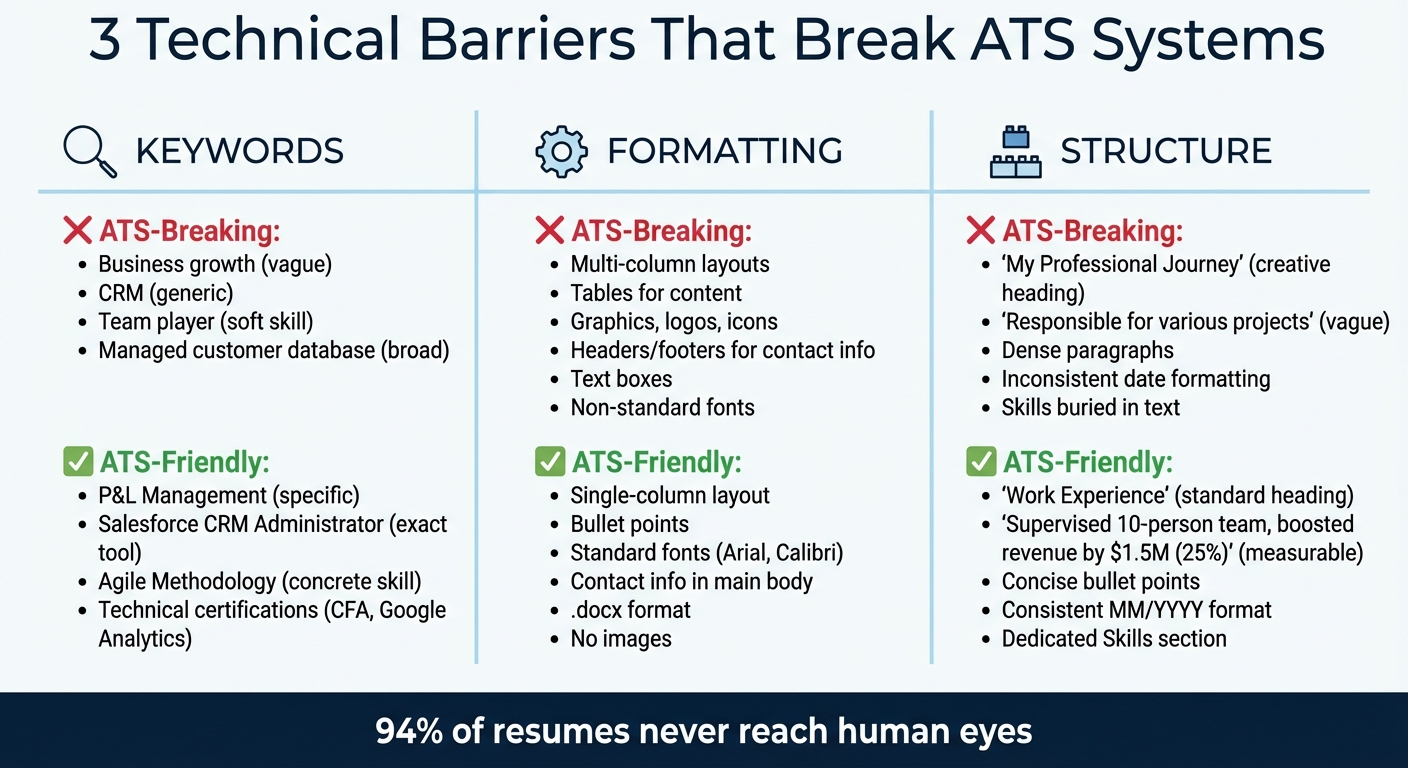
94% of resumes never reach human eyes. Applicant Tracking Systems (ATS) often reject resumes due to technical issues like inconsistent formatting, outdated terminology, or missing job-specific keywords. Even experienced professionals with long careers face challenges because ATS systems prioritize rigid criteria over actual qualifications.
Key reasons behind ATS rejections include:
- Formatting issues: Tables, multi-column layouts, graphics, and inconsistent fonts disrupt ATS parsing.
- Missing keywords: Broad terms like "business growth" fail to match ATS searches for specifics like "P&L Management."
- Structural problems: Non-standard headings or dense paragraphs confuse ATS, leading to missed data.
To avoid rejection, candidates must optimize resumes for ATS by using AI resume builders with simple layouts, specific keywords, and measurable achievements. Services like Scale.jobs combine human expertise with ATS-friendly designs, ensuring resumes are parsed correctly and reach recruiters. Whether you're applying for full-time jobs or seeking a job search virtual assistant, understanding ATS systems can make the difference between landing an interview or being overlooked.
Your Resume Is Getting REJECTED by ATS (Here’s How to FIX IT) + FREE TEMPLATE INSIDE!
Why ATS Rejects Strong Candidates: 3 Technical Barriers
ATS-Friendly vs ATS-Breaking Resume Elements Comparison
Missing Job-Specific Keywords
Applicant Tracking Systems (ATS) rely heavily on detecting specific keywords related to the job. These terms often fall under categories like Function, Methodologies, Software/Tools, and Certifications. For instance, instead of using a vague description like "Managed customer database", you should specify "Salesforce CRM Administrator" to align with what the ATS is programmed to recognize.
"The system is programmed to find concrete, verifiable evidence of your ability to do the job. It looks for matches in these specific categories: Function, Methodologies, Software/Tools, and Certifications." - Christian, Career Expert
Experienced professionals sometimes fall into the trap of using broad terms like "Business growth" instead of precise phrases such as "P&L Management" or "M&A Integration." Similarly, listing "CRM" without specifying "Salesforce" or assuming the system will understand methodologies like Agile without explicitly mentioning them can lead to missed matches. Overloading your resume with soft skills like "team player" or "strong communicator" can also crowd out the technical terms that the ATS prioritizes.
Even if you’ve nailed the keyword game, poor formatting can prevent the ATS from correctly parsing your resume.
Resume Formatting That Breaks ATS Parsing
Certain design choices can make your resume unreadable to ATS software. These include tables, multi-column layouts, non-standard fonts, headers or footers for contact details, graphics, logos, icons, and text boxes. When the ATS encounters these elements, it often results in parsing errors, where your information is misaligned, jumbled, or skipped entirely.
To avoid this, stick to a single-column layout and use standard fonts like Arial or Calibri. Replace tables with bullet points, avoid images and icons, and include your contact details in the main body of the document rather than in headers or footers. If you're considering professional resume writing services, ensure they focus on ATS-friendly designs that prioritize functionality over aesthetics.
Even with proper formatting, the overall structure of your resume plays a crucial role in how well it performs with ATS.
Resume Structures That ATS Can't Process
Once you've addressed keywords and formatting, it's essential to ensure that your resume's structure is ATS-friendly. Use standard headings like "Work Experience" and "Skills", highlight measurable achievements, and avoid long paragraphs that can confuse the software.
For example, writing "Responsible for various projects" provides no specific data for the ATS to match against job requirements. Creative headings like "My Professional Journey" instead of "Work Experience" can also confuse the system, as can burying technical skills within dense paragraphs.
As Klaxos explains, "Parsers often read straight across, scrambling your work history." Without clear section breaks and consistent date formatting, the ATS may struggle to distinguish between job titles, company names, employment dates, and responsibilities. This issue is particularly problematic for candidates with extensive career histories, where structural inconsistencies can lead to critical errors.
To overcome these challenges, structure your resume with ATS in mind. Use standard section headings, dedicate a specific section to skills with exact tools and methodologies, maintain consistent date formatting, and break up dense paragraphs into concise bullet points. These changes don’t diminish your experience - they simply ensure the ATS can accurately interpret and present your qualifications to a recruiter.
Next, explore actionable steps to optimize your resume for ATS compatibility.
How to Fix Your Resume for ATS Compatibility
Use ATS-Friendly Resume Formats
Getting your resume through an ATS (Applicant Tracking System) starts with a format that’s easy for these systems to read. Stick to a chronological or hybrid resume format to present your work history in a clear, sequential way. Avoid functional resumes altogether, as they often hide essential details like job titles and dates, which can confuse ATS software. Keep your layout simple - use a single-column format for better readability.
When it comes to fonts, choose standard ones like Arial, Calibri, or Times New Roman. While PDFs are generally accepted, the .docx format is often the safest choice, as it’s compatible with most ATS platforms, both old and new. Use straightforward section headings like "Work Experience", "Education", and "Skills." Creative or unconventional labels might make your resume stand out to a person, but they can throw off ATS systems, which are programmed to look for specific terms.
Once your resume format is ATS-compliant, the next step is to focus on integrating job-specific keywords.
Research and Incorporate Relevant Keywords
Keywords are the backbone of ATS scanning. Start by analyzing the job description and pulling out important terms. If the posting mentions "Search Engine Optimization", for instance, include both the full phrase and the abbreviation "SEO" to ensure your resume is picked up regardless of how the system is programmed to search.
Pay attention to these four main keyword categories:
- Function (e.g., "Project Manager", "Content Strategist")
- Methodologies (e.g., "Agile", "Lean Six Sigma")
- Software/Tools (e.g., "Slack", "Asana")
- Certifications (e.g., "CFA", "Google Analytics Certified")
Incorporate these keywords naturally into your work experience and skills sections. For example, instead of a generic "CRM experience", specify something like "Managed Salesforce CRM to track and optimize customer engagement." If you’re unsure how to strike the right balance between keyword optimization and readability, consider using a professional resume writing service to ensure your resume hits all the right notes.
With a solid format and keyword strategy in place, the final touch is showcasing measurable accomplishments.
Highlight Measurable Achievements to Improve ATS Scores
ATS systems and hiring managers both love numbers. Quantifiable achievements make your resume stand out by showing the direct impact of your work. Instead of a vague statement like "Managed a sales team", aim for something like, "Supervised a 10-person sales team, boosting quarterly revenue by $1.5M (25% growth) through targeted CRM strategies."
Whenever possible, use specific numbers, percentages, or timeframes to make your accomplishments tangible. For example, replace "Improved team efficiency" with "Streamlined team workflows, reducing project turnaround time from 10 days to 3 days." These details not only improve your ATS ranking but also grab the attention of recruiters by demonstrating the value you bring to the table.
scale.jobs vs. Automated ATS Tools: What Works Better
When you’ve fine-tuned your resume with the right format and keywords, the next step is choosing the right application tool to navigate the challenges of ATS systems. Here’s how scale.jobs measures up against automated ATS tools.
Human Expertise vs. Automation
Automated platforms like LazyApply and Jobscan promise quick results, but they often fall short when it comes to ATS compatibility. Features like multi-column designs, embedded graphics, or non-standard headers can confuse ATS software, leading to missed opportunities. scale.jobs, on the other hand, relies on trained professionals who create resumes and applications tailored to ATS requirements. They use simple, single-column layouts and standard headers to ensure smooth parsing by ATS systems.
Here’s why scale.jobs stands out:
- ATS-friendly formatting: Avoids pitfalls like multi-column layouts and graphics that automated tools often mishandle.
- Personalized handling: Addresses complex fields like visa status, portfolio links, or relocation details that automation often overlooks.
- Accurate data entry: Reduces errors that could result in mismatched or flagged applications.
- Dedicated support: Experts ensure error-free documents and offer live assistance via WhatsApp.
Transparency and Real-Time Updates
Automated tools often operate in a “black box” manner - you pay a subscription fee but rarely get visibility into the process. scale.jobs takes a different approach, offering time-stamped proof for every application submitted. You’ll also receive live updates through WhatsApp, ensuring a clear line of communication and accountability.
Benefits of this transparency include:
- Submission verification: Time-stamped evidence ensures your application reaches the recruiter.
- Live updates: WhatsApp notifications keep you informed in real-time.
- Strategic follow-ups: Avoid duplicate submissions and save time by knowing exactly where each application stands.
This level of transparency makes it easier to weigh the cost of scale.jobs’ one-time pricing against the recurring fees of automated tools.
One-Time Payment vs. Subscription Fees
Automated tools generally charge between $29 and $99 per month, which might work for short-term needs but can quickly add up over time. scale.jobs offers a flat-fee model: $199 for 250 applications, $299 for 500, or $399 for 1,000. There are no recurring charges, and unused credits are refunded, making it a more predictable and budget-friendly option.
Key benefits of scale.jobs’ pricing:
- Upfront cost clarity: Know exactly what you’re paying.
- Refundable credits: Get money back for unused applications.
- No ongoing fees: Avoid the financial strain of monthly subscriptions.
Comparing scale.jobs and Automated ATS Tools
| Feature | Automated Tools (LazyApply, Jobscan) | scale.jobs |
|---|---|---|
| Human Involvement | Fully automated | Trained professionals oversee each application |
| Resume Customization | Limited to templates | Tailored for each specific job |
| ATS Compatibility | Prone to errors from complex formatting | Optimized by experts for flawless ATS parsing |
| Application Execution | Bulk automation | Field-by-field precision by humans |
| Transparency | Minimal visibility; no proof of submission | Time-stamped proof + WhatsApp updates |
| Pricing | $29–$99/month | One-time fee: $199–$399 (with refunds) |
Choosing the Right Tool for Your Needs
When to use automated tools (LazyApply, Jobscan):
- You’re applying to a high volume of similar roles with straightforward requirements.
- You’re comfortable troubleshooting ATS issues on your own.
- You need a low-cost, short-term solution for basic resume scanning.
When to choose scale.jobs:
- You have a complex work history that requires a nuanced presentation.
- You’ve been laid off and need a reliable, ATS-compliant resume without trial and error.
- You want proof that your applications are reaching recruiters.
- You’re dealing with tricky application fields like visa status or portfolio uploads.
- You prefer predictable costs without monthly subscription fees.
Why scale.jobs Might Be the Better Choice
Switch to scale.jobs if:
- Your applications are being rejected due to formatting problems, despite strong qualifications.
- You want verifiable proof that your applications are being submitted and reviewed.
- You’re in a long-term job search and want to avoid costly monthly fees.
- You need human oversight for complex application fields that automated tools often mishandle.
- You value direct communication and accountability through WhatsApp updates and submission records.
With scale.jobs, you’re not just another number in an automated system - you’re getting personalized service that prioritizes accuracy, transparency, and results. Whether you’re navigating a competitive job market or dealing with unique application challenges, this approach offers reliable support tailored to your needs.
Conclusion: Fixing ATS Problems with the Right Approach
Your skills and experience are essential, but the way your resume is structured can determine whether it gets past an ATS (Applicant Tracking System). Resumes with multi-column layouts, embedded graphics, or poorly placed keywords often confuse these systems, leaving your qualifications unnoticed. Addressing these issues requires a focus on proper formatting, strategic keyword use, and accurate submission.
If you're confident in identifying job-specific keywords and tweaking your resume's design, free tools and templates can be a good starting point. However, when those tools fall short, seeking professional assistance can save time and frustration. Services like scale.jobs take the guesswork out of the process by ensuring your resume adheres to ATS-friendly standards. They use single-column layouts, clear headers, and tailored keywords, all while offering real-time updates through WhatsApp and timestamped proof of submission. For job seekers with additional complexities like visa requirements or portfolio links, this level of detail can be crucial - something automated tools often miss.
The choice ultimately depends on your job search needs. If you're comfortable troubleshooting on your own, a DIY approach may work. But if you're struggling to get responses despite having strong qualifications, consider using a service that specializes in ATS-optimized resumes. A resume writing service with a focus on compatibility and transparency could be the key to turning applications into interviews. By choosing a system that prioritizes precise formatting and verifiable submissions, you can shift from waiting for callbacks to actively scheduling interviews.
FAQs
How can I tell if my resume is failing ATS due to formatting or keywords?
When it comes to applicant tracking systems (ATS), resumes can often get rejected for reasons that might surprise you. One major culprit is formatting issues. Complex layouts, graphics, or non-standard fonts can confuse the system, leading to parsing errors that prevent your resume from being properly read. Another common problem is keyword mismatches. If your resume doesn’t include the specific terms or phrases relevant to the job description, it may rank lower in the system.
To avoid these pitfalls, consider using ATS compatibility tools. These tools can help identify formatting problems and highlight where optimization is needed, such as missing keywords. Stick to simple, clean formatting and ensure your resume is tailored to include the job-specific terms mentioned in the description. This approach can improve your chances of making it through the ATS and into the hands of a recruiter.
For more help with crafting a resume that works with ATS, try an AI resume builder to streamline the process.
What are the highest-impact keywords I should copy from a job description?
When tailoring your resume, highlight keywords that align closely with the job description. Pay attention to skills, qualifications, and specific terms such as job titles, certifications, and core competencies mentioned in the posting. Including these exact keywords ensures your resume is more compatible with Applicant Tracking Systems (ATS), boosting your chances of making it through the initial screening process.
Should I use PDF or .docx to reduce ATS parsing errors?
When it comes to submitting your resume, using .docx files is often a smarter choice compared to PDFs. Many Applicant Tracking Systems (ATS) have trouble extracting text from PDF formats, which can lead to errors or missed information. On the other hand, .docx files are more reliably processed by ATS, ensuring your resume's details are accurately recognized. This small change can make a big difference in improving your chances of passing ATS filters.