Interactive Resumes vs. Traditional Portfolios
Compare interactive resumes and traditional portfolios: when to use each, pros/cons, ATS tips, and a hybrid approach for maximum hiring impact.

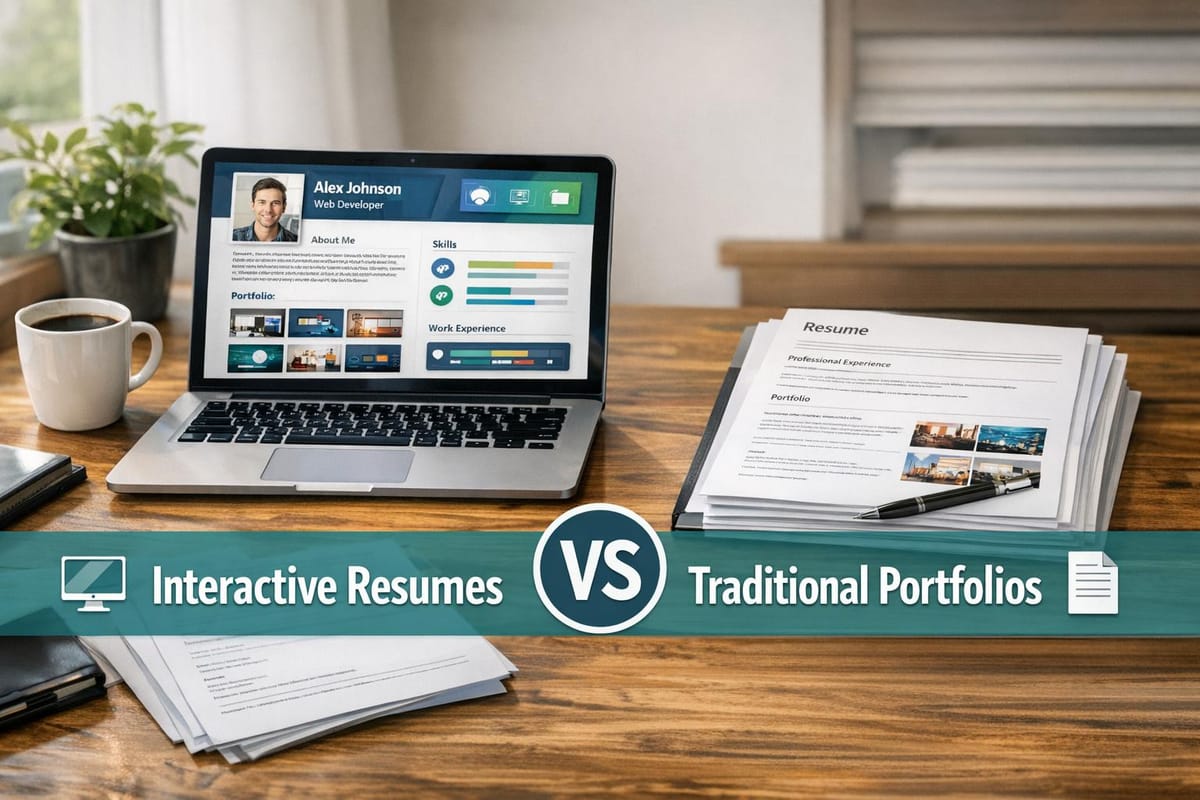
Interactive resumes and traditional portfolios serve different purposes in today’s job market. Interactive resumes use multimedia like videos, links, and animations to showcase skills dynamically, while traditional portfolios rely on static formats like PDFs or physical documents to present work samples. Interactive resumes excel in grabbing attention in creative and tech roles but struggle with Applicant Tracking Systems (ATS). Traditional portfolios are universally accepted, especially in formal industries like law or healthcare, and work well with ATS.
Key Takeaways:
- Interactive Resumes: Best for tech, design, and marketing roles. Use videos, clickable links, and live demos to stand out. Not ATS-friendly; ideal for networking strategies or direct outreach.
- Traditional Portfolios: Suitable for formal industries. Use PDFs or static layouts to showcase work. ATS-friendly and reliable for online applications.
Quick Comparison:
| Feature | Interactive Resume | Traditional Portfolio |
|---|---|---|
| Format | HTML, Notion, Video, Interactive PDF | PDF, Physical Binder, Static Pages |
| Best For | Tech, design, creative roles | Law, healthcare, finance |
| ATS Compatibility | Low | High |
| Engagement | High with multimedia | Moderate with static content |
| Accessibility | Online only | Offline and universal |
| Update Ease | Instant online updates | Manual updates |
For the best results, combine both formats. Submit an ATS-compliant resume for applications and share an interactive version during networking or interviews. Tailor your choice to the industry and job role to maximize impact.
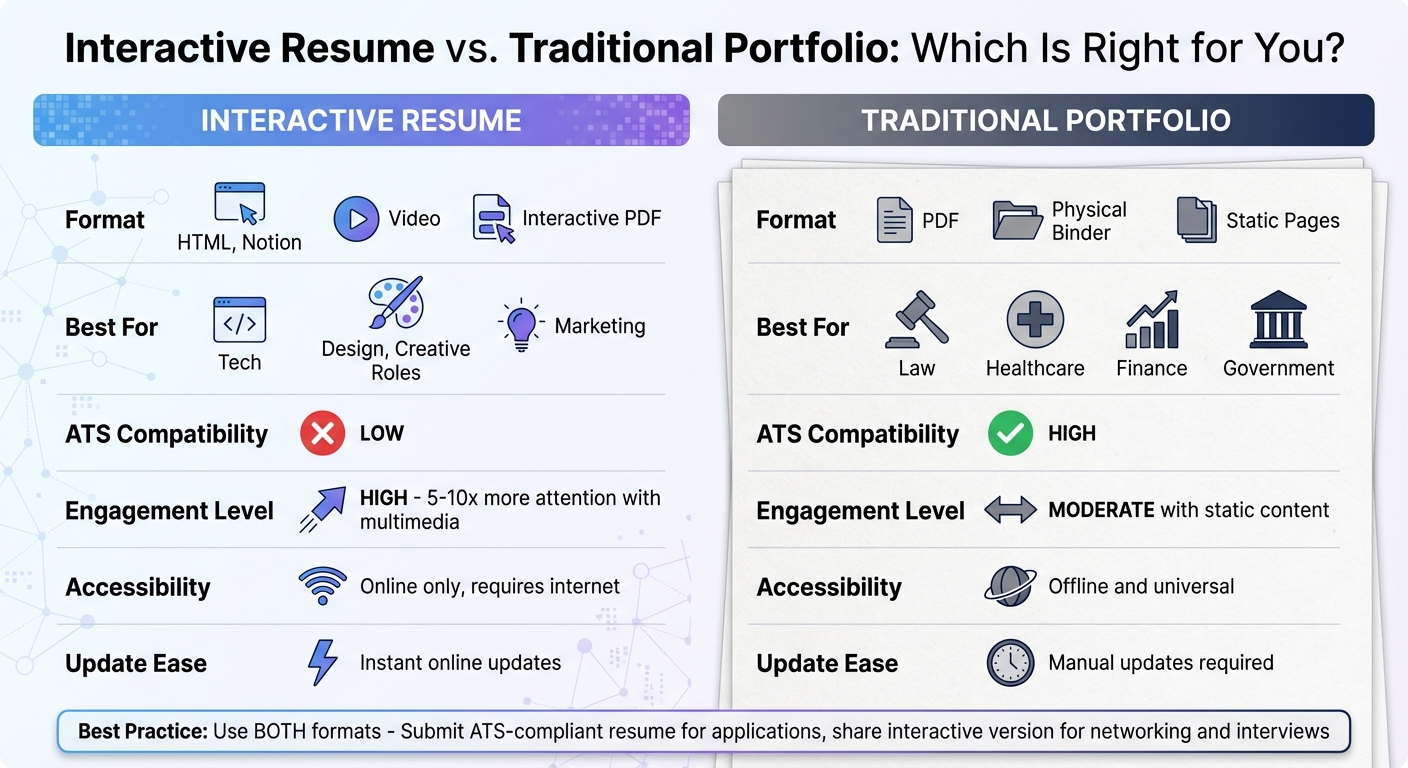
Interactive Resume vs Traditional Portfolio Comparison Chart
How to Turn Your Boring CV into an Interactive Resume That Would Get You Hired!
What Is an Interactive Resume?
An interactive resume is a web-based version of your resume that goes beyond plain text by incorporating multimedia elements like videos, animations, clickable links, and live demos. Instead of simply listing your skills, it gives potential employers the chance to experience them firsthand. While traditional resumes are designed for quick scanning, interactive resumes encourage recruiters to engage directly with your content, making you stand out in a crowded job market. That said, since most applicant tracking systems (ATS) can’t process multimedia, it’s crucial to also have a standard text-based version for initial submissions.
For example, instead of just stating "Proficient in JavaScript", your interactive resume could link to a working web app you’ve built or include a short video where you explain your design process. This approach transforms your resume from a static document into a dynamic experience.
"An interactive resume should invite the reader to interact with your resume, not just view and skim it." - Resumeble
Every interactive feature should serve a clear purpose, like showcasing a skill, presenting results, or simplifying complex information. Keep in mind, the ultimate goal is to land the job - not to create a flashy design piece. Below are some common formats for using an AI resume builder to create interactive resumes that effectively highlight your strengths.
Common Interactive Resume Formats
Interactive resumes come in various formats, each tailored to different industries and skill sets. For instance:
- Personal websites: Developers often build resumes as websites using HTML and CSS, allowing the site itself to showcase their technical expertise. A responsive, well-designed site speaks volumes about your skills without needing extra explanation.
- Notion pages: These are a favorite among non-technical professionals. Notion allows you to embed videos, add collapsible sections, and make real-time updates, offering an easy way to create interactive resumes without coding knowledge.
- GitHub repositories: For software engineers, GitHub serves as a living resume. It displays commit history, project contributions, and includes a README file that acts like a traditional resume but with added depth.
- Interactive PDFs: These provide a hybrid approach, enhancing standard resumes with clickable links, embedded videos, and navigation buttons. They’re a great option if you want some interactivity without going fully web-based.
- Video resumes: Platforms like TikTok and YouTube allow candidates to showcase their personality and communication skills in ways that plain text simply can’t.
Key Features of Interactive Resumes
The best interactive resumes share certain features that make them memorable and effective. Embedded media, like videos or animations, grabs attention instantly and adds a personal touch. Clickable project galleries let recruiters dive into your work at their own pace, while live demos are especially impactful for technical roles - why describe an app you built when you can link to a working prototype?
To keep things organized, collapsible sections allow you to include detailed work histories or project descriptions without overwhelming the layout. Some interactive resumes even include real-time analytics, so you can see when someone views your resume and which sections they engage with the most.
Since ATS systems struggle with interactive elements, always keep a text-based PDF version on hand for online job applications. Use the interactive version for networking, direct outreach, or interviews - situations where a real person, not a machine, is evaluating your application. Next, we’ll explore how these features compare to traditional portfolios during the hiring process.
What Is a Traditional Portfolio?
Unlike interactive resumes that use multimedia to engage viewers, traditional portfolios stick to a more straightforward, static format. These portfolios showcase work samples through text and high-quality images, often presented as PDF documents, physical folders for in-person meetings, or simple web pages without dynamic features like videos or clickable links.
The appeal of traditional portfolios lies in their universal acceptance, particularly by Applicant Tracking Systems (ATS) and industries with strict regulations. They are the go-to choice for formal applications in fields like law, healthcare, finance, and government roles. As Jessica Millett, Recruiting Manager at Future State, puts it:
"While a resume can describe your skills and the tools you use, a portfolio helps you illustrate how you put those skills to use."
Resumeble highlights this further:
"Highly regulated fields like law, healthcare, or finance will not look favorably at your interactive resume. Large companies that employ Applicant Tracking Systems (ATS) will send your document to the bin due to the number of third-party links and unreadable images."
If you're applying in more conservative industries or need to navigate automated screening tools, a traditional portfolio is often the safer, more practical choice. It offers a stark contrast to the dynamic nature of interactive resumes, which we'll explore later.
Common Traditional Portfolio Formats
Traditional portfolios come in a few well-recognized formats that prioritize clarity and consistency over interactivity:
- PDF documents: Easy to format and ATS-friendly.
- Physical folders: Perfect for face-to-face interviews.
- Static web pages: Accessible online without technical complications.
Many professionals maintain a master PDF portfolio that includes case studies, project descriptions, and visual samples, all in one cohesive file. For in-person interviews, a well-organized printed portfolio can be invaluable, allowing you to guide hiring managers through your work while addressing their questions directly.
Key Features of Traditional Portfolios
The most effective traditional portfolios share a few core traits that make them stand out across various industries. clear project descriptions are essential, offering real-life examples of the challenges you tackled, the tools you used, and the results you achieved. Unlike interactive formats, these portfolios rely solely on words and images to tell your story.
High-resolution images are crucial for visually oriented professions. Whether you're presenting design concepts, architectural plans, or marketing campaigns, sharp visuals convey professionalism and attention to detail. Meanwhile, organized layouts ensure recruiters can quickly find the information they need. As Kachi Okoronkwo, Founder of Recruiting Like a Boss, explains:
"Having a resume that greatly deviates from the 'norm' can make a recruiter's job more challenging."
A clean, structured design not only respects the recruiter's time but also boosts your chances of making a strong impression.
Main Differences Between Interactive Resumes and Traditional Portfolios
Choosing between an interactive resume and a traditional portfolio can make a big difference in how your work is received. Interactive resumes act as digital storytelling tools, incorporating multimedia elements like videos, animations, and clickable links to bring your professional journey to life. Traditional portfolios, on the other hand, rely on static formats - think PDFs, physical binders, or simple web pages - using text and high-quality images to present your work.
One major distinction lies in how updates are handled. Interactive resumes can be updated instantly online, making them ideal if you’re frequently adding new projects or skills. Traditional portfolios, however, require manual updates and redistribution, which can be time-consuming.
Accessibility is another key factor. Interactive resumes depend on internet access and responsive design to function well across various devices. Traditional portfolios, in contrast, can be accessed offline and are compatible with most systems, making them a safer choice in industries with strict regulations or companies that rely on Applicant Tracking Systems (ATS).
Engagement is where interactive resumes often shine. In digital-focused industries, they can grab 5–10x more attention compared to traditional PDFs, according to recent data. However, this approach may not work in more conservative fields that favor standard formats. Interestingly, over 60% of initial resume reviews now happen on mobile devices. For interactive resumes, this means ensuring smooth functionality and fast loading times. For traditional portfolios, it’s about maintaining readability on smaller screens.
Here’s a quick breakdown of the differences:
Comparison Table: Structure and Format
| Feature | Interactive Resume | Traditional Portfolio |
|---|---|---|
| Primary Format | HTML/CSS, Notion, Video, Interactive PDF | Static PDF, Website, or Physical Binder |
| Core Content | Multimedia, animations, and clickable links | Case studies, project samples, and proof of work |
| Navigation | Interactive with clickable tabs and collapsible sections | Linear or gallery-based with scrolling pages or project grids |
| Update Ease | Instant via web/cloud; changes reflect immediately | Manual; requires re-saving and re-sending files |
| ATS Compatibility | Low - often unreadable by automated systems | High if text-based and in standard format |
| Device Access | Responsive across devices | Universal; supports offline reading |
| Best For | Digital marketing, UX/UI design, front-end development, creative roles | Engineering, data science, law, healthcare, backend development |
| Engagement Level | High - encourages active engagement | Moderate - focused on evidence and depth |
How Each Format Affects Job Applications and Hiring
The format of your resume doesn't just influence how well it passes through an ATS - it also shapes how recruiters perceive you during the hiring process. Traditional portfolios and interactive resumes create entirely different impressions, and knowing when to use each can make the difference between landing an interview or being screened out before anyone even sees your work.
ATS Compatibility
Applicant Tracking Systems (ATS) are often the biggest obstacle for interactive resumes. These systems, widely used by large companies, scan applications for specific keywords and qualifications. However, they’re designed to process standard text formats, not HTML, videos, or embedded multimedia. As Jeff Gillis and Mike Simpson of The Interview Guys explain, "Interactive resumes are terrible for Applicant Tracking Systems (ATS), which scan for keywords in traditional formats." Similarly, Resumeble points out, "Large companies that employ Applicant Tracking Systems (ATS) will send your document to the bin due to the number of third-party links and unreadable images (like infographics)."
This means interactive resumes often get rejected before they even reach a recruiter’s desk. On the other hand, traditional portfolios saved as PDFs or .docx files have no trouble bypassing ATS software. These formats allow the text to be easily scanned, keywords to be identified, and your application to move forward to human review. The best approach? Have both formats ready. Use a traditional, ATS-friendly resume for job application assistance, while reserving your interactive version for networking events, direct outreach to hiring managers, or in-person interviews where you can control how it’s presented.
But clearing the ATS is only part of the challenge. How your resume engages recruiters is equally important.
Engagement and Industry Fit
Once your resume reaches a recruiter, interactive formats can shine - especially in certain industries. Video and interactive resumes can grab up to ten times more attention compared to static PDFs. This makes them particularly effective in fields like tech, design, and digital marketing, where showing off your digital skills can be as important as listing them.
Take Jeffrey Roeffen, for example. In 2020, he created a video resume tailored specifically for Nike, showcasing his passion for the brand alongside his marketing expertise. After sharing the video on social media, he landed a role as Nike’s EMEA Digital Content Specialist. His success underscores how interactive resumes let employers experience your abilities firsthand rather than just reading about them.
That said, it’s essential to align your format with industry expectations. While interactive resumes can work wonders in digital and creative roles, they often fall flat in more traditional industries. Fields like law, healthcare, finance, and government typically favor formal, static portfolios. In these cases, an interactive resume might come across as unprofessional or overly flashy. Executive Recruiter Jeff Detweiler cautions, "A non-traditional resume can really sink a great traditional background if it's poorly executed." For these industries, a traditional portfolio with detailed case studies and concrete examples of your work is a safer bet.
Another consideration is mobile compatibility. With over 60% of initial resume reviews happening on mobile devices, interactive resumes must load quickly and be optimized for smaller screens. Traditional PDFs, however, maintain their format and readability across all devices, offering a consistent experience no matter how they’re viewed.
Pros and Cons of Each Format
Both interactive resumes and traditional portfolios bring unique strengths to the table, but they also come with trade-offs that can influence how your application is received. Choosing the right format depends largely on your industry and the specific job you're targeting.
Interactive resumes are great at drawing attention. They can generate 5–10 times more engagement than static PDFs, making them ideal for networking, outreach, and social media. Features like collapsible sections allow you to include a wealth of information without overwhelming the viewer. However, there are limitations. Applicant Tracking Systems (ATS) often struggle to process infographics, external links, or interactive elements. Additionally, industries like law, finance, healthcare, and government may view these formats as unprofessional. Another potential drawback: if your resume takes longer than three seconds to load on mobile, many viewers will simply move on.
Traditional portfolios, by contrast, are reliable and straightforward. They’re easy to replicate, customize for various applications, and update over time. A well-organized PDF portfolio with case studies and project samples won’t run into compatibility issues with ATS software. On the downside, these formats lack the dynamic appeal of interactive resumes. They’re static, less memorable, and don’t offer the same opportunity to showcase technical skills in real-time.
Here’s a side-by-side look at the strengths and weaknesses of each format:
Advantages and Disadvantages
| Feature | Interactive Resume | Traditional Portfolio |
|---|---|---|
| Engagement | Highly engaging; grabs attention | Relies on content quality alone |
| ATS Compatibility | Low; may be rejected by automated systems | No issues; often linked, not submitted |
| Skill Demonstration | Highlights technical skills (e.g., coding) | Shows depth via detailed case studies |
| Scalability | Limited; requires manual updates | Easily duplicated and customized |
| Industry Fit | Ideal for tech, design, and creative roles | Preferred in traditional, formal fields |
| Mobile Optimization | Must load quickly (under 3 seconds) | Consistent formatting across devices |
| Reach | Excellent for networking and outreach | Standard for professional applications |
| Maintenance | Time-consuming; needs technical updates | Simple to update with new projects |
This breakdown highlights how each format aligns with different career paths and application strategies, helping you select the one that best suits your needs.
When to Use Interactive Resumes vs. Traditional Portfolios
Choosing the right format for your resume or portfolio depends on your industry, the role you're pursuing, and the stage of the application process. This decision can significantly impact how well you communicate your qualifications and whether your application gets noticed by both Applicant Tracking Systems (ATS) and recruiters.
Interactive Resumes for Digital Roles
Interactive resumes shine in fields like tech, design, marketing, and UX/UI, where digital skills are a must. For instance, if you're a software developer, an interactive resume allows you to showcase live code demos and clickable project galleries, providing a hands-on experience of your capabilities rather than just listing programming languages. Similarly, creative professionals can use multimedia elements to demonstrate their skills in action.
"A static PDF might list your coding abilities, but an interactive resume lets employers experience them firsthand." – The Interview Guys
This format is especially useful for entry-level candidates and career changers. When you lack extensive experience, an interactive resume can highlight your personality, transferable skills, and digital proficiency, helping you stand out. In digital-first industries, these resumes often generate higher engagement.
Traditional Portfolios for Broader Applications
Traditional formats are better suited for industries like law, healthcare, finance, and government, where formality and standardized presentations are prioritized over creativity. For instance, federal job applications often require strict adherence to specific guidelines, making interactive formats unsuitable.
Senior and executive roles also lean toward traditional resumes. At this level, hiring managers focus on leadership achievements and measurable results rather than creative presentation. Additionally, ATS software cannot process interactive elements, such as third-party links or infographics. To ensure your resume passes automated screenings, unlocking the ATS secret with a keyword-optimized traditional format is essential.
Hybrid Approach: Using Both Formats Together
Combining both formats offers a strategic advantage, allowing you to cater to both automated systems and human reviewers. By understanding the strengths of each format, you can adapt your application to meet the specific demands of the role and the recruitment process.
A practical strategy is to maintain both versions and use them strategically. Submit your traditional, ATS-friendly resume for online applications and corporate job portals, where automated systems screen submissions. Reserve your interactive resume for networking events, direct outreach to hiring managers, or in-person interviews where you're engaging directly with people.
For a seamless approach, include a QR code in your traditional resume that links to your interactive portfolio. This way, you can meet ATS requirements while also impressing recruiters with a dynamic presentation. Some candidates have even found that the engagement their interactive resumes generate on platforms like LinkedIn serves as valuable social proof when included in traditional applications. Tools like scale.jobs make it easy to create both an ATS-compliant resume and an interactive portfolio, helping you maintain a professional edge without juggling multiple platforms.
Best Practices for Creating Resumes and Portfolios
When it comes to crafting resumes and portfolios, the goal is to blend technical precision with resumes that shine through professional design. Your resume should not only be accessible and optimized for Applicant Tracking Systems (ATS) but also stand out to human reviewers. Here’s how you can achieve that balance.
Optimizing for Mobile and Accessibility
With over 60% of resumes first reviewed on mobile devices, ensuring your resume looks great on screens of all sizes is crucial. Make sure it loads in under 3 seconds and test it on various devices to confirm readability.
For interactive resumes, consider using collapsible sections to neatly organize detailed work histories. Stick to standard fonts to avoid rendering issues, and ensure clickable elements are large enough for touchscreens. Accessibility goes beyond mobile compatibility - use appropriate color contrasts for visually impaired readers and include alt text for any images or graphics. These adjustments not only improve mobile usability but also align with ATS-friendly design principles.
Ensuring ATS Compliance
Interactive resumes can pose challenges for ATS software, which many large companies use to screen applications. As Mike Simpson from The Interview Guys points out:
"Interactive resumes are terrible for Applicant Tracking Systems (ATS)... You need both versions."
To ensure your resume passes ATS filters, keep a plain .docx or text-based PDF version on hand. Use a single-column layout with standard headers like "Education" and "Experience", minimal graphics, and fonts like Arial or Calibri. Avoid using elements such as infographics or complex layouts that could confuse the system. Once your resume meets these technical requirements, you can focus on tailoring it for specific roles.
Using Tools Like scale.jobs
Platforms like scale.jobs make managing resumes easier by combining creative design with technical functionality. Their free ATS-compliant Resume Builder helps you create resumes that pass automated screenings, while their Portfolio Website Generator allows you to establish an interactive online presence - no coding required.
For those looking to save time, scale.jobs offers advanced tools like their AI Assistant Pro, available for $9/month during the launch phase. This tool generates unlimited customized resumes and cover letters tailored to specific job postings. For a more hands-on approach, their Human Assistant service provides trained virtual assistants who manually submit applications across multiple job portals. This service avoids the common pitfalls of automation tools like LazyApply, which can sometimes trigger bot flags. With features like real-time WhatsApp updates, timestamped proof-of-work screenshots, and a flat-fee model starting at $199 for 250 applications, scale.jobs ensures transparency and control - qualities often missing from subscription-based alternatives.
Conclusion: Choosing the Right Format for Your Career Goals
Deciding between an interactive resume and a traditional portfolio comes down to aligning your format with your industry, the application process, and where you are in your career. For fields like law, healthcare, or finance - where regulations and formalities dominate - traditional text-based resumes are the safest bet. These formats work seamlessly with Applicant Tracking Systems (ATS) and ensure your application isn't overlooked. On the other hand, for creative or tech-focused roles in areas like UX/UI design, marketing, or software development, an interactive resume can highlight your skills in ways a static PDF simply can't.
In 2026, having both formats at the ready is a smart move. Keep an ATS-friendly version for automated systems and an interactive one for direct, personal interactions. This dual approach ensures your resume passes initial filters while also grabbing the attention of recruiters, who typically spend only six seconds reviewing resumes at first glance.
To make this strategy work, customization is critical. Generic resumes rarely leave an impression. Platforms like scale.jobs offer tools for creating ATS-compliant resumes alongside interactive portfolios. Their Human Assistant service takes things a step further by manually tailoring and submitting applications, bypassing common bot-detection issues. Plus, they provide real-time WhatsApp updates and proof-of-work screenshots for peace of mind.
Your resume should reflect where you're headed, not just where you've been. Take the time to research your target companies - do they value creativity or prefer a more traditional approach? Use this insight to tailor your application materials. By combining the right formats and leveraging tools effectively, you'll present yourself as both qualified and imaginative - exactly the kind of candidate hiring managers want in today's competitive job market.
FAQs
How can I make my interactive resume compatible with ATS systems?
To make sure your interactive resume is compatible with applicant tracking systems (ATS), start with a clean, straightforward PDF version. Stick to simple, easy-to-read fonts like Arial or Calibri, and use standard headings such as Work Experience and Skills. Avoid adding complex design elements like icons or embedded multimedia, as these can confuse ATS software. Save your resume in PDF or Word format - both are widely accepted.
For a touch of creativity, include a QR code on your PDF that links directly to your interactive resume. Position it near your contact details so recruiters can quickly access your online portfolio for a more engaging experience, all while keeping the PDF ATS-friendly.
Before submitting, run your PDF through an ATS checker to confirm it’s readable. Tools like resume builders or feedback platforms can also help you fine-tune keywords and formatting, giving you a better shot at passing ATS filters while still letting your creativity shine.
Which industries benefit the most from using interactive resumes?
Interactive resumes hold particular appeal in fields where creativity, technical expertise, and digital know-how are key.
For creative industries like graphic design, marketing, advertising, and media production, these resumes allow candidates to go beyond static portfolios. By incorporating elements like videos, animations, or infographics, individuals can present their artistic vision and personal brand in a dynamic, engaging way that traditional formats simply can't match.
In tech-driven roles, such as software development, UI/UX design, and data science, interactive resumes shine as well. They provide a platform to embed live code samples, interactive demos, or links to projects, giving employers a firsthand look at technical skills and problem-solving abilities.
Meanwhile, digital-first sectors - think product management, digital marketing, or startups - appreciate how these resumes demonstrate comfort with web-based tools and interactive storytelling. For these industries, an interactive resume isn't just a bonus; it’s often an ideal way to stand out.
How can I effectively combine an interactive resume with a traditional portfolio?
Combining a traditional resume with an interactive portfolio is a smart way to appeal to both ATS screenings and the visual, multimedia preferences of modern recruiters. Start by crafting a clean, well-organized PDF resume. Use clear headings, concise bullet points, and industry-relevant keywords to ensure it’s easy to scan and passes ATS filters.
Then, take it a step further by building an online portfolio that brings your work to life. Incorporate elements like videos, project demos, infographics, or animations to highlight your achievements. To connect the two, include a short, easy-to-remember URL or a QR code on your PDF resume. Likewise, add a "Download PDF" button to your online portfolio for easy access. Make sure the content across both formats aligns, but use the online version to dive deeper with case studies, detailed visuals, or additional context.
Before sending out your resume, run the PDF through an ATS checker to confirm it meets the necessary criteria. This dual-format strategy ensures your application is both scannable and visually engaging, giving you an edge in the hiring process.