How to Use LinkedIn to Get Job Offers Not Just Connections
Optimize your LinkedIn profile, use keywords, engage with recruiters, and personalize outreach to convert connections into real job offers.


LinkedIn is more than a networking site - it’s a tool that can help you secure job offers. With 95% of recruiters using LinkedIn to find candidates, optimizing your profile and engaging strategically can significantly increase your chances of landing interviews. This guide breaks down actionable steps to turn your LinkedIn profile into a recruiter magnet:
- Optimize Your Profile: Use targeted keywords in your headline, skills, and experience sections to rank higher in recruiter searches.
- Craft a Strong Headline & Summary: Highlight your value with measurable achievements and industry-specific skills.
- Engage Effectively: Share insights, comment thoughtfully, and connect with hiring managers to stay visible.
- Leverage Job Search Tools: Use filters, Boolean search, and job alerts to find roles that align with your goals.
- Personalize Outreach: Send tailored connection requests and concise InMail messages to recruiters.
Steal this LinkedIn strategy to get recruiters blowing up your inbox
How to Optimize Your LinkedIn Profile for Recruiters
Turn your LinkedIn profile into a round-the-clock career pitch. Recruiters often rely on AI-powered tools to scan for specific keywords in your profile - especially in areas like your headline, skills, and experience sections. Without these keywords, your profile might never show up in their search results, no matter how qualified you are.
The profiles that stand out to recruiters typically excel in three areas: smart keyword use, results-driven descriptions, and visual elements that catch attention. Together, these factors boost your visibility and make it easier for hiring managers to see your potential.
Write a Headline and Summary That Attract Attention
Your headline is the most critical part of your LinkedIn profile. While LinkedIn allows 220 characters, many people waste it on generic titles like "Marketing Manager at ABC Company." That’s a missed opportunity to stand out.
Instead, try this formula: Target Role | Specialty | Key Tools/Skills. For example, Maanek at Zola uses "Senior Manager – Marketing Analytics @ Zola | Analyzing the intersection of Love + Data." This approach combines searchable keywords with a clear description of what you bring to the table. Similarly, Vishal at Authentic Brands Group crafted a headline that reads, "Senior Manager, Digital Innovations – Paid Media and Digital Strategy", helping him appear in more recruiter searches.
"On the average, five times as many people read the headline as read the body copy. When you have written your headline, you have spent eighty cents out of your dollar." – David Ogilvy, "Father" of Advertising
Your summary, or "About" section, gives you 2,600 characters to tell your professional story. Start with a strong statement that highlights your value, then use 2-3 bullet points to showcase your key achievements, backed by numbers. Wrap it up with a "Core Competencies" list to pack in additional keywords. This format not only aligns with LinkedIn’s algorithm but also gives recruiters the proof they need to take the next step.
Highlight Experience and Skills Effectively
Recruiters are less interested in your job responsibilities and more focused on what you’ve achieved. For each role, use the formula Action + Tool + Result to describe your accomplishments. For instance, instead of saying "Managed customer support", write "Managed 40+ daily customer chats via Zendesk with a 95% satisfaction rate."
Incorporate keywords into your job titles when possible. A title like "Accountant – CPA, Budget Forecasting, Financial Analysis" is far more likely to appear in searches than just "Accountant." You have up to 2,000 characters for each experience entry, so use that space to highlight measurable results that demonstrate your impact.
The Skills section is just as important. Include 20-30 skills, prioritizing the top 3-5 that directly match your target role - these are weighted more heavily in recruiter searches. Endorsements from colleagues further validate your expertise. Profiles with at least five endorsed skills are more likely to appear in search results.
While the text-based sections are essential for keyword discovery, visuals play a big role in strengthening your professional image.
Use the Right Profile Picture and Banner
A professional photo can make a huge difference. Profiles with one get 14 to 21 times more views and 9 times more connection requests than those without. Use your phone’s Portrait Mode and natural lighting to create a clean, professional look.
Your banner image (1,584 x 396 pixels) offers another chance to showcase your brand. For example, Samuel, a software engineer at Jobscan, uses a banner featuring lines of computer code to emphasize his technical expertise. Choose an image that aligns with your industry or highlights your unique skills.
Take care of the technical details, too. Create a custom "vanity URL" like linkedin.com/in/yourname to improve SEO and make your profile easier to find. Enable the "Open to Work" feature (you can set it to "Recruiters only" if you want to keep it private from your current employer). Including a specific location on your profile, even if you’re open to remote work, increases your visibility by 23 times in recruiter searches.
Before making updates, disable the "Share profile updates" setting to avoid notifying your current network. Re-enable it after your optimizations are complete. If you’re unsure how to craft a profile that grabs attention, consider optimizing your LinkedIn profile with AI or working with experts.
These steps not only improve your chances of appearing in search results but also help convert profile views into meaningful job opportunities.
How to Use LinkedIn's Job Search Features
LinkedIn offers more than just a basic search bar for job seekers. With over 40 million weekly job searches, its tools can help you zero in on roles that align with your skills and goals. To get started, head to the Jobs section from your homepage. Enter your desired job title in the search bar and use the filter panel on the left to refine your results. Key filters include experience level (Entry, Associate, Mid-Senior, Director, Executive), job type (Full-time, Part-time, Contract, Internship), and location preferences (On-site, Hybrid, Remote). If you're open to working from anywhere, filtering by "Remote" can reveal opportunities nationwide.
Once you've narrowed your search, take advantage of advanced filters and set up alerts to streamline your process.
Use Advanced Filters to Find Better Matches
Advanced filters and Boolean operators can help you refine your search even further. For instance, using a query like "marketing manager" AND "SaaS" NOT "director" will show marketing manager roles in SaaS companies while excluding director-level positions. These techniques ensure your search results are tailored to your experience and career focus.
If you're a LinkedIn Premium user, you'll gain access to additional insights, such as how your profile stacks up against other applicants and details about the company hiring. These insights can help you prioritize your applications. If you're finding it challenging to optimize your LinkedIn profile, you might consider working with professional resume writers who specialize in ATS-friendly resumes and LinkedIn strategies.
Set Up Job Alerts That Actually Help
Once you've fine-tuned your search, job alerts can do much of the work for you. After applying your preferred filters, click the "Job Alert On" toggle to save your search. You'll then receive notifications whenever new roles match your criteria.
To maximize opportunities, create separate daily alerts for each role and location you're targeting. For instance, you could set up alerts for "Product Manager Remote", "Product Manager New York", and "Product Manager Hybrid." This ensures you won't miss out on roles that fit your preferences across different locations.
Additionally, enable the "Open to Work" feature on your profile and specify your desired roles, start date, and location. Set this to "Recruiters only" if you're currently employed and want to keep your search discreet. Profiles with this feature enabled are 36 times more likely to receive messages from recruiters, increasing your chances of discovering new opportunities even when you're not actively searching.
Build Relationships That Lead to Job Offers
Building connections that lead to job offers requires more than just having a large network; it’s about meaningful engagement. 95% of recruiters use LinkedIn to find candidates, and they notice those who actively contribute to discussions, share valuable insights, and genuinely connect. This isn’t about spamming generic messages - it’s about showing authentic interest.
Start by offering value. Share articles that solve problems or add thoughtful comments to posts by hiring managers or industry leaders. These small but impactful actions create goodwill and make you memorable. When paired with a optimized LinkedIn profile, these strategies can significantly increase your chances of landing job offers.
Send Connection Requests That Get Accepted
A generic connection request is a fast track to being ignored. With LinkedIn’s 300-character limit for notes, every word matters. Your goal is to answer the unspoken question: “Why should I connect with you?”
Make it personal. Reference something specific, like a recent article they wrote, a shared alma mater, or a mutual connection. If you’re reaching out to someone at a company you’re targeting, mention what about their work or role caught your attention. Technical recruiter Cyndi Klein from Rackspace Hosting emphasizes this point:
"Customize your approach to each position or person. We don't want someone who just wants to get a job anywhere. We want someone who is passionate about working here. Make us feel special!"
Before sending a request, review their profile for shared interests or experiences. These small details can spark authentic conversations and make your outreach feel genuine, not transactional.
Comment and Share Content to Get Noticed
Once you’ve established a connection, the next step is staying visible. Consistent, thoughtful engagement ensures you remain on the radar of recruiters and hiring managers.
Engagement is as critical as having an optimized profile. When you comment on posts from people at companies you admire, LinkedIn’s algorithm often highlights your activity to others in your network, including recruiters. This passive visibility showcases your expertise without being pushy.
Follow the LinkedIn pages of your target companies and interact with their content regularly. Don’t just click “share”; add your own insights to industry articles. Joining LinkedIn Groups relevant to your field and contributing to discussions also signals that you’re active and knowledgeable, even during a job search.
Focus on quality over quantity. A few well-thought-out comments carry more weight than dozens of generic ones. Over time, this consistent engagement can position you as a standout candidate when opportunities arise.
How to Write InMail Messages That Work
An optimized LinkedIn profile may attract recruiters, but a well-crafted InMail can seal the deal. Personalization is key here, too. Keep your messages concise - InMails under 400 characters tend to get a 22% higher reply rate than longer ones.
If you’ve already applied for a job, reach out to the recruiter or hiring manager right after submitting your application. Klein suggests a direct approach:
"Be direct and to the point. For example, you might write, 'I just applied for XYZ position and I wanted to reach out to you directly to let you know I applied.'"
This short, proactive message shows initiative and ensures your application doesn’t get overlooked. For cold outreach, follow a simple structure: start with a personalized opening that references something specific about the recipient, briefly explain why you’re reaching out, and end with a low-pressure question instead of an immediate job request.
Timing matters. Avoid sending messages on Fridays or Saturdays when response rates drop. Instead, aim for Sunday through Thursday. If you don’t hear back, follow up on Day 4, Day 7, and Day 12 with short, relevant messages.
If writing tailored messages feels overwhelming, consider working with professional resume writers. They can help you create LinkedIn profiles and outreach templates that stand out in a crowded job market.
Apply for Jobs the Right Way
Once your LinkedIn profile is optimized, it’s time to refine your job application strategy. Avoid relying solely on the "Easy Apply" button for every job posting - it might be convenient, but tailored applications are far more effective. Studies show that resumes linked to a detailed LinkedIn profile are 71% more likely to receive callbacks. This success comes down to one thing: customization paired with consistent follow-through.
To stand out, each application should be personalized for the specific role you’re targeting. Generic resumes often get filtered out by Applicant Tracking Systems (ATS) before a recruiter even sees them. By tailoring your materials and keeping track of your progress, you can turn a random job search into a focused, results-driven effort.
Customize Your Resume with Job Keywords
While your LinkedIn profile should broadly reflect your desired role, your resume needs to be laser-focused for each job you apply to. Start by reviewing 5–10 job postings for similar roles and identifying repeated hard skills or tools. For instance, if you’re applying for data analyst positions, you might notice frequent mentions of "SQL", "Python", and "Tableau." Make sure to integrate these keywords into your resume.
Place these terms in prominent sections such as your headline, summary, work experience, and skills. Instead of a generic title like "Accountant", try something more descriptive, like "Accountant – CPA, Budget Forecasting, Financial Statement Analysis." Use measurable achievements to further strengthen your resume, following the formula of quantifying results to showcase impact.
LinkedIn allows you to save up to five versions of your resume, which can simplify the application process for different roles. Just make sure your employment dates and job titles are consistent with your LinkedIn profile to avoid raising concerns. If using an AI resume builder to create multiple tailored resumes feels overwhelming, consider working with professional resume writers to craft ATS-friendly documents that stand out to hiring managers.
Once your resume is optimized, focus on tracking your applications and following up effectively to increase your chances of success.
Track Applications and Follow Up
Keep track of every application using a spreadsheet that includes key details like the date, job title, company name, recruiter contact, and follow-up status. While LinkedIn’s "Easy Apply" feature automatically logs applications made through the platform, applications submitted on external company websites won’t appear there - so manual tracking is crucial.
After submitting an application, take the extra step to connect with the recruiter or hiring manager via LinkedIn InMail. Keep your message concise - under 400 characters - to improve your chances of a response, as shorter messages tend to have a reply rate 22% higher than average. Reference something specific about the job or company to show genuine interest. Also, timing matters: avoid sending follow-ups on Fridays or Saturdays, when responses are less likely.
A structured follow-up plan can make all the difference. Here’s a suggested timeline:
- Day 1: Send a connection request with a brief note.
- Day 4: Follow up with a short status inquiry.
- Day 7: Share an article or resource relevant to the role or industry.
- Day 12: Send a final check-in message.
This approach keeps you on the recruiter’s radar without being overly pushy.
LinkedIn Job Search Tools: scale.jobs vs Competitors
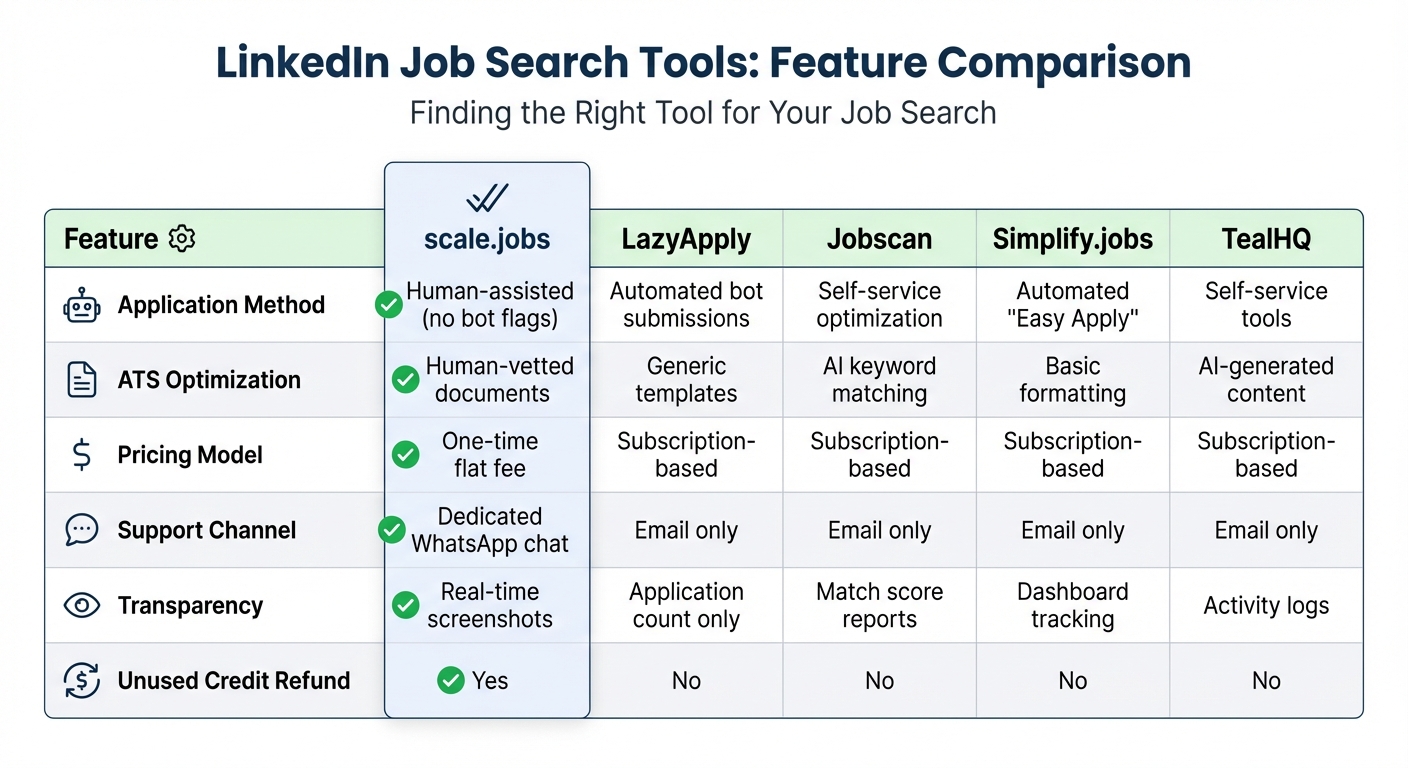
LinkedIn Job Search Tools Comparison: scale.jobs vs Competitors
When it comes to LinkedIn job searches, picking the right tool can make all the difference. While having an optimized profile and strategic approach is essential, the job search platform you choose can significantly impact your results.
Most LinkedIn job search tools fall into two categories: automated or self-service. Unfortunately, neither approach consistently gets past ATS (Applicant Tracking System) filters or wins over human recruiters. Automated tools often trigger bot flags, leading to rejections. On the other hand, self-service platforms like Jobscan and Rezi.ai focus on keyword optimization but leave the heavy lifting to you.
As mentioned earlier, combining human expertise with strategic keyword use is key. That’s where scale.jobs stands out, offering a tailored and precise approach to your LinkedIn job search.
scale.jobs takes a human-assisted approach, providing ATS-optimized resumes and handling applications with care - all for a single flat fee. Unlike subscription-based or DIY tools, scale.jobs assigns trained assistants who customize your resume and ensure each application meets ATS requirements. They also provide time-stamped proof-of-work screenshots via WhatsApp, keeping the process transparent and reliable.
Feature Comparison: What Makes scale.jobs Different
| Feature | scale.jobs | LazyApply | Jobscan | Simplify.jobs | TealHQ |
|---|---|---|---|---|---|
| Application Method | Human-assisted (no bot flags) | Automated bot submissions | Self-service optimization | Automated "Easy Apply" | Self-service tools |
| ATS Optimization | Human-vetted documents | Generic templates | AI keyword matching | Basic formatting | AI-generated content |
| Pricing Model | One-time flat fee | Subscription-based | Subscription-based | Subscription-based | Subscription-based |
| Support Channel | Dedicated WhatsApp chat | Email only | Email only | Email only | Email only |
| Transparency | Real-time screenshots | Application count only | Match score reports | Dashboard tracking | Activity logs |
| Unused Credit Refund | Yes | No | No | No | No |
These features highlight why scale.jobs excels. Unlike competitors, it emphasizes quality and precision, ensuring your job search is both effective and stress-free.
Why Choose scale.jobs?
- Human Assistance: Applications are managed by trained professionals, eliminating the risk of bot detection.
- Expert ATS Optimization: Resumes are carefully reviewed and tailored to pass ATS filters.
- Flat Fee Pricing: No recurring subscriptions, just a one-time payment for full service.
- Real-Time Updates: Dedicated WhatsApp support provides transparent, up-to-the-minute updates with proof of work.
If you're looking to craft documents that not only pass ATS filters but also impress hiring managers, consider working with professional resume writers. With the right blend of expertise and strategy, your LinkedIn job search can shift from a numbers game to a focused effort that actually delivers results.
Conclusion: Turn LinkedIn Connections into Job Offers
LinkedIn isn’t just a networking tool - it’s a powerful job search platform. The profiles that stand out and secure offers excel in searchability, engagement, and strategic outreach. With 95% of recruiters relying on Boolean searches and algorithmic filters, an unoptimized profile risks going unnoticed.
While profile optimization is key to attracting recruiters, securing job offers requires more effort. Using strategies like crafting keyword-rich headlines, engaging with recent content to boost visibility by 41%, and sending concise, personalized InMail messages (under 400 characters) can transform your profile into a recruiter magnet. For example, these techniques have led to results such as 14 unsolicited recruiter messages in just 10 days.
However, even a well-optimized LinkedIn profile needs to be part of a broader strategy. To convert recruiter interest into job offers, you’ll need ATS-friendly resumes, personalized cover letters, and consistent follow-ups. This is where many job seekers struggle, but services like scale.jobs can bridge the gap. Unlike automated platforms, scale.jobs offers a hands-on approach with trained assistants who customize your application documents, manually submit them, and provide real-time updates via WhatsApp, complete with proof-of-work screenshots. It’s a blend of precision and personal support, ensuring every application meets ATS standards.
LinkedIn gives you the exposure you need, but pairing that visibility with a focused application strategy and expert assistance can turn your connections into meaningful opportunities. Stop collecting contacts and start landing interviews and offers.
FAQs
How can I optimize my LinkedIn profile to attract recruiters and job offers?
To catch the attention of recruiters on LinkedIn, it’s essential to focus on the right elements of your profile. Begin with a compelling headline and summary that incorporate key industry-specific terms. These keywords improve your visibility in recruiter searches. Ensure your profile is fully fleshed out, showcasing detailed work experience, measurable accomplishments, and a well-rounded skills section.
Stay active by sharing, commenting on, and posting content relevant to your industry. This not only enhances your visibility but also establishes you as a knowledgeable and engaged professional. Additionally, make good use of LinkedIn's tools, such as job alerts and the “Open to Work” feature, to discreetly signal your availability to recruiters.
By combining a polished profile with consistent engagement and smart use of LinkedIn’s features, you can greatly improve your chances of landing the job opportunities you’re seeking.
What are the best ways to connect with potential employers on LinkedIn?
To make the most of LinkedIn and connect with potential employers, start by fine-tuning your profile. Highlight your skills, accomplishments, and experience using keywords that recruiters are likely to search for. A polished, professional profile not only enhances your credibility but also makes it easier for recruiters to find you.
When reaching out to recruiters or hiring managers, always personalize your messages and connection requests. Take the time to learn about the person or company - mentioning specific details like their recent projects, posts, or company milestones shows that you’ve done your homework and are genuinely interested.
Additionally, stay active within your industry’s LinkedIn community. Share thoughtful comments on posts, contribute your insights, and join discussions. This not only increases your visibility but also helps you establish meaningful connections. Consistent engagement demonstrates your expertise and interest, which can open doors to job opportunities.
How can I personalize LinkedIn messages to improve my chances of getting job offers?
To make your LinkedIn messages stand out and improve your chances of securing job opportunities, focus on being personal and clear. Start by doing a bit of homework - review the recipient’s profile to identify shared connections, mutual interests, or specific aspects of their work that resonate with you. Mentioning these details in your message shows that you’ve taken the time to understand their background and creates a sense of connection.
Keep your message brief and to the point. Introduce yourself in a straightforward way, explain the purpose of your outreach, and include a clear call to action - whether it’s requesting a quick chat, asking for advice, or exploring potential opportunities. Avoid sending generic or overly lengthy messages, as they’re less likely to get the recipient’s attention.
Additionally, make sure your LinkedIn profile is polished and aligned with the roles you’re pursuing. Use relevant keywords and highlight your accomplishments to enhance your visibility to recruiters and leave a strong impression when they review your profile.