How to Build a Resume That Passes ATS and Gets Seen by Humans
Create a single-column ATS-friendly resume: match job keywords, quantify achievements, and save as .docx or text-based PDF to reach recruiters.


Most resumes fail before they even reach a recruiter. With 75% of resumes filtered out by Applicant Tracking Systems (ATS) and recruiters spending only 6–7 seconds scanning the ones that do, creating the right resume is critical. Here's the key: your resume must be ATS-friendly while showcasing measurable results to human recruiters.
To achieve this balance:
- Use simple, single-column layouts without tables or graphics.
- Match keywords directly from job descriptions, including both acronyms and full terms.
- Quantify achievements using metrics and action verbs (e.g., "Increased revenue by 25%").
- Save your resume as a .docx or text-based PDF for compatibility.
Platforms like scale.jobs combine human expertise with ATS-optimized tools to streamline this process, offering tailored resumes, keyword checks, and formatting guidance. Whether you're applying for full-time jobs or part-time jobs near you, mastering these steps ensures your resume passes ATS filters and impresses recruiters.
Read on for actionable tips, step-by-step methods, and tools like AI resume builders and job search virtual assistants to simplify your job search.
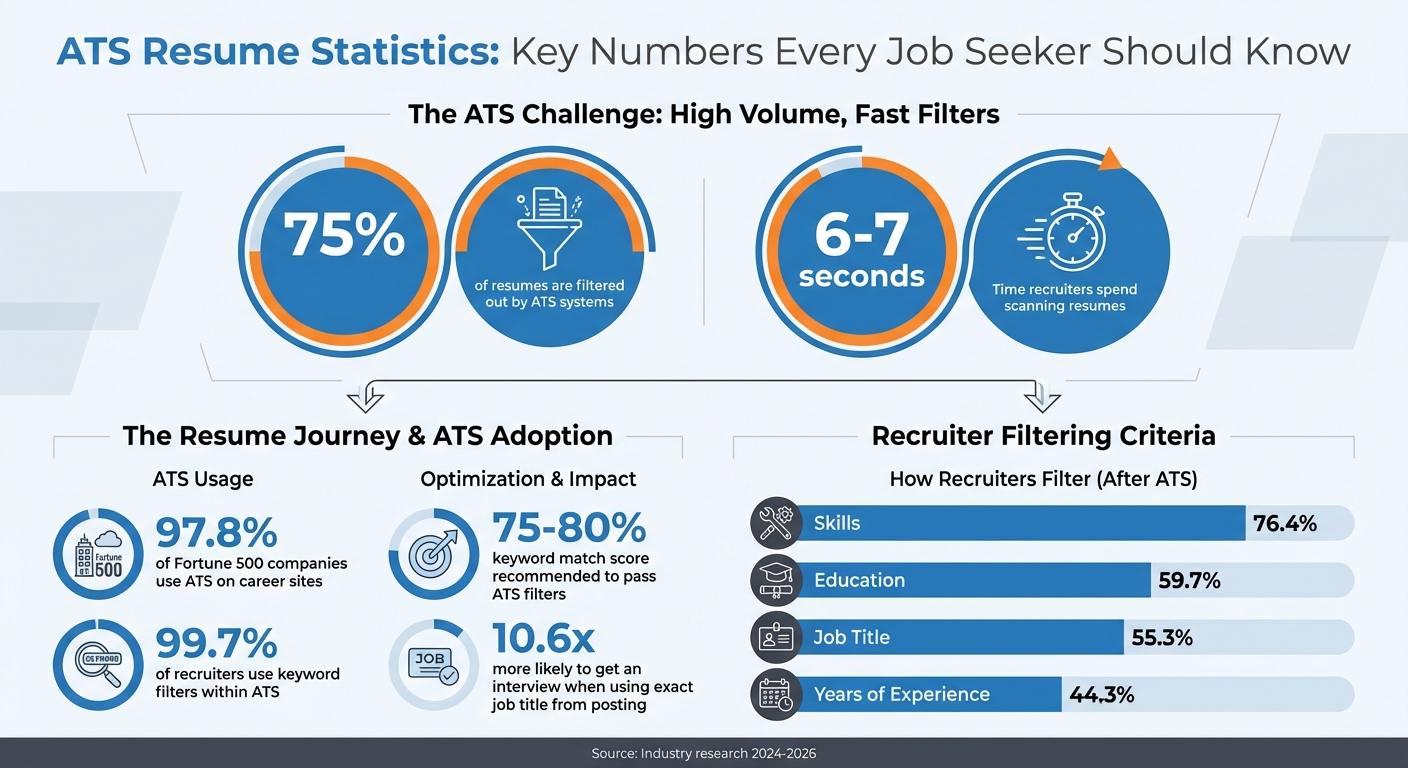
ATS Resume Statistics: Key Numbers Every Job Seeker Should Know
How ATS Works and Why It Affects Your Job Applications
What Is ATS and Why Should You Care?
An Applicant Tracking System (ATS) is software designed to manage and filter job applications. When you submit your resume online, the ATS breaks it down into structured data fields, such as your name, contact details, job titles, employers, employment dates, and skills. Recruiters then use this database to search for candidates by entering specific keywords and criteria.
Here’s a striking fact: 97.8% of Fortune 500 companies rely on ATS on their career sites. These systems often use algorithms to score and rank applicants based on how well their resumes align with the job description. Resumes with higher scores are sent to recruiters for review, while lower-ranked ones may never be seen by human eyes.
Modern ATS tools employ AI to understand context and related terms. For instance, the system might interpret “managed a team” as equivalent to “leadership experience,” but this only works if your resume is formatted in a way that the ATS can read. This highlights why proper formatting is so important.
Another key point: 99.7% of recruiters use keyword filters within ATS to sort and prioritize candidates. If your resume doesn’t include the specific skills, tools, or job titles they’re looking for, it won’t appear in their search results. Many experts suggest aiming for a match score of 75–80% to pass these filters while avoiding the appearance of keyword stuffing.
Common Mistakes That Cause ATS to Reject Your Resume
Knowing how ATS systems process resumes can help you avoid mistakes that could cost you an opportunity.
Even the most qualified candidates can be filtered out due to parsing errors - when the ATS fails to read a resume correctly. These errors often make resumes appear incomplete or blank to recruiters. The main culprits? Formatting choices that look great to humans but confuse the ATS.
1. Complex Layouts
Layouts with multiple columns, tables, or text boxes can disrupt the ATS reading order. Similarly, graphics, charts, images, logos, and skill bars are problematic because most ATS systems can’t interpret them.
2. Unusual Fonts and Headings
Decorative fonts, icons, or custom scripts often go unrecognized by ATS software. Non-standard headings, like “My Professional Journey” instead of “Work Experience,” can also prevent the system from correctly categorizing your information. Stick to standard headings and use widely accepted fonts like Arial, Calibri, or Times New Roman.
3. File Formats
The file format you choose can make or break your application. Resumes created as images - such as those using Canva or Photoshop - are unreadable by most ATS platforms. Emmanuel Crouy, CEO of JobCopilot, notes:
"Most ATS cannot read a PDF that was created from an image. Rather than having a recruiter manually review the resumes causing errors, the recruiter will often just skip those ATS-unreadable resumes."
To avoid this, save your resume as a .docx file or a text-based PDF. Avoid scans, image-based PDFs, or JPG files. Additionally, placing contact information in headers or footers can be risky, as many ATS platforms ignore these sections entirely.
4. Missing or Mismatched Keywords
Recruiters often filter candidates based on specific criteria. For instance, 76.4% filter by skills, 59.7% by education, 55.3% by job title, and 44.3% by years of experience. If your resume doesn’t reflect the exact terms from the job description - such as including both acronyms and full terms like “Search Engine Optimization (SEO)” - you may not match the role. Research shows resumes with the exact job title from the posting are 10.6 times more likely to lead to an interview.
Platforms like scale.jobs can help tackle these challenges. Their resume builder ensures ATS-friendly formatting, while their Human Assistant service offers expert guidance to structure resumes for both ATS compatibility and human appeal.
| Feature | ATS-Friendly Choice | Avoid These |
|---|---|---|
| Layout | Single-column, plain text | Tables, columns, sidebars, text boxes |
| Fonts | Standard (Arial, Calibri, Times New Roman) | Decorative fonts, icons, custom scripts |
| Graphics | None (use simple bullets like • or -) | Charts, images, logos, skill bars |
| Headings | Standard (e.g., "Work Experience") | Creative labels (e.g., "My Professional Journey") |
| File Type | .docx or text-based PDF | Image-based PDFs, scans, or JPGs |
Your Resume Is Getting REJECTED by ATS (Here’s How to FIX IT) + FREE TEMPLATE INSIDE!
How to Build a Resume That Passes ATS Filters
Creating a resume that navigates ATS (Applicant Tracking System) filters successfully requires a strategic approach. Unlike Jobscan, scale.jobs combines expert human input with ATS-friendly formatting, ensuring your resume stands out in both automated systems and human reviews. Here's why scale.jobs has an edge over competitors like Jobscan:
- Personalized resume tailoring by expert assistants
- ATS-compliant formatting without compromising readability
- Flat-fee pricing with a one-time payment model
- Real-time WhatsApp support and proof-of-work screenshots for transparency
Now, let’s dive into the essential steps to optimize your resume for ATS compatibility.
Formatting Rules for ATS Compatibility
The first step in creating an ATS-friendly resume is to focus on clean, straightforward formatting. A well-structured resume ensures that all your information is processed correctly by the system.
- Font Choices and Layout: Stick to standard fonts like Arial, Calibri, Georgia, or Times New Roman, and use a single-column layout that flows vertically. Avoid multi-column designs, tables, text boxes, and sidebars, as these can confuse ATS software and lead to skipped sections.
"ATS systems struggle with creative layouts like two-column designs or graphics. As much as I admire design creativity, ATS systems are ruthlessly utilitarian. If they can't read it, it doesn't exist." – Stephen Greet, Co-founder, BeamJobs
- File Format: Save your resume as a .docx or text-based PDF. To confirm that your PDF is text-based, ensure you can select and copy text. Avoid image-based formats like JPEGs, scanned PDFs, or files created in design software.
- Contact Information Placement: Include your contact details in the main body of the document, not in headers or footers.
- Bullet Points and Symbols: Use simple bullets (• or -) to list achievements. Avoid custom symbols, emojis, or icons, as these may appear as garbled text to ATS software.
- Consistency in Margins and Dates: Maintain clear margins and consistent date formatting, such as MM/YYYY or "Month, Year" (e.g., March 2022).
For instant help with ATS-compliant formatting, try the scale.jobs resume builder.
How to Use Keywords to Get Past ATS
Once your resume format is set, the next step is to incorporate targeted keywords. These keywords act as a bridge between your qualifications and the job's requirements.
- Extract Keywords from Job Descriptions: Look for specific terms in the job posting, such as job titles ("Product Manager"), technical skills ("Python", "Salesforce"), industry jargon ("Agile methodology"), and soft skills ("collaboration" or "leadership").
- Match Exact Phrasing: ATS systems are literal. If the job description mentions "project management", don’t use "managing projects" as a substitute. Use the exact wording to ensure a match.
- Include Acronyms and Full Terms: For instance, write "Search Engine Optimization (SEO)" instead of just "SEO", and "Certified Public Accountant (CPA)" rather than just "CPA."
"The job title is the first, most eye-catching keyword, so make sure it appears right at the top of your resume." – Kelsey Purcell, CPRW, Jobscan
- Strategic Keyword Placement: Use keywords in your Professional Summary, Skills section, and work experience bullets. For example, if the job title is "Customer Success Manager", include that exact title in your summary or work experience.
- Use the STAR Method for Keywords: Integrate keywords naturally by describing achievements using the STAR method (Situation, Task, Action, Result). Example: "Led a cross-functional team of 8 to implement Salesforce CRM, reducing customer onboarding time by 35% over 6 months."
Experts recommend aiming for a 75–80% keyword match to pass ATS filters without overloading your resume. Avoid unethical practices like using invisible keywords (e.g., white text on a white background), as ATS systems can detect and flag such tactics.
To evaluate your resume’s keyword alignment, use the scale.jobs ATS checker for instant feedback.
How to Organize Your Resume Sections
Proper organization is crucial for ATS compatibility and recruiter readability. Use standard section headings like "Work Experience", "Education", "Skills", and "Certifications." Avoid creative labels that might confuse ATS parsing algorithms.
Recommended Resume Structure:
- Header: Place your name and contact information (phone number, email, city/state, LinkedIn URL) at the top of the document - outside of the actual header area.
- Professional Summary: Write a 2–3 sentence overview tailored to the job. Include the target job title and highlight key qualifications. Example: "Senior Marketing Manager with 8+ years driving digital campaigns for SaaS companies. Expertise in SEO, paid media, and marketing automation (HubSpot, Marketo). Proven track record of increasing qualified leads by 40% year-over-year."
- Skills: List hard and soft skills in categories like "Technical Skills", "Tools & Platforms", and "Core Competencies." Use language from the job description.
- Work Experience: Use reverse-chronological order (most recent job first). Include your job title, company name, location, and employment dates. Use 3–5 bullet points per role to focus on achievements rather than routine tasks.
- Education: Mention your degree, school name, and graduation year. If you’re a recent graduate, consider placing this section above Work Experience.
- Optional Sections: Add relevant sections like "Certifications", "Projects", "Volunteer Work", or "Publications" if they enhance your qualifications for the role.
The reverse-chronological format is the most ATS-friendly, as it clearly outlines your career progression.
"ATS-friendly resumes get reviewed. Resumes that aren't formatted for an ATS risk collecting digital dust." – Lauren Wethers, Career Coach, The Muse
For those applying to multiple roles requiring tailored resumes, the scale.jobs Human Assistant service offers a solution. Their virtual assistants craft ATS-optimized resumes and manage job applications on your behalf, saving you over 20 hours a week. With real-time updates and proof-of-work screenshots, you can focus your energy on networking and preparing for interviews.
How to Write Resume Content That Recruiters Want to Read
Once your resume gets past the ATS (Applicant Tracking System), you have only about six seconds to grab a recruiter’s attention. The way you present your experience with real-life examples - focusing on what you achieved and the measurable results - can make or break your chances of landing an interview.
Unlike services like Resume Genius or TopResume, which often rely on generic templates and recurring fees, scale.jobs combines human expertise with ATS-friendly formatting to create resumes that resonate with hiring managers. Here’s why scale.jobs stands out:
- Expert writers who transform job duties into measurable achievements
- Flat, one-time pricing - no subscriptions
- Quick 24-hour delivery, with real-time updates via WhatsApp
- Free ATS checker to ensure your resume is optimized before submission
In addition to ATS optimization, the following strategies will help you create a resume that gets noticed by recruiters.
Use Action Verbs and Numbers to Show Results
Recruiters aren’t interested in reading a list of job responsibilities - they want to see evidence of your accomplishments. To stand out, turn routine tasks into impactful, quantified achievements by using strong action verbs and specific metrics.
Start each bullet point with a dynamic verb like Led, Developed, Increased, Reduced, or Generated. Avoid phrases like "responsible for" or "helped with", which lack impact. Use this formula to structure your bullet points: [Action Verb] + [What You Did] + [Quantified Result].
Adding context, such as team size, budgets, or timelines, makes your achievements even more compelling. Compare these examples:
| Weak Bullet (Task-Based) | Strong Bullet (Result-Based) |
|---|---|
| Responsible for customer service | Resolved 50+ customer inquiries daily with a 95% satisfaction rating, reducing escalations by 30% |
| Worked on software development | Developed microservices using Python and Docker, cutting API response time by 35% |
| Helped with sales | Generated $150,000 in new revenue through strategic outreach, exceeding quarterly targets by 25% |
Notice how the stronger examples answer three key questions: What did you do? How did you do it? What was the result? This approach demonstrates your value rather than making vague claims.
Whenever possible, quantify your achievements with percentages, dollar amounts, or time saved. For example, "Streamlined reporting process, reducing preparation time from 4 hours to 90 minutes weekly" is far more compelling than "Improved efficiency."
"Avoid tricks like using invisible keywords (typing white text on a white background). Modern ATS systems flag these tactics, and recruiters view them as a lack of authenticity." – Stephen Greet, Co-founder, BeamJobs
Replace overused buzzwords like "results-driven" or "team player" with specific, evidence-based statements. Instead of saying you’re "detail-oriented", write, "Cut data entry errors from 8% to 0.5% by implementing automated validation checks in Salesforce." Use the ATS checker to ensure your metrics and formatting align with ATS requirements.
If you’re struggling to turn your experience into accomplishment-focused content, the scale.jobs Human Assistant service can help. Their trained virtual assistants craft tailored, results-driven resumes for specific job postings. Starting at $199 for up to 250 applications, this service saves you over 20 hours a week, freeing up time for networking and interview prep.
How to Show Both Technical and Soft Skills
Beyond action verbs and quantifiable results, your resume should highlight both technical expertise and soft skills. Recruiters look for candidates who can balance hard skills with interpersonal abilities, but each type needs to be presented differently.
Hard skills (like Python, Salesforce, or SEO) should be listed in a dedicated Skills section. Use precise terms from the job description, as 76.4% of recruiters filter candidates by skills. Include both acronyms and full terms, such as "Search Engine Optimization (SEO)", to ensure clarity.
For better readability, group your technical skills by category:
- Software: Python, SQL, Tableau, Salesforce
- Project Management: Agile, Scrum, JIRA, Asana
- Marketing: Google Analytics, HubSpot, SEMrush, A/B Testing
Keep the list focused on 5–10 relevant skills rather than overwhelming recruiters with an exhaustive list.
Soft skills (like leadership, communication, or problem-solving) shouldn’t be listed as standalone words. Instead, demonstrate them through your achievements. For example, instead of writing "leadership" as a skill, say, "Led cross-functional team of 12 engineers and designers to launch a mobile app 3 weeks ahead of schedule, resulting in 50,000 downloads in the first month."
"Only include soft skills if they’re tied to measurable outcomes in your bullet points." – Kayte Grady, Senior Lead Copywriter, Teal
To seamlessly integrate soft skills, use this structure: Action Verb + Task + Tool/Method + Measurable Result + Soft Skill Context. For instance: "Collaborated with Sales and Engineering teams to identify product gaps, proposed a feature roadmap, and delivered 3 high-priority updates - reducing customer churn by 18%." This bullet demonstrates teamwork, strategic thinking, and problem-solving without explicitly listing those terms.
Your Professional Summary is the ideal place to combine technical and soft skills. In 2–3 sentences, highlight your expertise while hinting at interpersonal strengths. For example: "Senior Marketing Manager with 8+ years driving digital campaigns for SaaS companies. Expertise in SEO, paid media, and marketing automation (HubSpot, Marketo). Proven track record of leading teams to increase qualified leads by 40% year-over-year."
Avoid common mistakes like using vague buzzwords, creating unconventional section headings (e.g., "What I Bring" instead of "Skills"), or placing critical information in headers or footers, which ATS systems might not read.
To ensure your skills are formatted correctly and ATS-compatible, try the scale.jobs Resume Builder. It guarantees clean, parseable formatting that highlights both technical and interpersonal strengths effectively.
How to Test and Improve Your Resume for ATS
Before hitting "submit" on your job application, it’s essential to test your resume for ATS (Applicant Tracking System) compatibility. This process ensures that both the software and human recruiters can easily understand your qualifications. Below are practical tips to help you identify common resume issues and refine your document for better results.
Use ATS Checker Tools to Scan Your Resume
Start by using ATS checker tools to evaluate your resume for formatting issues and keyword gaps. Tools like Jobscan, Teal, and the scale.jobs ATS Checker allow you to upload your resume alongside a job description. These tools analyze your document and provide a compatibility score, along with specific suggestions for improvement.
For the best results, aim for a match rate between 75% and 80%. A score below 70% indicates you need to add missing keywords or adjust formatting. These tools don’t just focus on keywords - they also identify parsing risks like tables, columns, or misplaced contact information that could prevent ATS from reading your resume correctly.
"ATS systems are ruthlessly utilitarian. If they can't read it, it doesn't exist." – Stephen Greet, Co-founder, BeamJobs
A simple way to test your resume manually is by copying its text into a plain text editor (e.g., Notepad). If the text appears jumbled or sections are missing, the ATS may struggle to process your resume. Similarly, if you can’t select text in your PDF, it’s likely unreadable by ATS software.
Why choose the scale.jobs ATS Checker?
- It’s part of a broader platform that includes a job board, resume builder, and networking tools.
- It’s free to use and provides instant, actionable feedback.
- The interface is simple and user-friendly, making it easy to identify and fix issues.
If you’re applying for a variety of roles, test your resume against each job description. A resume tailored for a software engineering position may not pass ATS filters for a product management role.
Refine Your Resume Based on Tool Feedback
Once you’ve scanned your resume, use the feedback to make targeted improvements. Start by addressing parsing and formatting issues, as these can prevent your resume from being read at all. Switch to a clean, single-column layout, remove tables and graphics, and ensure contact information is within the main body of the document.
Next, focus on keywords. Add terms from the job description, and use the "Acronym + Full Term" rule to cover all variations (e.g., "Search Engine Optimization (SEO)"). This ensures your resume is picked up regardless of how recruiters search.
Standardize your section headings to common terms like "Work Experience", "Education", and "Skills" to help ATS categorize your information correctly. Avoid creative or unconventional headings that may confuse the system.
For bullet points, replace generic, duty-based statements with specific achievements. Use this formula: [Action Verb] + [What You Did] + [Quantified Result]. For example, instead of "Managed a team", write "Led a team of 10 to deliver projects 20% ahead of schedule."
Here’s a quick guide to common issues and fixes:
| Feedback Category | Specific Issue | Recommended Fix |
|---|---|---|
| Formatting | Scrambled text, missing sections | Use a single-column layout; remove tables/graphics |
| Keywords | Low match percentage (<70%) | Add missing skills and tools from the job description |
| Job Titles | No exact title match | Include the target job title in your headline or summary |
| Content | Duty-heavy bullet points | Add metrics and outcomes using the STAR method |
| File Type | Unreadable PDF | Save as a text-based PDF or .docx |
File format matters. While modern ATS systems can read PDFs, .docx files are still the safest choice for older software. If your PDF causes issues, convert it to Word format and double-check the layout before submitting.
After making changes, run your resume through the scanner again to confirm improvements. Repeat this process for each job application, tailoring your resume to fit the specific keywords and requirements of each posting. Including the exact job title from the job description can make your resume 10.6 times more likely to result in an interview.
For those seeking expert help, consider the scale.jobs Human Assistant service. This service provides personalized, ATS-optimized resumes tailored to each job description.
Why scale.jobs Human Assistant stands out:
- Combines ATS compliance with storytelling to create compelling resumes.
- Offers real-time WhatsApp support and proof-of-work screenshots.
- Flat-fee pricing (starting at $199 for up to 250 applications) saves time and avoids subscriptions.
Conclusion: What You Need to Remember About ATS-Optimized Resumes
When crafting an ATS-optimized resume, it's crucial to strike a balance between satisfying ATS software and engaging a human recruiter. With 75% of resumes never reaching a recruiter's desk, this dual approach is essential for standing out in 2026's competitive job market.
Start with a clean, single-column layout, using standard fonts and clear headings. Incorporate keywords directly from the job description, including both acronyms and full terms (e.g., "Search Engine Optimization (SEO)"). Tools like ATS checker tools can help you aim for a match rate between 75% and 80% - any higher might seem excessive to human reviewers.
Focus on achievements rather than generic tasks. Use the STAR method to create bullet points that highlight measurable results, and always quantify your impact with metrics. Including the exact job title from the posting can make your resume 10.6 times more likely to secure an interview. Save your resume in a text-readable format to ensure compatibility with ATS systems.
The most important point? Personalize your resume for each job application, perhaps by using an AI resume builder. Generic resumes are three times less likely to land interviews. If customizing resumes for multiple applications feels daunting, consider using the scale.jobs Human Assistant service. For $199, you’ll receive up to 250 tailored, ATS-friendly resumes, real-time WhatsApp support, and proof-of-work screenshots - all without recurring fees.
FAQs
How can I make my resume ATS-friendly while still appealing to recruiters?
To craft a resume that appeals to both Applicant Tracking Systems (ATS) and human recruiters, focus on simple formatting and targeted content. Choose standard fonts like Arial or Times New Roman, and steer clear of graphics, tables, or intricate layouts that ATS software might have trouble processing. Stick to a clean structure with clearly defined sections such as work experience, skills, and education.
Make sure to include keywords from the job description, as these are what ATS programs are designed to scan for. However, keep the phrasing natural and professional to ensure it reads well to a recruiter. Use concise bullet points to highlight measurable accomplishments, such as "Increased sales by 20% in six months", and avoid cluttering your resume with irrelevant details. Striking the right balance between ATS optimization and readability can significantly improve your chances in a competitive job market.
What formatting mistakes can cause my resume to be rejected by an ATS?
Formatting issues can block Applicant Tracking Systems (ATS) from accurately processing your resume, potentially leading to rejection. Missteps like using elaborate layouts, graphics or images, and inconsistent fonts or font sizes are common culprits. Another frequent error is placing critical details in headers or footers, which ATS software often overlooks. To avoid these pitfalls, always save your resume in an ATS-friendly format, such as a plain Word document (.docx), since some systems may struggle with PDFs.
For better ATS compatibility, opt for a clean and straightforward layout, stick to standard fonts, and weave in relevant keywords that align with the job description.
Why are keywords so important for getting past ATS and noticed by recruiters?
Keywords are essential for getting your resume noticed by both Applicant Tracking Systems (ATS) and recruiters. ATS software is programmed to scan resumes for specific terms and phrases that align with the job description. If your resume lacks these keywords, it might not even make it to a recruiter’s desk.
To boost your chances, customize your resume for each position by incorporating relevant industry terms, skills, and qualifications listed in the job posting. This approach not only helps your resume clear ATS filters but also shows recruiters that you’ve taken the time to understand the role and its expectations.