10 Hidden Resume Filters Job Portals Never Tell You About
Learn 10 hidden ATS resume filters — keywords, formatting, file type, employment gaps, location and bias — and practical fixes to pass automated screening.


When applying for jobs, you might wonder why your resume isn’t getting responses despite your qualifications. The truth is, 94% of resumes fail to pass through Applicant Tracking Systems (ATS), automated tools used by employers to filter and rank candidates. These systems reject applications due to formatting errors, missing keywords, or even minor inconsistencies, often before a human ever sees them.
This guide uncovers 10 hidden ATS filters that can silently disqualify your resume and explains how to overcome them. From keyword density and semantic relevance to formatting and employment gaps, each section provides actionable steps to ensure your resume is ATS-friendly. Tools like Scale.jobs combine AI and human expertise to help applicants navigate these filters better than automated software like Jobscan.
Here’s a quick overview of the key challenges and solutions:
- Keyword Matching: Use exact terms from job descriptions, but avoid overstuffing.
- Formatting Issues: Stick to simple layouts without tables or graphics.
- File Types: Submit in .docx format for better parsing.
- Employment Gaps: Address gaps with professional titles like “Consultant.”
- Location Filters: Include city/state and note relocation preferences if applicable.
- Education Verification: Format certifications with full names and acronyms.
- Duplicate Applications: Tailor resumes for different roles to avoid flags.
- Bias Filters: Remove graduation years and personal photos to minimize bias risks.
How to beat AI resume filters and speak to a human recruiter
1. Keyword Density Thresholds
When you submit your resume, the Applicant Tracking System (ATS) processes it in just seconds, scanning for specific keywords from the job description. These systems aren’t interested in creative phrasing or storytelling - they’re hunting for precise terms that align with the role. If your resume doesn’t include those keywords, it becomes effectively invisible to recruiters, no matter how qualified you are. This is why exact keyword alignment is so important.
Here’s a key statistic: 99.7% of recruiters rely on keyword filters in ATS searches, but only 34% of these systems recognize synonyms. For example, if a job description specifies "Project Manager" but your resume uses "Team Lead", you might not show up in the search results. While modern ATS platforms are evolving to include semantic understanding and contextual AI, most still prioritize exact keyword matches.
However, overloading your resume with keywords can backfire. Excessive keyword stuffing - especially when out of context - raises spam flags in 73% of cases with AI-powered systems. Resumes listing 20+ skills in a disorganized way face a rejection rate of 67%, compared to 34% when keywords are naturally woven into sentences. For instance, instead of listing "Python, predictive models, data processing", you might write, "Developed a Python-based predictive model that reduced processing time by 40%." This approach integrates keywords seamlessly, showcasing your skills without triggering spam filters.
Unlike platforms like Jobscan, which focus heavily on keyword metrics, Scale.jobs prioritizes placing keywords naturally within the right context. This reduces the risk of spam flags and ensures recruiters can clearly identify your expertise.
"A recruiter searches: 'Product Manager AND B2B AND SQL.' The ATS returns resumes with those exact terms in indexed fields. If your resume says 'Product Owner' instead, you might not appear in the results." - Lauren, Former Recruiter
The goal isn’t to cram as many keywords as possible into your resume. It’s about using the exact terms recruiters are searching for, placed in the right context, to ensure your resume ranks higher when it counts. With this understanding of keyword dynamics, you’re better prepared to tackle another common ATS hurdle: formatting errors that can confuse these systems.
2. Semantic Relevance Scoring
Instead of just scanning for exact terms, semantic relevance scoring digs deeper to understand the meaning behind your words. Modern ATS platforms employ Natural Language Processing (NLP) to analyze sentence structure and context, moving beyond simple keyword matching. While tools like Jobscan focus heavily on exact keyword matches, Scale.jobs takes it a step further by using advanced contextual analysis to better interpret how your skills and achievements align with job requirements. This approach ensures the system evaluates your contributions in a meaningful way, rather than just counting keywords.
Interestingly, only 34% of ATS platforms currently have the ability to recognize synonyms or semantic relationships. For example, if your resume says "Client Experience Lead" but the job description uses "Customer Success Manager", less advanced systems might miss the connection entirely. More sophisticated platforms, like Scale.jobs, utilize Contextual AI Screening to evaluate your entire work history, link skills to achievements, and predict your fit for the role. This deeper level of analysis offers a significant advantage over traditional keyword-based systems.
One of the key challenges in this shift toward semantic scoring is what experts call the "Skills Trap." Simply listing 20+ skills in isolation often leads to rejection. Instead, embedding skills within achievement-focused statements makes your resume more impactful. For instance, instead of listing "Python, predictive modeling, data processing", you could write: "Developed a Python-based predictive model to analyze 50,000+ records, cutting processing time by 40%." This approach provides the context that modern ATS platforms prioritize.
"A resume is no longer being judged solely on whether it contains a list of specific keywords; it is being evaluated on the relevance and context of its entire profile." - Resumly.ai
To optimize for semantic scoring, include both full terms and acronyms (e.g., "Certified Public Accountant (CPA)"), use exact job titles from postings, and integrate keywords into action-oriented statements. If you're finding it difficult to strike the right balance between keyword optimization and natural language, Scale.jobs' human-assisted resume services can help you create documents that meet the standards of both algorithms and recruiters. The focus should always be on showcasing your qualifications through context-rich, achievement-driven narratives rather than simple lists. Unlike Jobscan, which emphasizes keyword density, Scale.jobs combines contextual AI with human expertise to ensure your accomplishments are fully recognized.
3. Formatting Parsers Rejecting Tables and Graphics
Even with optimized keywords and strong semantic relevance, formatting issues can still derail your resume's chances. Applicant Tracking System (ATS) parsers, which are designed to extract text into structured fields like "Name", "Job Title", and "Skills", often struggle with tables, columns, and other complex layouts. The numbers are telling: up to 43% of resumes encounter parsing errors, and 23% of rejections stem from the system's inability to interpret the file correctly.
One of the most frequent issues involves the reading sequence. Tables and columns can confuse ATS parsers, causing them to read left-to-right across the entire page and jumble unrelated content together. For instance, a two-column layout might produce a garbled result like: "Senior Marketing Manager Python, SQL, Data Analysis Led team of 12..." instead of separating each section logically. Resumes formatted in .docx with tables face a 31% rejection rate, compared to just 4% for plain text .docx files.
Graphics, icons, and text boxes only add to the problem. Many ATS tools treat these elements as "objects" rather than text, skipping over them entirely. If your key details - like your job title or contact information - are placed inside a graphic or text box, they might not be indexed at all. This effectively makes your resume invisible to recruiters. As Lauren, a hiring expert at InterviewPal, explains:
"The ATS didn't reject you. You were simply invisible."
The fix is straightforward: opt for a single-column layout with simple, left-aligned text. Use standard section headers such as "Work Experience" and "Education", and avoid tables, text boxes, or graphics altogether. A quick test is to copy and paste your resume into Notepad; if the text appears scrambled, the ATS will likely misread it. Unlike Jobscan, Scale.jobs provides tailored guidance to ensure your resume is ATS-friendly while remaining polished for human recruiters.
"A beautifully designed resume that parses poorly actually creates a worse first impression than a plain resume that parses cleanly." - CVCraft Team
If you're finding it challenging to strike the right balance between clean formatting and professional design, consider using an AI resume builder or professional writing services. Their expertise ensures your resume is both ATS-compliant and visually appealing, giving you a competitive edge. Fixing formatting errors is a crucial step before addressing finer details like file naming conventions.
4. File Type and Naming Conventions
Technical details can make or break your resume's journey through an ATS (Applicant Tracking System). Even a perfectly crafted resume can get rejected if the file format or naming convention doesn't meet ATS requirements. For instance, while .docx files are widely compatible, PDFs with embedded fonts face an 18% rejection rate, and formats like .pages, JPEG, or PNG are almost always unreadable. Taleo systems, a common ATS, show a 34% higher error rate with PDFs compared to .docx files. To avoid these issues, always submit your resume as a .docx file unless the job posting specifically requests another format. This small adjustment can boost parsing accuracy by 89% across various ATS platforms.
Another critical factor is how you name your file. A poorly named file like "resume_v1_final_2.pdf" not only appears unprofessional but can also make it harder for recruiters to locate your application. ATS systems often flag such files, which can lower your overall candidacy score. Instead, stick to a clear and professional naming format like FirstName_LastName_Resume.docx. This ensures your document is easily searchable and avoids confusion with other applicants.
"The ATS is a filing system... Your resume's job is not to impress. It's to surface you at the right moment." - Lauren, Recruiter
ATS systems dedicate the first three seconds of processing to validate file formats. If the system cannot parse your file - common with scanned PDFs or resumes containing tables, which have a 31% rejection rate - it will discard the file immediately, regardless of your qualifications. The ATS needs to read and highlight the text, not just display it visually.
If you're unsure whether your resume is ATS-friendly, Scale.jobs' resume writing services can help. Their team ensures your resume is formatted correctly, uses the appropriate file type, and follows proper naming conventions, reducing the risk of rejection. With 23% of resumes rejected due to technical errors, taking these precautions can make a significant difference. Once your file format and naming are optimized, the next step is focusing on resume length and section order.
5. Length and Section Order Requirements
Applicant Tracking Systems (ATS) are designed to scan resumes for specific patterns and information. One critical detail is the order of your contact information: it should always follow this sequence - Full Name, Phone Number, Email Address, and City/State. Deviating from this format can cause parsing errors, with a rejection rate as high as 43%.
The placement of resume sections plays a vital role as well. For example, placing your skills section after your professional summary ensures ATS systems quickly index your core abilities. If this section is delayed, the rejection rate jumps by 31%. Similarly, using unconventional headers instead of standard ones like "Work Experience" or "Skills" can confuse ATS algorithms, leading to a 23% rejection rate because the system struggles to process the information accurately.
"The ATS is a filing system. Recruiters are overloaded. Hiring managers are impatient. Your resume's job is not to impress. It's to surface you at the right moment." - Lauren, Hiring Team Expert, InterviewPal
For the best results, follow this section order: Contact Information, Professional Summary, Skills, Work Experience, Education, Certifications. Straying from this structure or using non-standard headers can disrupt indexing, reducing your chances of being shortlisted. Once you've ensured proper file formatting and naming, fine-tuning the section order is the next step to improve your resume's visibility.
If you're unsure whether your resume meets these ATS standards, consider using Scale.jobs' resume writing services. Their team specializes in human-assisted formatting to ensure your resume adheres to ATS requirements, with the correct section order and naming conventions. These adjustments not only improve ATS compatibility but also prepare your resume for further enhancements to stand out in the hiring process. You can also leverage a virtual assistant to manage these technical details across all your applications.
6. Employment Timeline Gap Detection
Applicant Tracking Systems (ATS) do more than just scan for keywords - they also evaluate your employment history for consistency and continuity. Gaps in employment exceeding six months often trigger red flags, as 48% of employers use automated filters to exclude resumes with such gaps. These inconsistencies can raise concerns about reliability and commitment.
ATS software extracts dates, job titles, and employer names into structured fields. Using inconsistent date formats - like mixing "Dec 2023" in one section and "December 2023" in another - can make your resume appear careless, leading to a 38% rejection rate. Additionally, avoid placing dates in tables or graphics, as many ATS tools cannot process these formats.
"Companies use [ATS] to filter out applications that suggest poor attention to detail, inconsistent work history, or misaligned qualifications." - JobEase Team
To ensure your resume passes ATS scrutiny, stick to a consistent MM/YYYY date format throughout. If you have gaps in your timeline but were freelancing, consulting, or volunteering, list these experiences with professional titles like "Independent Consultant" instead of "Freelancer." Make sure to include these roles in your standard work history section rather than unconventional layouts like text boxes, as ATS systems may overlook them otherwise.
For older positions that might reveal irrelevant gaps, consider creating an "Additional Experience" section without specific dates. This approach allows you to maintain a cohesive professional story without drawing attention to potential gaps. Scale.jobs experts can help refine your employment chronology, ensuring consistent formatting and strategic gap management. Their professional resume services can make your profile ATS-friendly and polished. Up next, fine-tune your location and skills sections to further optimize your ATS ranking.
7. Location and Skills Proximity Matching
While Jobscan emphasizes keyword matching, Scale.jobs takes it a step further by combining advanced AI with human expertise to refine both location and skills matching. This ensures your resume aligns with proximity algorithms without losing clarity or relevance.
Job portals don't just rank candidates based on keywords - they also factor in geographic proximity and skill alignment. Modern applicant tracking systems (ATS) use weighted scoring formulas that evaluate how close a candidate is to the job location and how well their skills match the job requirements. Interestingly, candidates located nearer to the job site may rank higher, even if their skill alignment is slightly weaker.
Geographic filters often act as deal-breakers. If your location falls outside the preferred area, your resume might not even reach the recruiter’s desk - no matter how qualified you are. Platforms like LinkedIn and Indeed automatically pull your location from your IP address, GPS, or profile details and compare it to the employer’s desired location. For remote roles, ensure your time zone aligns with the employer's working hours to avoid being filtered out.
Skills proximity matching has also grown more nuanced. While ATS platforms are improving, many still struggle with synonym recognition. For example, if a job posting specifies "CRM software" but your resume only lists "Salesforce", the system might not make the connection unless both terms are present. Since ATS software filters resumes in seconds, burying important skills in older job entries can hurt your chances of being noticed.
To improve your chances with location filters, include your City and State prominently in your resume header. If you’re open to moving, add a clear note like “Willing to Relocate” under your contact information - vague phrases like “open to opportunities” might not get past geographic filters. When listing skills, include both the full term (e.g., Customer Relationship Management) and specific tools (e.g., Salesforce) in one concise bullet point. Place your skills section right after your professional summary and weave high-priority skills into your recent job descriptions using this formula: [Action Verb] + [Keyword] + [Specific Result].
"Geolocation targeting is a recruitment strategy in which organizations identify prospective candidates based on their location and then present them with content about career opportunities." - AMS Verified
This focus on location and skill alignment highlights how Scale.jobs combines AI-driven precision with human insight, setting it apart from the competition. If you're seeking remote roles across various regions or need help navigating complex ATS proximity filters, virtual job search assistants can help tailor your profile to meet both location and skills requirements without triggering spam filters. With your location and skills in check, the next step is understanding how education credentials and certifications are verified.
8. Education and Certification Verification
Job portals do more than just search for keywords - they also check if your education and certifications align with the job's requirements before your resume even reaches a recruiter. Modern ATS (Applicant Tracking Systems) extract details like degree types, institutions, graduation dates, and certifications, then compare them against pre-set criteria. If your credentials don’t match perfectly, your application could be filtered out. While tools like Jobscan focus on keyword optimization, Scale.jobs takes it a step further. It ensures your education and certifications are formatted correctly and verified, so minor errors don’t lead to automatic rejection. With the added benefit of human oversight, Scale.jobs ensures ATS systems accurately read and index your qualifications.
One of the toughest filters comes in the form of knockout questions - those pre-screening queries like, “Do you have a PMP certification?” or “Do you hold an MBA?” Answering “no” to these can result in an instant rejection, no matter how qualified you are otherwise. This rigid system is a common issue. According to Harvard Business School’s Hidden Workers Study, 88% of employers admit that qualified candidates are often excluded due to overly strict ATS settings, not because they lack the necessary skills. Shockingly, 8% of all resume rejections stem from these arbitrary filters.
Certain industries apply even stricter scrutiny. In healthcare, for example, ATS systems specifically look for license numbers and expiration dates. The JobEase Team found that 78% of healthcare systems automatically reject resumes missing these details. In finance, systems prioritize certifications like Series 7 or CPA, while tech platforms search for credentials such as AWS or Google Cloud certifications. If you fail to format these details correctly or omit them, even if they’re listed elsewhere on your resume, the ATS may not detect them.
Proper formatting can make a huge difference. Resumes that include relevant certifications see a 41% higher acceptance rate compared to those listing only degrees - but only if they’re formatted correctly. Follow the "Full Term + Acronym" rule: always spell out the full name of your certification or degree followed by its acronym in parentheses (e.g., "Certified Public Accountant (CPA)" or "Project Management Professional (PMP)"). Include the name of the issuing organization, the date obtained, and, if applicable, the license number. Avoid placing these details in tables or text boxes, as ATS systems often fail to parse this information. If formatting challenges are holding you back, consider using Scale.jobs for ATS-optimized resume services that ensure your credentials are visible and correctly indexed.
9. Duplicate Application Blockers
Job portals often monitor duplicate applications closely. Applicant Tracking Systems (ATS) identify duplicates by pulling unique details from your resume, such as Name, Email, and Phone Number. These details serve as keys in a centralized database. If you apply to multiple roles at the same company using the same resume within a set timeframe (typically 6 months), the system flags it. Data shows that 97.8% of Fortune 500 companies use ATS platforms with this functionality, and 99.7% of recruiters depend on search and filter tools to sort through candidates.
Some job portals even include pre-screening questions like, "Have you applied to this role in the last 6 months?" A "yes" response can result in your application being automatically rejected without a recruiter ever seeing it. Additionally, AI systems use natural language processing (NLP) to detect over-optimized or spam-like resumes. If flagged, these applications may be blocked outright. As one Head of Talent Acquisition from a leading tech company explained:
"We don't just want to find qualified candidates. We want to filter out candidates who might create problems."
- Head of Talent Acquisition, Major Tech Company
"An ATS is primarily a filtering, sorting, and retrieval system... Think of it like Gmail for recruiters."
- Lauren, Hiring Expert
How Scale.jobs Stands Out Against Jobscan and LazyApply
- Human oversight ensures resumes are customized by job category, reducing duplicate flags.
- ATS-optimized formatting prevents parsing issues without triggering spam filters.
- One-time payment includes dedicated WhatsApp support for continuous adjustments.
- Transparent proof-of-work shows exactly how resumes are tailored to specific roles.
- Category-specific versions are crafted by experts, not automated systems.
Choosing Between Jobscan, LazyApply, and Scale.jobs
- Jobscan or LazyApply: Ideal for those who prefer DIY tools, quick keyword checks, or managing multiple applications on a budget.
- Scale.jobs: Best for applicants targeting multiple roles at the same company, needing expert help to avoid duplicate detection, or seeking personalized, ATS-compliant resumes that catch recruiter attention.
To avoid duplicate application flags, focus on tailoring your resume by job category rather than individual job postings. For instance, create one version for "Senior Software Engineer" roles and another for "Engineering Manager" positions. Always maintain consistent contact information - Name, Phone, Email, Location - across all submissions. This ensures the system merges your profiles correctly, avoiding errors like "ghost" duplicates that could cause problems during parsing. If you're unsure how to create category-specific resumes, Scale.jobs' human-assisted services can help you design tailored resumes that stay ATS-friendly.
Lastly, respect the cooling-off period. Many organizations enforce a rule preventing candidates from reapplying to the same position for at least 6 months. Carefully review job descriptions for any mention of prior applications, and only reapply if you've significantly improved your qualifications. Once you've addressed duplicate application concerns, you can shift your focus to ensuring your educational credentials are accurately reflected.
10. Demographic Signal Filters
Job portals often rely on data points like names, graduation dates, and locations as proxies for demographics, even though anti-discrimination laws prohibit such practices. This can lead to biased filtering within ATS systems. Research highlights that resumes with "white-sounding" names receive 50% more callbacks compared to those with "African-American-sounding" names. Additionally, 57% of job seekers cite age bias as their top concern during the hiring process. Automated knockout questions further complicate the issue, amplifying the impact of these filters.
For instance, questions like "Do you require visa sponsorship?" or "Are you willing to relocate?" can lead to automatic rejection if your answer doesn't align with the preferred response. These binary filters are responsible for 22% of rejections before a recruiter even reviews an application. Similarly, rigid experience requirements disproportionately affect job seekers, with 89% of candidates being rejected for falling just one year short of the stated criteria. This often impacts younger workers or those with career breaks.
"ATS can unintentionally create bias because they rely on how recruiters set filters and how well the software parses resumes."
- Astley Cervania, Career Writer and Editor, Rezi
To navigate these demographic filters, consider adjusting your resume strategically. For example:
- Remove graduation years from your education section to avoid age-related bias.
- Avoid personal photos to eliminate visual cues that could trigger unintended bias.
- Use standardized section headers like "Work Experience" and "Education" to ensure ATS systems categorize your information correctly.
- For older roles, create an "Additional Experience" section without dates to showcase your skills while avoiding age signals.
If you're uncertain about how to format your resume to bypass these filters, Scale.jobs' human-assisted services can help craft an ATS-friendly and strategically formatted document that minimizes demographic triggers.
Although some companies are adopting blind screening practices - removing names, photos, and dates before resumes reach hiring managers - this isn't yet the norm. In fact, 88% of employers admit that qualified candidates are often excluded due to ATS configurations. Until blind screening becomes widespread, your best approach is to proactively remove data points that might activate demographic-based filters, ensuring your qualifications remain the focal point.
Filter Comparison: Impact and Optimization Difficulty
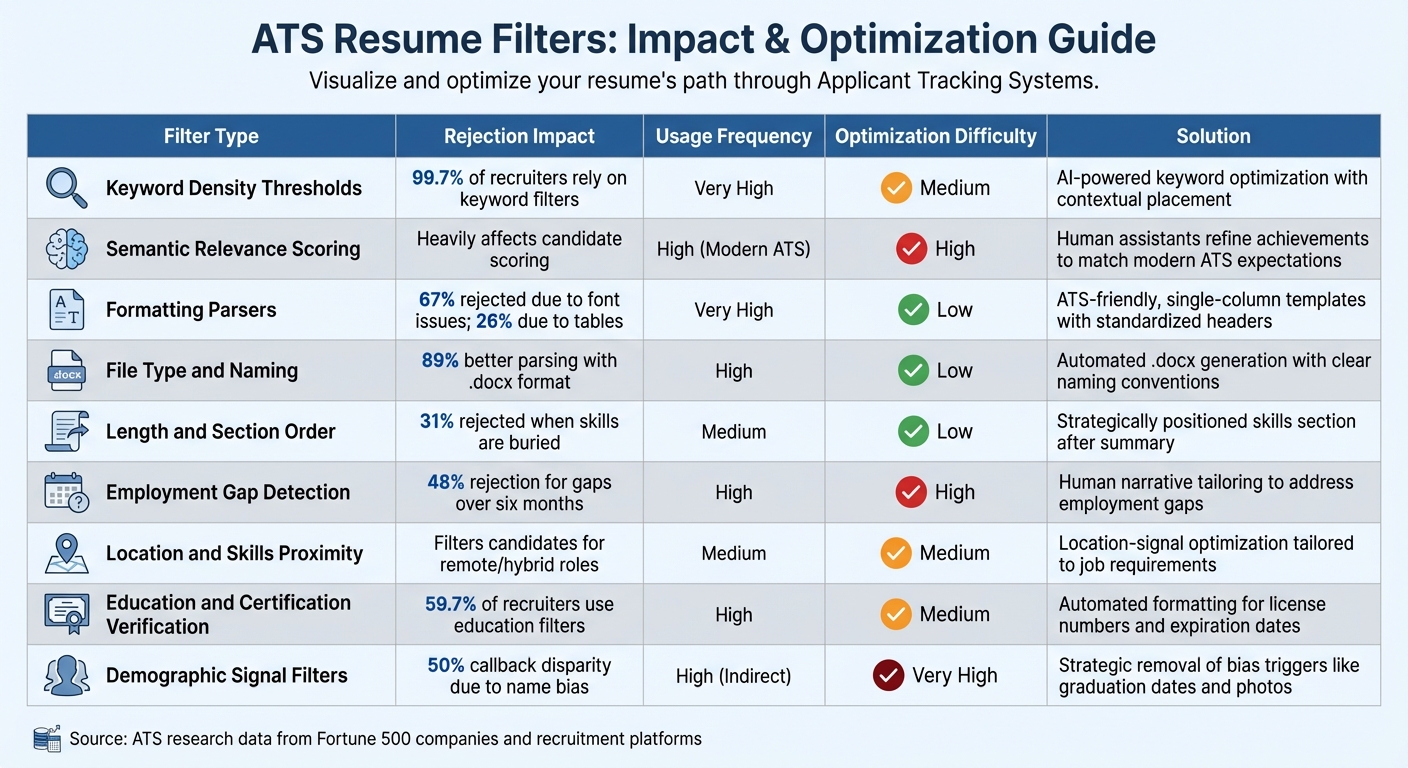
ATS Resume Filters: Impact, Frequency & Optimization Difficulty Comparison
To navigate the complexities of hidden ATS filters, understanding their impact and how challenging they are to optimize can make a significant difference. Below, you'll find a comparison table highlighting nine key filters, ranked by their rejection impact, frequency of use, and the level of difficulty involved in addressing them:
| Filter Type | Rejection Impact | Usage Frequency | Optimization Difficulty | Scale.jobs Solution |
|---|---|---|---|---|
| Keyword Density Thresholds | 99.7% of recruiters rely on keyword filters | Very High | Medium | AI-powered keyword optimization with contextual placement |
| Semantic Relevance Scoring | Heavily affects candidate scoring | High (Modern ATS) | High | Human assistants refine achievements to match modern ATS expectations |
| Formatting Parsers | 67% rejected due to font issues; 26% due to tables | Very High | Low | ATS-friendly, single-column templates with standardized headers |
| File Type and Naming | 89% better parsing with .docx format | High | Low | Automated .docx generation with clear naming conventions (e.g., FirstName_LastName_Resume) |
| Length and Section Order | 31% rejected when skills are buried | Medium | Low | Strategically positioned skills section, placed immediately after the summary |
| Employment Gap Detection | 48% rejection for gaps over six months | High | High | Human narrative tailoring to address employment gaps proactively |
| Location and Skills Proximity | Filters candidates for remote/hybrid roles | Medium | Medium | Location-signal optimization tailored to job requirements |
| Education and Certification Verification | 59.7% of recruiters use education filters | High | Medium | Automated formatting for license numbers and expiration dates |
| Demographic Signal Filters | 50% callback disparity due to name bias | High (Indirect) | Very High | Strategic removal of bias triggers like graduation dates and photos |
Key Insights from the Comparison
Some filters, such as file formatting and naming conventions, are straightforward fixes that can prevent unnecessary rejections. For example, using a single-column layout and the .docx format can significantly improve parsing accuracy. However, more complex filters, like semantic relevance scoring and employment gap detection, demand a deeper level of strategy.
One of the most challenging aspects of semantic relevance scoring is that modern ATS tools don’t just look for keywords - they analyze how those terms are used in context. For example, simply listing "project management" isn’t enough; you need to demonstrate how you applied those skills in your achievements. Similarly, addressing employment gaps effectively requires crafting a thoughtful narrative that automated tools can’t replicate.
"We don't just want to find qualified candidates. We want to filter out candidates who might create problems."
- Head of Talent Acquisition, Major Tech Company
Challenges with High-Difficulty Filters
High-difficulty filters, such as contextual evaluation, demographic signals, and employment gap detection, often intersect with formatting issues, amplifying rejection risks. For instance, if your resume uses a multi-column layout, critical fields like "years of experience" might be misread, causing you to fail both the formatting and experience filters - even if you’re otherwise well-qualified.
This is where Scale.jobs' human-assisted resume services can be invaluable. By combining AI precision with expert career specialists, Scale.jobs ensures your resume not only meets ATS requirements but also resonates with recruiters. Their approach tackles both low-difficulty fixes, like formatting, and high-difficulty challenges, such as crafting narratives for employment gaps or optimizing keyword context.
Conclusion
We've explored how keyword density thresholds, semantic relevance scoring, formatting parsers, file type conventions, section order requirements, employment gap detection, location proximity matching, education verification, duplicate application blockers, and demographic signal filters shape the hiring process behind the scenes. Unlike Jobscan and LazyApply, Scale.jobs combines AI-driven precision with expert human oversight, addressing each of these filters effectively.
The real challenge isn't just navigating ATS systems; it's doing so in a way that retains accuracy and authenticity. As Astley Cervania from Rezi aptly puts it:
"The ATS isn't an enemy you need to outsmart. It's simply software recruiters use to store, search, and filter resumes."
Your ultimate goal is to ensure your resume surfaces during recruiter searches while showcasing measurable achievements that grab attention during the crucial 6–10 second review window. Tackling complex filters like semantic relevance and employment gap detection requires a tailored, narrative-driven approach - something automated tools often fail to deliver. Scale.jobs builds on these strategies, ensuring your resume not only meets ATS standards but also stands out to human recruiters.
With 24-hour turnaround, compatibility across job portals, and transparent proof-of-work screenshots via WhatsApp, Scale.jobs offers the discoverability of ATS optimization without risking formatting errors or bot-flagging. Plus, their flat-fee pricing eliminates recurring subscriptions, and unused credits are refunded - providing a level of transparency that automated tools can't match.
Why Switch to Scale.jobs?
Consider Scale.jobs if:
- Your resume keeps getting rejected by ATS systems, despite your qualifications.
- You need professional support to create narratives that address employment gaps.
- You prefer a one-time payment model with clear proof-of-work delivered via WhatsApp.
- You're applying for multiple roles at the same company and need tailored, role-specific resumes.
- You want experts to handle ATS complexities, so you can focus on networking and interviews.
Decision Summary
Choose Jobscan or LazyApply if:
- You prefer DIY tools for quick keyword optimization.
- You're applying for a large number of roles on a limited budget.
- You're comfortable managing formatting and crafting narratives on your own.
Choose Scale.jobs if:
- You need expertly crafted resumes that pass both ATS filters and recruiter reviews.
- You're targeting high-stakes roles where ATS optimization alone won't suffice.
- You value transparent proof-of-work and dedicated WhatsApp support.
- You want specialists to handle complex filters like semantic scoring and employment gaps.
For a detailed comparison of Scale.jobs versus other tools, refer to the insights above. Don't let hidden ATS filters hold you back - optimize your resume for algorithms while ensuring it appeals to recruiters. Let the experts handle the technicalities so you can focus on building connections and acing interviews.
FAQs
How can I tell if an ATS misread my resume?
When an ATS misinterprets your resume, it may leave out critical keywords from the job description, present unclear content that fails to match ATS standards, or struggle with formatting that disrupts proper parsing. Resumes with intricate designs, absent standard section headers, or missing role-specific keywords are frequently discarded before they even reach a recruiter’s desk. To sidestep these pitfalls, consider using ATS compatibility tools to ensure your resume aligns with ATS requirements. These tools can help you refine formatting, incorporate relevant keywords, and improve your chances of passing the initial screening.
What’s the safest resume format and file type to avoid rejection?
When aiming to avoid ATS rejection, the safest resume format is a simple, ATS-friendly Word document (.docx or .doc) or a basic PDF. Stick to standard fonts like Arial or Times New Roman, use clear and straightforward formatting, and steer clear of graphics, tables, or text boxes. This ensures your resume is easily readable and compatible with automated systems used in the hiring process.
How can I use keywords without being flagged for keyword stuffing?
When adding keywords to your resume, aim for a natural and seamless integration. Place them thoughtfully in sections like skills, work experience, and your professional summary to ensure they fit the context. Avoid cramming or overusing keywords, as applicant tracking systems (ATS) can flag excessive or forced repetition. Instead, focus on using keywords to highlight your qualifications and improve clarity without compromising the readability of your resume. For help refining your resume, consider using an AI resume builder to ensure it aligns with ATS requirements.