How to Use Facebook Groups for Job Search
Use Facebook Groups to uncover hidden job leads, optimize your profile, engage recruiters, and track applications with AI and resume tools.


Facebook Groups are an underutilized resource for job seekers, offering direct access to recruiters, hiring managers, and exclusive job postings that often don’t appear on traditional job boards. With the right approach, you can bypass lengthy application processes and connect directly with decision-makers. This guide covers actionable steps to optimize your Facebook profile, find relevant groups, engage effectively, and track your job applications for better results.
Key Takeaways:
- Optimize Your Profile: Use a professional photo, update your work history, and include industry-specific keywords to make your profile recruiter-friendly.
- Find the Right Groups: Search for niche or location-based groups tailored to your career goals, such as remote roles, industry-specific communities, or visa sponsorship opportunities.
- Engage Thoughtfully: Avoid spamming; instead, contribute value by sharing insights, answering questions, and responding to job posts with personalized messages.
- Track Applications: Use tools like Scale.jobs to manage leads, generate tailored resumes, and stay organized.
- Follow Up Strategically: Consistent, respectful follow-ups can help nurture connections and improve your chances of landing interviews.
By combining the networking power of Facebook Groups with tools like an AI resume builder or a job application service, you can streamline your job search and focus on building meaningful connections. Let’s dive into the detailed steps to make the most of this approach.
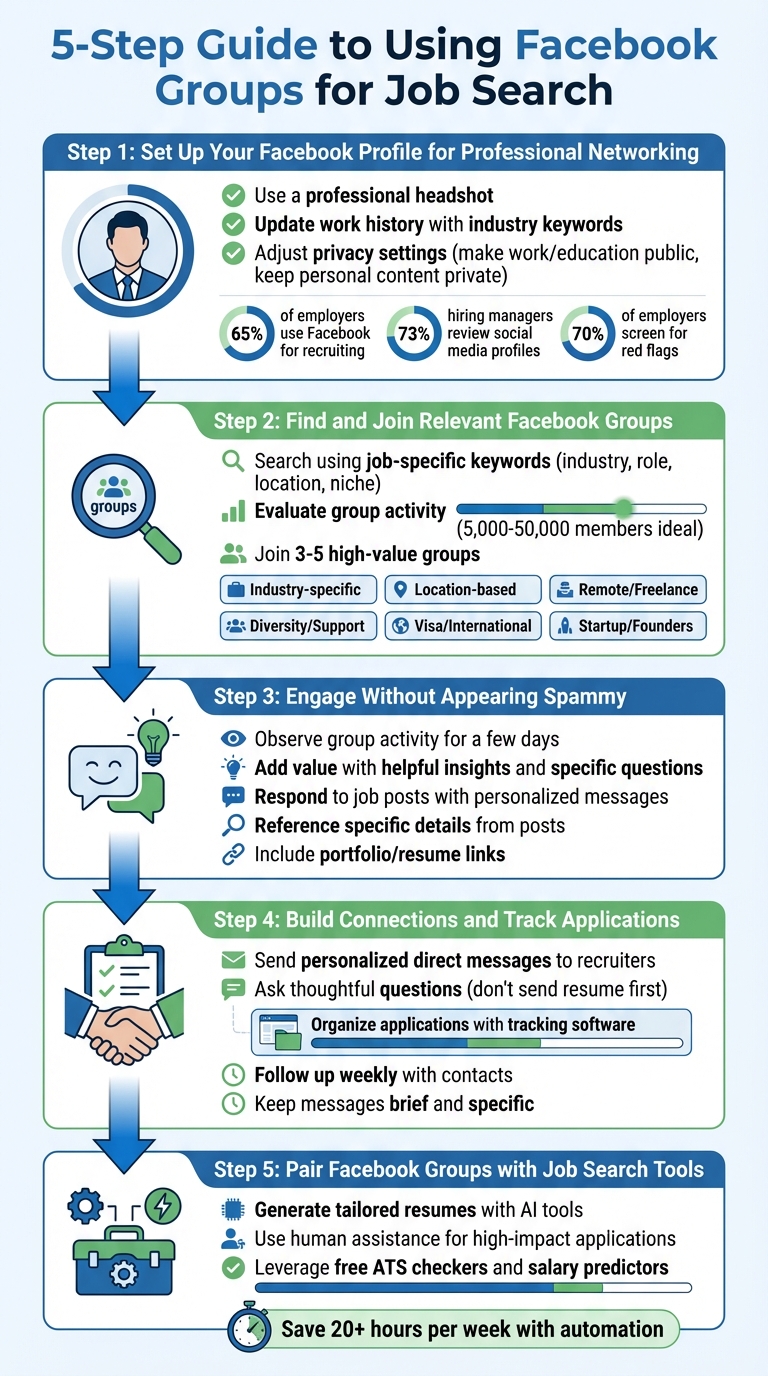
5-Step Guide to Using Facebook Groups for Job Search Success
how i landed freelance clients on Facebook groups (+ my 5 fave facebook groups for finding clients)
Step 1: Set Up Your Facebook Profile for Professional Networking
A well-prepared Facebook profile can be a powerful tool for networking in job-hunting groups. Since 65% of employers use Facebook for recruiting, it's clear that the platform plays a significant role in hiring. Additionally, 73% of hiring managers review social media profiles to assess candidates, and 85% have declined applicants due to what they found online.
Update Your Profile Picture and Work History
Start with a professional headshot - the same type you'd use on LinkedIn. Your cover photo should complement this professionalism, whether it features a clean design, a conference image, or something relevant to your industry.
Fill out your "About" section with accurate and up-to-date information about your current role, industry, education, and skills. Tailor this section to align with your career goals. For instance, if you're aiming for a project management role, adjust your title to something recruiters would search for, like "Project Manager" or "Team Lead", even if your current title is less standardized. Mike Bruni, Partner at Talent Acquisition Strategies, emphasizes:
"If you are actively pursuing a job, your social media persona should convey professionalism and passion for the career you're pursuing."
Write a brief bio - two to three sentences summarizing your expertise and goals. Include links to your portfolio, blog, or professional website if applicable. Review your timeline and remove or hide any posts that might be seen as inappropriate or unprofessional, as 70% of employers screen social media profiles for red flags.
With your profile polished, adjust your privacy settings to ensure only your professional image is visible to recruiters and group members.
Adjust Privacy Settings for Job Search
Use Facebook's "View As" tool to see what your profile looks like to others, particularly recruiters or networking contacts.
In the Privacy Settings, use the "Limit Past Posts" option to restrict old posts from being publicly visible. Set your work history, education, and professional bio to "Public" or "Friends of Friends", while keeping personal content like family photos and your friends list private.
Disable search engine indexing in your Facebook settings to control what appears when someone Googles your name. Test this by searching for yourself in an incognito browser window. You can also set up Google Alerts for your name to stay aware of what's being associated with you online. To manage your audience effectively, create custom lists for personal and professional contacts. This way, you can share industry-related updates with networking contacts while keeping personal posts private. Since 47% of employers are less likely to reach out to candidates they can't find online, maintaining a strategic public presence is crucial.
Once your privacy settings are sorted, focus on making your profile more discoverable by incorporating relevant industry keywords.
Add Industry Keywords to Your Profile
Recruiters often search Facebook using specific keywords, so it's important to include terms that match their searches. For example, if a recruiter searches for "Microsoft Word" and your profile only mentions "Microsoft Office", you might miss out on appearing in their results.
In your "About" section, list job titles, industry-specific terms, certifications, and skills. If you're targeting multiple roles, separate titles with slashes, such as "Project Manager / Senior Project Lead." For certifications, include both acronyms and full names - e.g., "Project Management Professional (PMP)" - to maximize your visibility.
Mention tools and software relevant to your field, such as SAP, AWS, Google Analytics, or Salesforce. Be specific about your location by including your city, state, and nearby areas (e.g., "Oakland, CA" and "East Bay Area") to appear in both localized and broader searches. Tools like Indeed JobTrends can help you identify which skills and terms are currently trending in job descriptions.
If you're unsure how to align your Facebook profile with your resume and cover letter, consider using a professional resume writing service. These services can ensure consistency across all your job search materials, making it easier for recruiters to find and recognize your qualifications.
Step 2: Find and Join Relevant Facebook Groups
With your polished profile from Step 1, the next step is identifying and joining the right Facebook groups. These groups can often connect you directly with hiring managers or recruiters, bypassing the need for traditional application portals.
Use Job-Specific Keywords to Search
Start by entering targeted keywords into Facebook's search bar and selecting the "Groups" tab to filter results. Try phrases like "software engineer jobs", "remote marketing roles", or "H1B sponsorship opportunities", and add your location for more precise results - for example, "data analyst Seattle" or "nonprofit jobs Texas." For niche roles, consider searching Google for terms like "Best Facebook groups for [your job title]" to find curated lists.
| Category | Search Term Examples | Target Audience |
|---|---|---|
| Industry | "Marketing", "Nonprofit", "Ed Tech" | Professionals focused on specific sectors |
| Role | "Software Developer", "Data Analyst" | Specialists looking for specific job titles |
| Location | "Texas Area Jobs", "Seattle Chapter" | Job seekers targeting specific regions |
| Niche/Status | "H1B Visa Support", "Women in Tech" | International or underrepresented talent |
| Work Style | "Remote Digital Jobs", "Freelance Tech" | Remote or flexible work seekers |
Some of the most valuable groups may be "closed" or "private" and won’t appear in standard searches. If this happens, ask colleagues for an invite or search for the group name on Google to find a contact who can help you join.
Evaluate Group Activity Before Joining
Before you hit "Join", take a moment to assess the group’s activity and engagement levels. Groups with 5,000 to 50,000 members often strike the right balance between active job postings and manageable noise. Scroll through recent posts to see if members are actively commenting, sharing advice, and responding to questions, rather than just "liking" posts without interaction.
Check the "About" section or pinned posts to confirm the group’s rules. Some groups ban self-promotion or networking requests, and violating these rules could result in removal. Private or closed groups are usually better moderated, reducing spam and irrelevant content. Look for posts from employers using personal accounts instead of business pages - this often means you can reach out to them directly.
Join a Variety of Groups
To increase your chances of finding opportunities, join a mix of different group types. Industry-specific groups like "AI & Data Science Jobs USA" cater to technical roles, while location-based groups such as "Albert's Job Listings - Bay Area" are excellent for local referrals. Alumni groups from your school or bootcamp can also be goldmines for internal referrals.
| Group Type | Example Group Name | Primary Benefit |
|---|---|---|
| Industry-Specific | AI & Data Science Jobs USA | Access to niche technical roles |
| Location-Based | Albert's Job Listings - Bay Area | Local networking and job referrals |
| Remote/Freelance | Digital Nomad Jobs: Remote Opportunities | Verified remote and freelance work |
| Diversity/Support | Tech Ladies® | Support for women, including a private job board |
| Visa/International | H1B and Visa Tech Jobs Support Group | Recruiters offering sponsorship opportunities |
| Startup/Founders | Startup Jobs and Networking | Direct access to founders and startup roles |
Instead of joining every group you come across, focus on three to five high-value groups. This will keep your feed manageable and help you stay organized. If you’re applying for diverse roles, consider using tools like an AI resume builder to create tailored resumes for each position.
Once you’ve joined these groups, the next step is to engage thoughtfully and strategically without appearing spammy.
Step 3: Engage in Groups Without Appearing Spammy
Recruiters appreciate genuine participation more than self-promotional behavior. The way you interact early on can influence how you're perceived. Start by understanding the group's culture and expectations before diving in.
Observe Group Activity for a Few Days
Spend a day or two observing how the group operates. Review the most recent 20 posts to get a sense of what resonates with members - whether it’s discussions about industry trends, job openings, or professional advice. Check the group's rules to see if they have specific times for self-promotion, such as "Promo Wednesday", where you can share your portfolio or job search updates. As Zack Gallinger, Founder of Talent Hero Media, advises:
"If you immediately start posting jobs, you will be seen as a spammer and it's likely you'll be quickly banned from the group."
Notice the tone and level of formality in conversations. Some groups may favor casual chats, while others stick to a strictly professional tone. Look for patterns: Do members use first names? Do they share personal stories, or is the focus strictly on business? This observation phase also helps you identify key contributors and moderators who could become valuable networking contacts.
Add Value with Helpful Insights and Specific Questions
Once you’ve familiarized yourself with the group’s dynamics, start contributing in meaningful ways. Build credibility by sharing helpful information before you ask for assistance. For example, you can comment on posts seeking advice, share relevant news from your field, or provide constructive feedback on someone’s work. If you spot a question you can answer, offer detailed tips or point them to useful resources. Instead of saying, "I’m looking for work", you could respond to a post about interview strategies with: "Practicing the STAR method really helped me secure my last position - here’s a template I used."
When asking for help, keep your questions specific and focused. For instance, instead of "Does anyone know of any jobs?", try: "I’m a data analyst with three years of experience in healthcare analytics - are there any companies in Austin hiring for remote roles with H1B sponsorship?" This specificity not only highlights your expertise but also makes it easier for others to assist. Before posting, search the group’s history to see if your question has already been addressed - this prevents unnecessary repetition.
You can also introduce yourself with a casual, non-promotional icebreaker like: "Hi, I’m Sarah, a UX designer. I’d love to hear how others in this group transitioned into this field." This approach helps you connect with others without appearing overly eager. As the Skillroads Blog points out:
"Establishing human connection is completely fine, but don't be too 'thirsty' and try to sale under false colors of 'friendship.'"
Respond to Job Posts with Personalized Messages
When you come across a job posting that aligns with your skills, respond with a tailored message that highlights your qualifications. Reference specific details from the post and explain how your background matches the role. For example: "I have four years of experience working with Python and AWS, and I recently led a migration project similar to what you’re describing. I’d love to discuss this opportunity further - here’s my portfolio." Always include a link to your portfolio or an ATS-optimized resume for easy access.
Avoid the temptation to copy-paste generic replies across multiple job posts - recruiters can spot this quickly. If you’re applying to several roles, consider using tools to create customized resumes for each application. For high-priority roles, services like professional resume writing can help you craft ATS-friendly documents that align with the job’s specific requirements, giving you an edge over less-prepared candidates.
Finally, ensure your Facebook profile reflects your professional persona. Recruiters often check profiles after receiving comments, so keep your public content polished. Avoid inappropriate posts, controversial opinions, or anything unprofessional. Treat your profile as a "mini-LinkedIn" by showcasing your work experience and including industry-relevant keywords in your bio.
Step 4: Build Connections and Track Your Applications
Now that you've engaged with groups thoughtfully, it's time to focus on deepening personal connections and managing your job leads effectively. Facebook thrives on social interaction, so personal outreach is key. Start by engaging publicly - comment on posts, offer advice, or answer questions. These small interactions make transitioning to direct messages feel more natural rather than coming across as unsolicited.
Send Direct Messages to Recruiters and Members
When you reach out through Messenger, make your message specific and relevant. For instance: "Hi Sarah, I noticed your post about the data analyst role at TechCorp. I have three years of experience working with Python and AWS, and I recently led a migration project similar to what you mentioned. Would you be open to a quick chat about the position?" This approach shows you're paying attention and not just sending generic messages. Emilie Aries, Founder and CEO of Bossed Up, highlights the importance of genuine connection:
"Our community of courageous women on the rise believe in 'lifting as we climb' by sharing practical guidance, resources, and job opportunities, too."
Avoid sending your resume or application in the first message - this can often be seen as spam. Instead, ask a thoughtful question about the role or company culture. If you're reaching out to a group admin or an active member for an introduction, mention something specific they said or a shared interest. Keep your messages brief and to the point. While templates can help streamline your outreach, make sure each message feels personalized.
Once you've initiated conversations, it's time to organize your leads so you can stay on top of responses and next steps.
Organize Applications with Tracking Software
Facebook Groups can generate a lot of job leads, and without a system in place, it's easy to lose track of follow-ups. Use tools like the Job Applications Tracker from Scale.jobs to log your leads. This tool also includes features like a free Resume ATS Checker and Salary Predictor to help you stay efficient and accurate during your job search.
For high-priority roles you find through Facebook Groups, consider using professional resume services to create tailored, ATS-friendly documents. This ensures your resume aligns with the job's specific requirements, giving you a better chance of standing out compared to candidates who submit generic applications.
Follow Up with Contacts Weekly
Once your applications are organized, set aside dedicated time each week to follow up and keep the momentum going. Spend about an hour reviewing group feeds for new leads and sending follow-up messages. A simple message like, "Hi Mark, just checking in - any updates on the marketing manager role?" keeps you on the radar without being pushy. Allison Esposito, Founder of Tech Ladies, underscores the value of personal connections:
"In person you make a connection that is so much more lasting, there's almost no replacement for that."
Consistent, respectful follow-ups help nurture professional relationships. Use your tracker to log follow-up attempts and avoid over-messaging. If you don't hear back after two follow-ups spaced a week apart, it's best to move on. Persistence is important, but overdoing it can harm your reputation within the group.
Step 5: Pair Facebook Groups with Job Search Tools
Once you’ve built strong connections in Facebook Groups and organized your follow-ups, it’s time to make your application process more efficient. When a recruiter shares a job posting, responding quickly is essential. Instead of spending too much time on manual customizations, you can combine your Facebook Group activity with job search tools to streamline the process and increase your chances of standing out.
Generate Tailored Resumes and Cover Letters with AI
Speed is crucial when applying for jobs shared in Facebook Groups. With Scale.jobs' AI Assistant Pro, you can create ATS-optimized resumes and cover letters in seconds. This tool uses job-specific keywords to craft documents that match the role perfectly. Instead of dedicating 30–45 minutes to adjust your resume for every application, you can generate a customized, optimized version with just one click.
The free plan allows you to create two AI-generated resumes daily, while the AI Assistant Pro plan, available for $9/month during the launch, offers unlimited customizations. This feature is particularly helpful when juggling multiple job leads from various groups. For roles that demand a personal touch, however, human input might still be the better option.
Use Human Assistance for High-Impact Applications
For certain opportunities - like direct recruiter posts, referrals from group admins, or roles at companies you’ve thoroughly researched - personalized attention can make all the difference. Scale.jobs' reverse recruiter service offers human assistants who handle the entire application process for you. They submit your materials through the appropriate portals, attach tailored documents, and even provide proof-of-work updates via WhatsApp.
This service costs $199 for 250 applications and can save you over 20 hours a week. By using this flat-fee service, you can focus on networking and relationship-building while avoiding the hassle of managing multiple application portals. There are no recurring charges, making it a one-time investment for your job search campaign.
Leverage Free Tools for Resume and Salary Insights
Before applying to jobs you find in Facebook Groups, take advantage of Scale.jobs' free Resume ATS Checker. This tool evaluates your resume to ensure it can pass automated screening systems, offering tips on formatting, keyword usage, and overall compatibility.
Additionally, if you receive a job offer through your Facebook Group connections, the free Salary Predictor can help you determine whether the compensation aligns with your role, location, and experience. These tools can give you an edge in both the application and negotiation stages of your job search.
Conclusion: Combine Facebook Groups with scale.jobs for Better Results
Facebook Groups are a fantastic way to build connections and discover hidden job opportunities - something many platforms, like lazyapply.com, struggle to replicate. What sets Facebook Groups apart is their ability to foster genuine relationships and uncover leads that might not appear on traditional job boards. However, pairing this networking approach with a tool like scale.jobs can take your job search to the next level.
By following a clear strategy - optimizing your profile, joining the right groups, engaging meaningfully, creating direct connections, and using advanced job search tools - you can strike a balance between networking and efficient job applications. This combination not only simplifies your efforts but also saves you a significant amount of time.
Let’s face it: job hunting can feel overwhelming. While Facebook Groups help you navigate the hidden job market, applying to multiple opportunities remains critical. This is where scale.jobs steps in. Their service, powered by a mix of human and AI support, can handle up to 30 applications daily, giving you more time to focus on networking, attending virtual events, and following up on promising leads.
When you get a referral or a direct job lead from a group member or recruiter, scale.jobs ensures you’re ready. They provide tailored, ATS-friendly resumes and cover letters, along with human assistance for high-priority applications. Plus, you’ll get proof-of-work screenshots sent directly to you via WhatsApp, all with a clear and upfront pricing model.
Why Choose scale.jobs?
- Human assistant support: Skilled virtual assistants manage your applications, offering more than just automation.
- ATS-ready documents: Customized resumes and cover letters designed to pass automated screening systems.
- Flat-fee pricing: No subscriptions - pay once ($199 for 250 applications, $299 for 500, or $399 for 1,000 applications).
- Real-time updates: Stay informed with proof-of-work screenshots and time-stamped confirmations via WhatsApp.
- Refundable credits: Any unused credits are refunded, so you only pay for completed work.
By outsourcing the repetitive task of submitting applications, you can reclaim over 20 hours each week. This time can be better spent nurturing relationships and following up on referrals - activities that often lead to interviews. Combining the community-driven insights from Facebook Groups with the efficiency of scale.jobs creates a well-rounded job search strategy that maximizes both your network and your application success.
Use Facebook Groups to tap into hidden opportunities and make meaningful connections. Then, rely on scale.jobs to ensure every lead turns into a polished, ATS-optimized application. Together, these tools form a powerful system to boost your chances of landing interviews without exhausting yourself.
FAQs
Which Facebook Groups are actually worth joining for my field?
When looking for Facebook groups that align with your career aspirations, it’s important to choose ones that cater specifically to your industry and professional goals. For tech professionals, some excellent options include Tech Jobs and Career Network, AI & Data Science Jobs USA, and Remote Work & Freelance Tech Jobs. These groups provide a mix of job postings, networking opportunities, and even direct interactions with recruiters. To maximize your experience, prioritize groups that are active, well-moderated, and have a membership base of at least 5,000 people, ensuring a steady flow of useful updates and discussions.
How do I DM recruiters without sounding spammy?
When reaching out to recruiters on Facebook, it's important to strike the right balance between professionalism and approachability. Start by engaging with their posts or comments to create an initial connection. When crafting your message, make it personal - mention how you came across their profile or posts and explain, briefly, what interests you about their work or how your skills align with their focus. Keep the tone polite and your message concise, focusing on either offering value or seeking advice. Avoid sending generic or overly pushy messages, as these can come across as spammy. Instead, aim for a thoughtful and genuine approach.
How can I track Facebook Group job leads without missing follow-ups?
Tracking job leads in Facebook groups can be a game-changer if you approach it strategically. Start by enabling notification alerts for new posts in relevant groups - this ensures you’re among the first to see potential opportunities. Engage actively with group members by commenting thoughtfully and sharing insights; this helps you build connections and establish credibility.
Make sure your Facebook profile is well-optimized, showcasing your professional skills and experience. A strong introduction post in the group can also make a big impact - briefly highlight your expertise and the type of roles you’re seeking to encourage responses and referrals.
Finally, stay consistent. Regularly monitor group activity for new openings and follow up quickly on leads. Prompt action can often be the difference between landing a role and missing out.