How to Check If Your Resume Is ATS Friendly
Test and fix your resume for ATS: use scanners, simplify formatting, and add job-specific keywords to pass filters.


Over 75% of resumes are filtered out by Applicant Tracking Systems (ATS) before recruiters even see them. This means your resume might not fail because of your qualifications but due to formatting errors or missing keywords. ATS tools scan resumes for keywords, structure, and readability, so making your resume machine-readable is critical.
Key Steps to Make Your Resume ATS-Friendly:
- Test Your Resume: Use tools like Jobscan, Resume Worded, or scale.jobs to check ATS compatibility. Aim for a match score of 75% or higher.
- Fix Formatting Issues: Use simple layouts, standard section headers, and avoid tables, graphics, or text boxes. Save as a .docx or text-readable PDF.
- Add Relevant Keywords: Match job descriptions by using exact terms for skills, tools, and certifications without overloading your resume.
Why It Matters:
ATS systems rely on algorithms to evaluate resumes, prioritizing keywords and clear formatting. Tools like Jobscan and scale.jobs help optimize your resume, with scale.jobs offering tailored job application assistance and management for those who need extra support.
This guide walks you through actionable steps to ensure your resume gets past ATS filters and into the hands of recruiters. Whether you prefer DIY tools or managed services, making your resume ATS-friendly is essential for job search success.
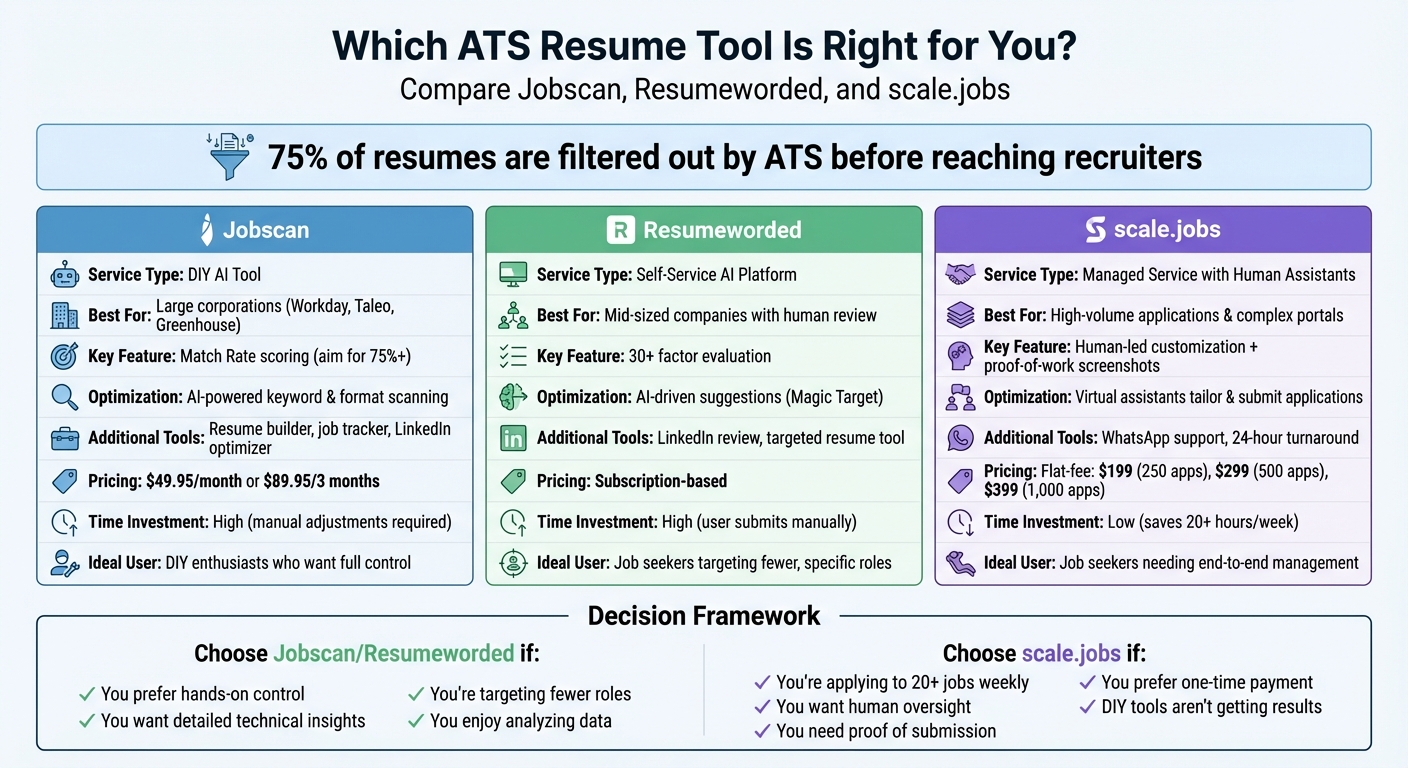
Jobscan vs Resumeworded vs scale.jobs: ATS Tool Comparison
Your Resume Is Getting REJECTED by ATS (Here’s How to FIX IT) + FREE TEMPLATE INSIDE!
Step 1: Test Your Resume with ATS Scanner Tools
ATS scanner tools simulate systems like Workday, Greenhouse, and Taleo to analyze and organize your resume data. These tools let you upload your resume, compare it to a job description, and provide a match score along with detailed feedback. They highlight formatting issues, missing keywords, and parsing errors, helping you address potential problems before submitting your application. By testing your resume early, you can make adjustments to improve its compatibility with ATS systems.
Using Jobscan, Resume Worded, and scale.jobs ATS Checker
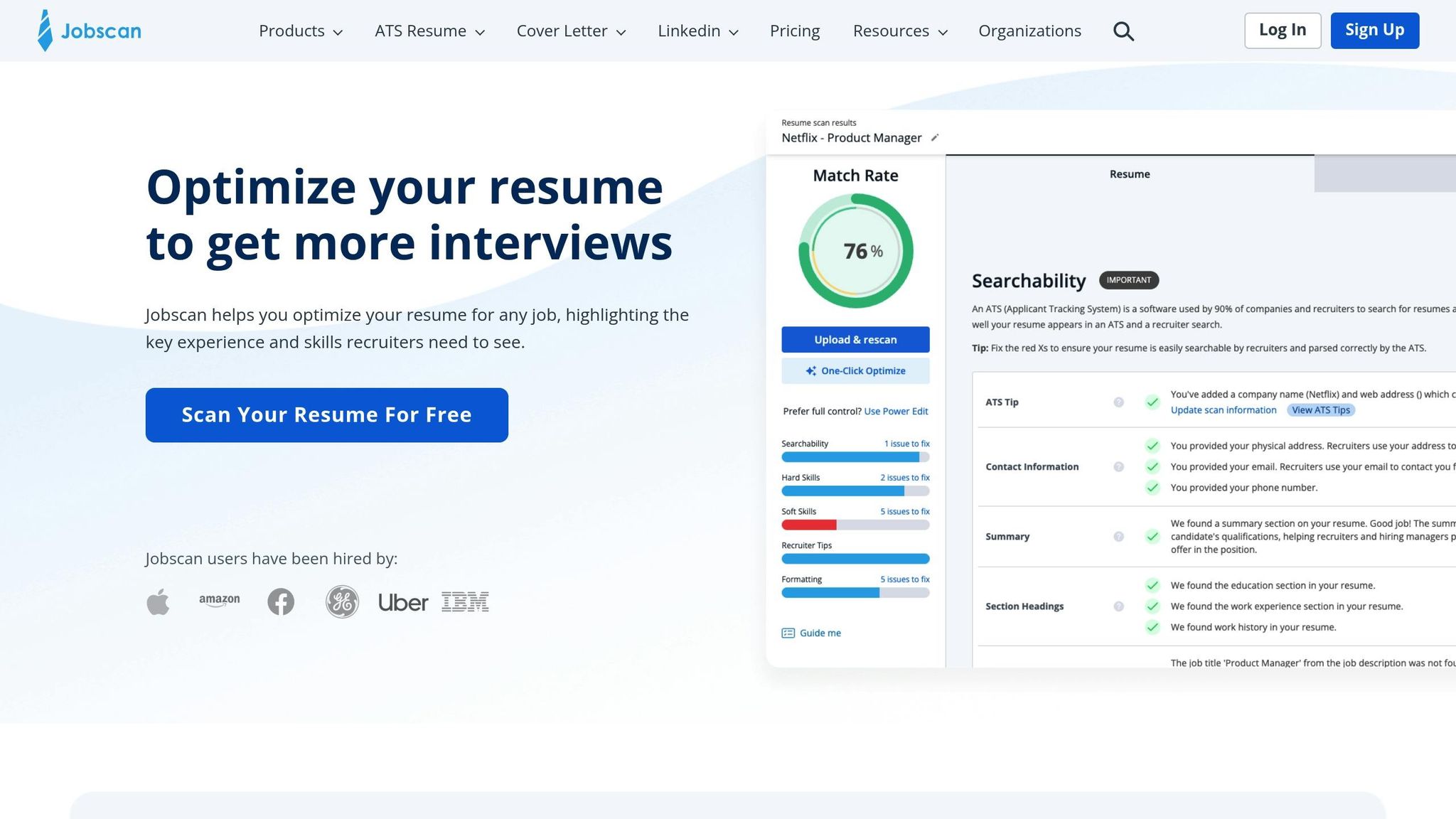
Start by uploading your resume and the job description into these tools. Jobscan provides a "Match Rate", with a goal of at least 75%, while Resume Worded evaluates over 30 factors, including hard skills, certifications, and work experience. If you encounter a "Section Recognition Failure", it means the ATS might completely skip over that section.
scale.jobs' free ATS checker offers something unique: it combines automated scanning with a human review. This human touch ensures your resume isn't just ATS-friendly but also appealing to recruiters. For roles that demand precision - like senior positions, competitive tech jobs, or roles requiring specific credentials - having a professional review can make a big difference in both readability and effectiveness.
Once you've run your resume through these tools, the next step is to understand and act on the feedback they provide.
Interpreting Match Scores and Feedback Reports
After scanning, follow these steps to make sense of your match scores and feedback. If your match score is below 75%, it likely means you're missing important keywords or have formatting issues. For example, Jobscan uses exact phrase matching, so if the job description mentions "Jira" but your resume only says "project management software", it won't count as a match. Resume Worded, on the other hand, places more weight on required qualifications than preferred skills - a missing certification could lower your score by 15–20 points, even if your experience is strong.
Pay attention to specific issues flagged in the feedback. If the tool can't detect your phone number or email, neither can the ATS. Check if the text in your PDF resume is selectable - if it isn’t, the ATS won’t be able to read it. For instance, in Q2 2024, UX designer Maya R. applied to 42 positions using a split-column resume that scored 94% on Jobscan. Despite the high score, she didn’t receive any callbacks because the ATS couldn’t parse her portfolio link. After switching to a single-column format and increasing her Resume Worded score from 62% to 88%, she landed 7 interviews in just two weeks (Source: Alibaba Product Insights, 2026).
Testing your resume with multiple tools helps uncover hidden formatting issues. If there’s a big score difference between Jobscan and Resume Worded, it might indicate problems like embedded fonts, text saved as images, or unconventional section headers. Identifying and fixing these issues can significantly improve your chances of getting noticed.
Step 2: Fix Resume Formatting to Avoid ATS Errors
After reviewing the scanner feedback, it's time to adjust your resume's format so the ATS (Applicant Tracking System) can accurately process all its elements. Even the best keywords won't help if the ATS can't read your resume properly. Common issues include overly complex layouts, unconventional section headers, and visual elements that ATS systems tend to ignore.
Use Simple Layouts and Standard Section Headers
Stick to a clean, single-column layout. Avoid multi-column designs, as they can misalign critical details like your work history and contact information. Use straightforward section headers like Work Experience, Skills, and Education. Fonts such as Arial or Calibri work best for ensuring high OCR (Optical Character Recognition) accuracy. Creative or non-standard titles like "My Journey" or "What I Bring" might seem unique, but they often confuse ATS systems, causing them to skip important sections entirely.
To test your formatting, save your resume as a .txt file and review it. If the text appears jumbled or out of order, it’s time to simplify your layout. If you're applying for a high-stakes role, consider using an AI resume builder to ensure your resume is both ATS-friendly and appealing to recruiters.
Avoid Tables, Graphics, and Non-Standard File Types
ATS systems struggle with certain formatting elements, so it’s crucial to avoid these pitfalls. Tables are a major issue, as ATS reads them column-by-column, which can separate job titles from dates or other key details. Similarly, text boxes, images, icons, and skill badges are often ignored entirely, leaving gaps in your application.
Place key details like your phone number, email address, and portfolio links in the main body of your resume. Headers and footers are frequently skipped by ATS software. Always save your resume as a .docx file for optimal compatibility. If you're submitting a PDF, make sure it’s text-selectable by testing it in a text editor - highlight the text line-by-line to confirm.
When listing skills, use plain text in a simple, comma-separated format, such as "Figma, Adobe XD, Python." Avoid using graphical elements like skill bars or icons, as these cannot be read by ATS systems. The simpler and more text-based your resume is, the better the ATS will parse it, increasing your chances of moving forward in the hiring process.
Step 3: Add the Right Keywords Without Overstuffing
Once you’ve streamlined your resume’s layout, the next step is to strategically incorporate the right keywords. These keywords are the specific skills, tools, certifications, and action verbs that align with the job description. Applicant Tracking Systems (ATS) rely on these exact matches to evaluate resumes, so using the employer’s language is crucial. However, it’s equally important to avoid making your resume sound unnatural or overloaded with jargon. The goal is to strike a balance that ensures your resume passes ATS scans and resonates with recruiters.
Pull Keywords Directly from Job Descriptions
Start by analyzing the job description for recurring terms. Look for the top five nouns that often represent hard skills, tools, or certifications - such as "cloud migration", "PCI compliance", or "Salesforce CRM." Then, note the top three action verbs like "developed", "implemented", or "mentored" that reflect the job’s expectations. Use the exact phrasing from the job description whenever possible. For instance, if the job mentions "managed P&L", avoid rephrasing it as "oversaw budget."
Place these keywords in the most relevant sections of your resume. For instance, technical skills like "Python" should appear in the Skills section rather than being buried in a project description. Similarly, if the job emphasizes phrases like "led cross-functional agile teams", integrate that wording into a bullet point under your experience. A practical formula to keep it natural is: "Verb + Scope + Outcome". For example: "Upgraded Salesforce CRM for 12 sales reps, reducing lead response time by 40%."
"When candidates use 'optimized,' 'scaled,' or 'orchestrated' in the same order the JD [job description] does, our ATS auto-ranks them higher - even if the rest of the resume is plain." – David Kim, Director of Recruiting, Clearline Fintech
Check Keyword Placement with Plain Text Preview
After adding keywords, ensure they’re visible to ATS tools by previewing your resume in plain text. Select text line-by-line in your PDF to confirm that it’s readable. If the text isn’t selectable or appears out of order, the ATS may struggle to parse your resume. Another option is to paste your resume into a plain text editor like Notepad to see how it looks without formatting. If your keywords appear jumbled or are missing entirely, you may need to simplify your layout further.
For additional guidance, tools like Jobscan and Resumeworded can help identify issues like "Section Recognition Failures", which occur when keywords are placed in non-standard headers or overly complex designs. If you’re applying to highly competitive roles and want to ensure your resume is ATS-friendly, consider using a professional resume writing service that specializes in optimizing resumes for ATS systems. The goal is to make your resume easy for the system to process so it reaches the recruiter’s hands.
Jobscan vs. scale.jobs: Which ATS Tool Should You Use?
When it comes to optimizing your resume for Applicant Tracking Systems (ATS), you have two distinct paths: tackle the process yourself or delegate it to a managed service. Jobscan and scale.jobs offer fundamentally different solutions. Jobscan is a do-it-yourself tool that analyzes your resume, provides a Match Rate, and suggests keywords for manual updates. On the other hand, scale.jobs combines ATS scanning with hands-on support from human assistants who tailor your resume and submit applications for you. Deciding which approach aligns with your needs can save time and improve your job search results.
What Jobscan Does Well
Jobscan shines in providing detailed insights to refine your resume. By comparing your resume to specific job descriptions, it identifies gaps, suggests improvements, and even detects which ATS the employer uses - be it Workday, Greenhouse, or Taleo. A Match Rate of 75% or higher is recommended for competitiveness, and the tool flags formatting issues that could hinder ATS compatibility. As Kelsey Purcell, CPRW, explains, "Jobscan identifies technical formatting issues (like tables or headers) that can cause an ATS to reject a resume."
One of its standout features is the "One-Click Optimize" option, allowing users to instantly apply or reject AI-generated keyword suggestions, with real-time updates to the Match Rate. Beyond resume scanning, Jobscan includes additional tools like a resume builder, cover letter generator, job tracker, and LinkedIn optimizer. If you provide the company name and job URL, it offers tailored tips for the specific ATS being used.
For job seekers who prefer to understand the technical nuances of ATS parsing and want to remain hands-on with their applications, Jobscan’s data-driven approach is a strong fit. Pricing starts at $49.95 per month or $89.95 for three months, which averages out to $29.99 per month.
Why scale.jobs Wins for Most Job Seekers
While Jobscan focuses on precision and self-service, scale.jobs takes a more hands-on approach by offering personalized support. The platform pairs ATS scanning with human assistants who customize your resume for each job and manually submit applications, ensuring your materials bypass bot-flags and reach recruiters. This eliminates the time spent tweaking keywords and re-uploading resumes. Additionally, you receive proof-of-work screenshots, showing exactly what was submitted, when, and how - adding a layer of transparency that automated tools often lack.
Here’s what sets scale.jobs apart:
- Human oversight: Virtual assistants refine your resume for each job without overusing keywords.
- Tailored documents: Resumes and cover letters are customized for each posting and delivered within 24 hours.
- Platform compatibility: Human assistants navigate corporate ATS systems, smaller job boards, and company career pages that automated tools often struggle with.
- Flat-fee pricing: One-time payments cover 250, 500, or 1,000 applications ($199, $299, or $399), with refunds for unused credits.
- Real-time support: Receive updates and proof-of-work screenshots via WhatsApp, ensuring full visibility into your application process.
For job seekers managing high application volumes or complex submission requirements, scale.jobs offers a streamlined solution. Pairing this service with a professional resume writing service can further optimize your base resume before tailoring begins. The combination of human involvement and flat-fee pricing saves you over 20 hours per week, freeing up time for networking and interview preparation.
| Feature | Jobscan | scale.jobs |
|---|---|---|
| Primary User Type | DIY job seekers | Those needing managed support |
| Optimization Method | AI-powered keyword & format scanning | Human assistants + tailored resumes |
| ATS Focus | Technical parsing & system-specific tips | Full-service application submission |
| Verification | Match Score updates | Proof-of-work screenshots |
| Pricing Model | Monthly/Quarterly Subscription ($49.95/month) | Flat-fee per service ($199–$399) |
| Additional Tools | Resume Builder, Job Tracker, LinkedIn Optimizer | WhatsApp support, managed applications |
Who Should Use Jobscan vs. scale.jobs
Use Jobscan if you’re a DIY enthusiast who wants full control over your job applications. It’s ideal for those who aim to understand ATS parsing issues, tweak their LinkedIn profiles, and focus on a smaller number of highly targeted roles. Jobscan works best when you have the time to manually adjust your resume after each scan.
Choose scale.jobs if you’d rather delegate resume tailoring and application submissions. It’s perfect for job seekers who value human oversight, need proof that applications are being submitted correctly, or want to avoid recurring subscription fees. This service is especially helpful for candidates applying to a large number of positions or handling complex application requirements, like navigating niche job boards or company-specific portals.
Switch to scale.jobs if you’ve been using Jobscan but aren’t seeing results, are spending over 20 hours a week on applications, or need assurance that your resumes are reaching recruiters. Scale.jobs’ flat-fee model avoids the ongoing costs of subscription tools, which can exceed $600 annually.
Ultimately, both tools aim to help your resume get past ATS and into the hands of recruiters. The choice boils down to whether you prefer detailed, hands-on control or managed, full-service support.
Decision Summary: Opt for Jobscan if you want to fine-tune your resume yourself and enjoy analyzing data. Choose scale.jobs if you need human oversight, faster application processing, and a transparent, managed service.
Resumeworded vs. scale.jobs: Comparing ATS Optimization Tools
Resumeworded and scale.jobs take very different approaches to ATS optimization. Resumeworded is a self-service platform that uses AI to evaluate your resume across more than 30 factors, such as parsing accuracy, career progression, and measurable impact. It provides instant feedback, leaving you to make adjustments independently. On the other hand, scale.jobs pairs you with human assistants who customize your resume for specific roles and handle the application process for you. They even provide proof-of-work screenshots showing exactly what was submitted. While Resumeworded focuses on AI-based analysis, scale.jobs relies on human expertise and offers flat-fee packages that include dedicated WhatsApp support and transparency. Both aim to help your resume clear automated filters, but they do so in very different ways.
What Resumeworded Does Well
Resumeworded stands out for its detailed, data-driven feedback, making it a great option for job seekers who prefer to fine-tune their resumes themselves. Its "Score My Resume" tool evaluates your resume against 12 enterprise-grade ATS systems, including Workday, Taleo, and Greenhouse. It highlights problems like unconventional section headers or design elements that could confuse ATS software.
The "Magic Target" feature helps prioritize essential qualifications over optional ones by suggesting smarter keyword usage. Instead of stuffing keywords, it recommends phrases like "Led Agile sprints (Scrum, Jira)" to balance automated scoring with human readability. Additionally, the LinkedIn Review tool helps optimize your LinkedIn profile with better headlines and summaries to improve visibility in recruiter searches. The "Targeted Resume" tool makes tailoring quick and straightforward.
"I've reviewed over 12,000 parsed resumes. The ones that get fast-tracked aren't the flashiest - they're the clearest. One-line bullets. Consistent tense. Verbs that match the job description's action language." - David Kim, Director of Recruiting, Clearline Fintech
For those applying to mid-sized companies where resumes are manually reviewed after an initial ATS screening, Resumeworded’s line-by-line diagnostics and grammar checks provide a solid starting point. The platform’s features are based on testing across 127 job applications in industries like tech, finance, and marketing. But how does scale.jobs compare when it comes to managing the entire application process?
Why scale.jobs Wins for Managed Job Applications
While Resumeworded helps you identify what to fix, scale.jobs takes the workload off your hands entirely. Human assistants customize your resume for each job, fill out applications on your behalf, and provide proof-of-work screenshots for full transparency. This hands-on approach saves you the 20+ hours per week that many job seekers spend tailoring resumes and completing applications.
Here’s why scale.jobs stands out:
- Human-led customization: Virtual assistants ensure your resume is optimized for ATS systems while still appealing to recruiters, avoiding keyword overuse.
- End-to-end application management: Assistants handle everything, from navigating corporate ATS platforms to submitting applications on niche job boards.
- Proof-of-work transparency: Receive WhatsApp updates and screenshots detailing when and how applications were submitted, removing guesswork.
- Flat-fee pricing: Pay once for 250, 500, or 1,000 applications ($199, $299, or $399), with refunds for unused credits. No subscription required.
- Quick turnaround: Custom resumes and cover letters are ready within one business day for each job posting.
For job seekers juggling a high volume of applications or dealing with complex submission processes, pairing scale.jobs with a professional resume writing service ensures your base resume is polished before customization begins. This combination addresses both the technical ATS requirements and the time-consuming task of applying, allowing you to focus on networking and interview prep.
| Feature | Resumeworded | scale.jobs |
|---|---|---|
| Service Model | Self-service AI platform | Managed service with human assistants |
| Resume Tailoring | AI-driven suggestions (Magic Target) | Human-led customization per job |
| Application Process | User submits manually | Service submits for the user |
| Feedback Type | Instant scoring and line-by-line reports | Proof-of-work screenshots |
| ATS Focus | Parsing diagnostics and keyword weighting | Full-service submission with ATS optimization |
| Pricing Model | Subscription-based | Flat-fee per campaign ($199–$399) |
Who Should Use Resumeworded vs. scale.jobs
Choose Resumeworded if you enjoy editing your own resume and want detailed, AI-generated feedback on grammar, parsing, and keyword alignment. It’s a great fit for job seekers targeting a smaller number of roles and who don’t mind manually tailoring their resumes after each scan. Resumeworded is ideal for understanding the technical aspects of ATS optimization and taking a DIY approach.
Go with scale.jobs if you want to delegate the entire process of resume tailoring and application submission. It’s perfect for those who value human oversight, need proof of submission, and prefer a one-time payment model. This service is especially useful for candidates applying to numerous positions, dealing with intricate application systems, or working on tight deadlines.
Switch to scale.jobs if you’ve been using Resumeworded but aren’t seeing results, are spending too much time on applications, or want assurance that your resumes are reaching recruiters. With its flat-fee pricing and human-led process, scale.jobs ensures your applications bypass ATS roadblocks and land in front of hiring managers.
When deciding between these tools, consider your needs for automation versus hands-on assistance. Both serve distinct purposes, but one may align better with your job search strategy.
Summary: Pick Resumeworded if you want to refine your resume independently with AI-guided insights. Opt for scale.jobs if you need comprehensive application management, human-driven customization, and guaranteed proof-of-work.
Conclusion: Making Your Resume ATS-Friendly and Choosing the Right Tool
Creating an ATS-compatible resume involves more than just formatting - it’s about ensuring your resume aligns with how applicant tracking systems process and filter applications. To make your resume ATS-friendly, focus on clear section headers like "Work Experience", single-column layouts with text-based content, and incorporating keywords directly from the job description in a natural and relevant way. Considering that over 75% of resumes get filtered out by these systems, prioritizing functionality over design is crucial.
Once your resume is optimized for ATS, the next step is deciding how to approach your job applications. Different tools cater to different needs:
- Jobscan is a strong choice for those targeting large corporations with rigid ATS platforms like Workday or Taleo, where keyword density plays a major role in initial screenings.
- Resumeworded works well for mid-sized companies where resumes are reviewed by human recruiters who value factors like clear career progression, semantic relevance, and measurable achievements.
Both tools are geared toward a DIY approach, requiring you to manually adjust and submit your applications after analyzing their feedback.
scale.jobs offers a completely different solution. Instead of providing suggestions for you to implement, their team of human assistants customizes your resume for each role, handles the application process, and sends proof-of-work screenshots via WhatsApp. This service is tailored for job seekers applying to numerous positions, navigating challenging application portals, or working under tight time constraints. With flat-fee pricing starting at $199 for 250 applications, scale.jobs eliminates recurring subscription costs and even refunds unused credits.
To maximize results, pairing this service with a professional resume writing service ensures your resume is polished and ATS-ready before the customization process begins. This combination addresses both the technical requirements of ATS systems and the often-overwhelming task of managing multiple applications.
When to Choose Each Option
- Jobscan or Resumeworded: Ideal if you prefer a hands-on approach, want detailed insights into keyword alignment, and enjoy managing the application process yourself.
- scale.jobs: Best for those seeking end-to-end application management, human-led resume customization, and proof that their applications are reaching recruiters.
Why Switch to scale.jobs?
- You’re applying to dozens of roles weekly and need to streamline the process.
- Tailoring resumes and completing applications is consuming 20+ hours of your week.
- You want human oversight and transparency, with proof-of-work for every application.
- DIY tools like Jobscan or Resumeworded aren’t leading to callbacks, even with high match scores.
- You prefer flat-fee pricing and want to avoid recurring subscription costs.
Final Thoughts
Whether you choose Jobscan or Resumeworded for their AI-driven insights or scale.jobs for its comprehensive, human-led application management, the decision ultimately depends on your specific needs. If you enjoy managing the process yourself, the DIY tools give you control and detailed diagnostics. But if you’re looking to save time and delegate the entire process, scale.jobs offers a complete solution to streamline your job search.
FAQs
Can an ATS reject my resume even with a high match score?
Yes, an ATS might still reject your resume even with a high match score. This can happen if your resume has formatting problems, misses crucial keywords, or includes overly complex layouts that the system struggles to interpret. To increase your chances of passing ATS filters, keep your resume straightforward, stick to standard formatting, and incorporate relevant keywords throughout the document.
Should I submit a PDF or .docx for ATS systems?
When applying for jobs, it's usually best to submit your resume as a .docx file. This format is widely recognized and works well with Applicant Tracking Systems (ATS), ensuring the software can process your information accurately. While PDFs might appear polished and professional, they can occasionally lead to formatting problems, which might affect how ATS software reads your resume. To avoid potential issues, sticking with a .docx file is the safer choice.
How many keywords is too many on an ATS-friendly resume?
When crafting an ATS-friendly resume, there isn't a strict limit on the number of keywords you should include. The key is to use relevant, job-specific keywords in a natural way throughout your resume. Stuffing it with excessive keywords can make it feel forced and may actually harm your chances. Strive for a balance - align your resume with the job description while ensuring it remains clear, readable, and appealing to both the ATS and human recruiters.