Why Cheap AI Apply Tools Fail on Workday Applications
Cheap AI apply tools often fail on Workday due to parsing/formatting errors, keyword mismatches, and bot-detection—manual ATS‑optimized submissions reduce rejections.

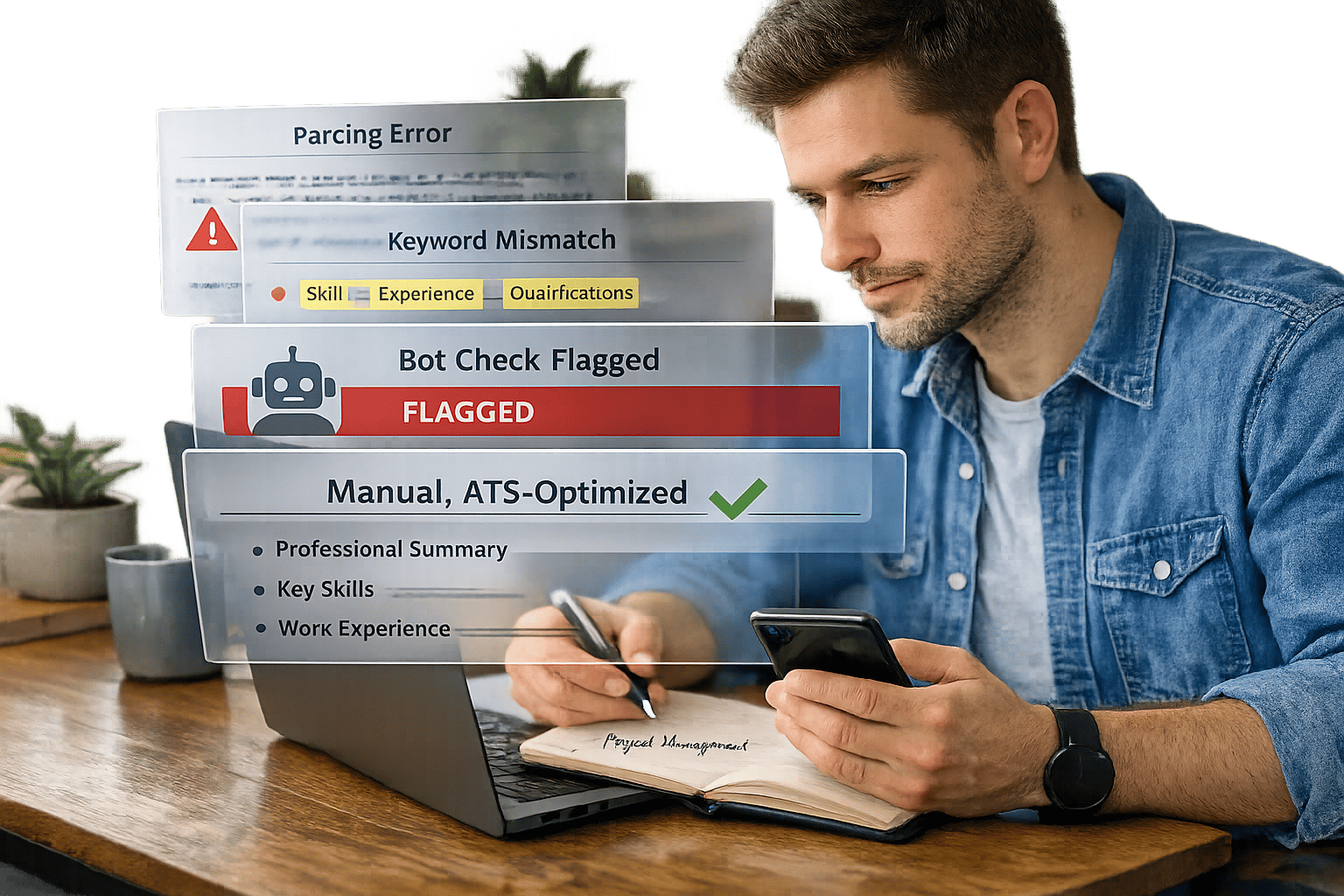
When applying for jobs through Workday, using low-cost AI tools like LazyApply or AIApply can hurt your chances of success. These tools often fail to meet Workday's strict Applicant Tracking System (ATS) standards, leading to formatting errors, keyword mismatches, and generic applications that get flagged or rejected. Workday's ATS is designed to rank resumes based on job-specific criteria, and poorly optimized submissions often fall into the "Probably Not" tier, where they’re ignored by recruiters.
Key takeaways:
- 43% of resumes are rejected due to formatting issues like tables or columns, which confuse Workday’s parser.
- 22% of rejections occur before qualifications are reviewed, often due to bot detection or poorly formatted responses.
- Generic keyword stuffing and automation patterns from budget tools trigger red flags in Workday's system.
To improve your chances, consider human-assisted services like Scale.jobs, which manually optimize resumes and applications for ATS compatibility, ensuring accurate keyword use and proper formatting. Unlike automated tools, these services avoid bot detection risks and provide proof of submission via time-stamped screenshots. Investing in the right application strategy can make the difference between rejection and landing an interview.
3 Reasons Cheap AI Apply Tools Fail on Workday
Let’s take a closer look at the three major challenges these low-cost tools face.
Keyword Mismatches and Parsing Errors
Budget-friendly AI tools like LazyApply and AIApply often rely on generic keyword stuffing, which rarely aligns with the specific requirements of platforms like Workday. For instance, if a job description specifies "SAP SuccessFactors", these tools might replace it with a broader term, failing to match the exact language. Considering that only 34% of applicant tracking systems (ATS) can interpret synonyms or related terms, this mismatch can lower your application score before it even reaches a recruiter.
Formatting is another stumbling block. Many of these tools generate resumes with complex layouts, such as tables, which Workday’s parser often struggles to process. Resumes with intricate formatting are more likely to face rejection compared to plain text .docx files. When Workday can’t accurately extract details like job titles or work history, your application risks being deprioritized.
Now, let’s discuss how the lack of personalization adds another layer of difficulty.
Missing Personalization
Template-driven tools churn out generic resumes that fail to meet Workday’s machine learning standards. Instead of tailoring achievements to match the job description - such as emphasizing accomplishments like "optimized talent acquisition pipelines" - these tools often rely on vague phrases like "managed hiring." This lack of specificity makes your resume blend into a sea of generic applications.
For early-career professionals, this issue is particularly damaging. Generic resumes rarely lead to callbacks, whereas personalized submissions can increase the chances of moving forward by two to five times.
Automation Triggers Red Flags
Fully automated tools often create patterns that Workday’s anti-bot systems can easily detect. For example, rapid submission times and repetitive field entries can flag your application as potential spam. In fact, hidden filters account for roughly 22% of rejections before your qualifications are even reviewed.
Another issue is data mismatches between your resume and the application form. These inconsistencies can prompt recruiters to manually review your submission, leading to delays or outright disqualification. This highlights the importance of human oversight, as provided by Scale.jobs. Their professional resume services ensure every submission is manually verified for ATS compatibility, reducing the risk of rejection.
| Feature | Budget AI Tools (LazyApply, AIApply) | Human-Assisted (Scale.jobs) |
|---|---|---|
| Workday Compatibility | Low (<50% accuracy) | High (manual verification) |
| Keyword Approach | Generic stuffing | Contextual tailoring |
| Bot Detection Risk | High (automated patterns) | Zero (manual submission) |
| Formatting | Template-based (higher rejection) | ATS-optimized (lower rejection) |
| Parsing Accuracy | Content often lost | Verified for readability |
Scale.jobs vs. LazyApply, Find My Profession & Other Competitors
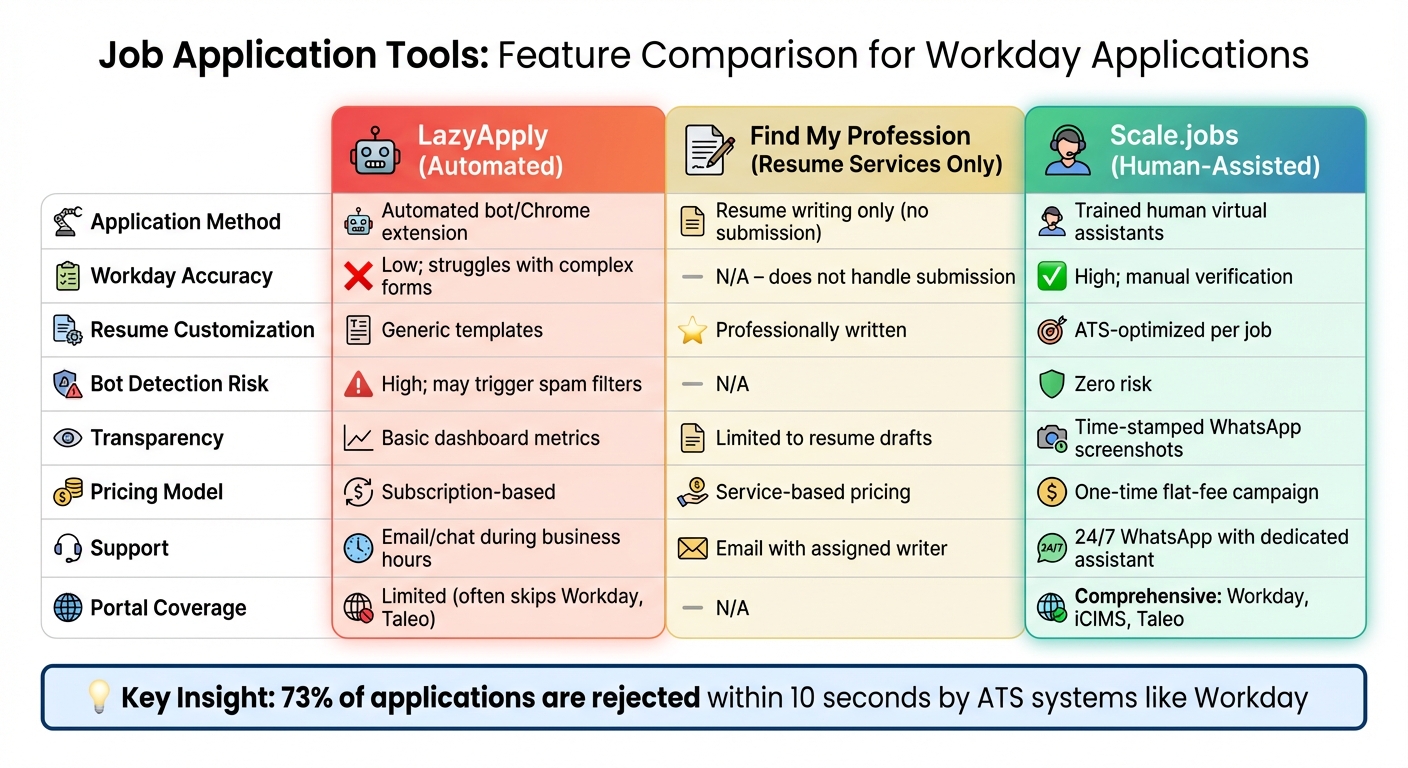
Comparison of Job Application Tools for Workday ATS Compatibility
Why Scale.jobs Excels with Workday Applications
When dealing with Workday’s strict parsing rules and advanced anti-bot filters, Scale.jobs stands out by relying on a human-assisted approach rather than automated bots like LazyApply or resume-only services like Find My Profession. Here’s how Scale.jobs addresses common challenges:
- Manual Completion of Every Field: Trained assistants meticulously fill out each Workday field, avoiding common errors caused by automated parsing.
- ATS-Optimized Resume Customization: Resumes are tailored to each job posting, using precise language from the role description. For example, if the job mentions "SAP SuccessFactors", that exact term is included rather than a generic alternative.
- No Bot-Detection Risks: Since submissions are handled manually, there’s no chance of triggering Workday’s anti-bot filters, which can result in a 22% rejection rate for automated tools.
- Transparent Process: Time-stamped WhatsApp screenshots provide clear proof of each submission, so you know exactly what’s been done.
- Flat-Fee Pricing with Refunds for Unused Credits: Campaign bundles (250, 500, or 1,000 applications) come with a one-time fee, and you get refunds for any unused credits - no recurring subscriptions to worry about.
What Competitors Offer
LazyApply is effective for quickly applying to straightforward job boards. If you’re targeting entry-level roles on platforms like Indeed or LinkedIn, its Chrome extension can handle bulk applications fast and includes a basic analytics tool to track submission counts.
Find My Profession focuses on resume writing services and personalized career consultations. Their expert career coaches create polished resumes and offer strategic guidance. However, you’ll still need to handle the application submissions yourself, including navigating Workday portals manually.
Here’s a quick comparison of the features offered by these services:
Feature Comparison: Scale.jobs vs. Competitors
| Feature | LazyApply (Automated) | Find My Profession (Resume Services Only) | Scale.jobs (Human-Assisted) |
|---|---|---|---|
| Application Method | Automated bot/Chrome extension | Resume writing only (no submission) | Trained human virtual assistants |
| Workday Accuracy | Low; struggles with complex forms | N/A – does not handle submission | High; manual verification |
| Resume Customization | Generic templates | Professionally written | ATS-optimized per job |
| Bot Detection Risk | High; may trigger spam filters | N/A | Zero risk |
| Transparency | Basic dashboard metrics | Limited to resume drafts | Time-stamped WhatsApp screenshots |
| Pricing Model | Subscription-based | Service-based pricing | One-time flat-fee campaign |
| Support | Email/chat during business hours | Email with assigned writer | 24/7 WhatsApp with dedicated assistant |
| Portal Coverage | Limited (often skips Workday, Taleo) | N/A | Comprehensive: Workday, iCIMS, Taleo |
Who Should Use LazyApply
- You’re applying to a high volume of simple job postings (on platforms like Indeed or LinkedIn) where speed is more important than customization.
- You’re targeting entry-level roles with minimal application complexity.
- You don’t mind manually fixing errors or resubmitting flagged applications.
- You want a low-cost, subscription-based service.
Who Should Use Find My Profession
- You’re looking for a professionally written resume but prefer to handle applications on your own.
- You value strategic career coaching and personalized guidance.
- You’re comfortable manually navigating Workday and other ATS portals.
- You’re willing to invest $395–$795 for resume services.
Who Should Choose Scale.jobs
- You’re targeting mid-to-senior roles at large companies that use Workday.
- You need guaranteed ATS-friendly submissions without the risk of bot detection.
- You want proof of submission quality through time-stamped screenshots.
- You prefer a one-time payment model with the option for refunds on unused credits.
- You don’t have time to manually complete lengthy Workday applications.
Switch to Scale.jobs If...
- Workday rejections are a recurring issue: Manual submissions eliminate parsing errors and bot-related flags.
- You need clear proof of your applications: Time-stamped screenshots show exactly what was submitted.
- You’re applying to 250+ roles across multiple ATS systems: Flat-fee pricing ($750–$2,500) with refunds for unused credits can save you money compared to monthly subscriptions.
- You want round-the-clock support: Dedicated WhatsApp access ensures immediate assistance, unlike email-only support during business hours.
- You value human oversight: Trained assistants review every submission, ensuring each meets ATS requirements and avoids common mistakes.
Better Alternatives to Cheap AI Tools for Workday
How to Optimize Your Resume for Workday
When preparing your resume for Workday, precision is key. Workday's parser works best with specific section headings like Professional Summary, Core Competencies, Professional Experience, Education, Certifications, and Technical Skills. Using these exact terms ensures that your qualifications are accurately parsed.
Stick to a single-column layout and standard fonts such as Arial, Calibri, or Times New Roman in 11–12pt size. Avoid multi-column designs, which can mix up job titles, dates, and descriptions due to Workday's horizontal reading pattern. Always save your resume as a .docx file to maintain proper formatting.
Tailor your resume to match the job description word-for-word. For example, if the job post mentions "Project Management Professional (PMP)", include both the full phrase and the abbreviation. Similarly, use terms like "international affairs" instead of substituting them with "global affairs." Place your contact information in the main body rather than in headers or footers, and use a consistent MM/YYYY date format to ensure accurate calculation of your experience.
Before submitting, test your resume by pasting it into a plain text editor, like Notepad. This helps identify any formatting issues that might confuse Workday's parser. Avoid using graphics, logos, tables, or icons, as these elements can appear as blank spaces or jumbled text. Proper formatting is crucial - around 75% of resumes are rejected by ATS systems before reaching a recruiter.
These adjustments set the stage for the next step: leveraging human-assisted services for applications.
Using Human-Assisted Application Services
For a more precise approach to Workday applications, services like Scale.jobs offer virtual assistants who manually complete every field. This method bypasses the errors and risks associated with automated tools. Each assistant customizes your resume to align with the specific job posting. For instance, if the job description mentions "SAP SuccessFactors", that exact term will appear in your application.
Unlike automated tools such as LazyApply, which may struggle with Workday's advanced parsing and anti-bot measures, human assistants ensure compliance with ATS requirements. They also provide time-stamped WhatsApp screenshots of each submission, giving you clear proof of what was submitted and when. This transparency eliminates the ambiguity often associated with automated dashboards that only show submission counts.
Scale.jobs offers flat-fee pricing, with packages ranging from $199 to $1,099 for 250–1,000 applications. This pricing model avoids recurring subscriptions, and dedicated WhatsApp support ensures personalized help throughout the process.
Human-assisted services go beyond just filling out forms. They address career transitions, employment gaps, and other nuances that automated tools might overlook. This personalized touch becomes critical when your resume reaches a recruiter after passing through the ATS.
For those considering professional resume writing services, pairing a polished resume with human-assisted submissions can significantly enhance your chances of success on platforms like Workday.
DIY Tools vs. Human Assistance: When to Use Each
Deciding between DIY tools and human-assisted services depends on your specific needs. DIY tools work well for entry-level roles in industries like retail, hospitality, or tech startups, which often use simpler ATS platforms such as Greenhouse or Lever. These systems have straightforward application processes, making DIY tools effective for submitting 10–20 applications per week.
On the other hand, human-assisted services are ideal for competitive mid-to-senior roles, positions with visa sponsorships (like H‑1B, F‑1, or TN), or applications through complex systems like Workday, iCIMS, and Taleo. Workday's strict parsing rules and anti-bot filters make human assistance essential for avoiding errors. While DIY tools may achieve only 50% accuracy on Workday forms and risk triggering spam filters, human assistants ensure every field is completed correctly, eliminating these risks entirely.
For those submitting 250 or more applications across multiple ATS systems, the time saved can be substantial. By reclaiming 20+ hours each week, you can focus on networking and preparing for interviews - activities that directly impact your job search success. Additionally, human-assisted services provide detailed transparency, so you always know the status of your applications - something automated dashboards often fail to offer.
Conclusion: Choosing the Right Tool for Workday Applications
Workday's Applicant Tracking System (ATS) operates on stringent rules that go beyond what generic automation can handle. With its precise parsing requirements, knockout questions, and anti-bot detection measures, it's no surprise that 73% of applications face rejection within the first 10 seconds - often before a human even reviews them. While tools like LazyApply and Simplify offer mass submission capabilities, they often fall short on platforms like Workday due to issues like keyword mismatches, improper formatting, and generic submissions that trigger algorithmic filters. This makes human oversight an essential factor for success.
The best tool for your job application efforts depends on your specific needs. For those targeting 5–10 entry-level roles on simpler platforms like Greenhouse, a do-it-yourself approach to resume optimization might work. However, for competitive mid-to-senior positions, especially at Fortune 500 companies where Workday is prevalent, human-assisted services can significantly improve your chances compared to the approximate 50% accuracy rate of fully automated tools. Here's a breakdown of when to consider switching from generic AI tools to tailored, human-assisted solutions.
Decision Summary: Which Tool to Use When
- Affordable AI tools: Ideal for straightforward platforms like Greenhouse or Lever, especially when applying to entry-level roles in industries such as retail, hospitality, or tech startups with simpler hiring processes.
- Mass submission tools like LazyApply or Simplify: Suitable if you're applying to multiple platforms and are willing to invest time in manually reviewing and correcting submissions. However, their effectiveness on Workday is limited, with success rates hovering around 50%.
- Scale.jobs: Best suited for applications to Workday-heavy companies, especially Fortune 500 firms, roles requiring visa sponsorship (e.g., H‑1B, F‑1, TN), or situations involving rapid rejections that suggest algorithmic filtering. Scale.jobs employs trained human assistants to handle applications, avoiding common pitfalls like formatting errors. Their transparent pricing model (ranging from $199 to $1,099 for 250–1,000 applications) and time-stamped WhatsApp screenshots provide a level of accountability that automated dashboards lack.
Switch to Scale.jobs If...
- You're experiencing quick rejections: Instant rejections often signal issues with keyword alignment or formatting that human reviewers can fix.
- You're applying to 20+ positions at Workday-using companies: Workday's intricate account setup and field-specific formatting requirements demand a level of precision that basic automation tools can't achieve.
- You have a non-traditional career path or are changing industries: Automated tools often struggle to translate diverse experiences into the specific language Workday systems require. Human reviewers can bridge this gap effectively.
- You're applying for roles with strict qualifications or certifications: Knockout questions and experience thresholds often lead to auto-rejections. Human-assisted services can ensure these are addressed correctly, minimizing the risk of rejection.
- You need proof of submission: Unlike automated dashboards that simply tally submissions, Scale.jobs provides time-stamped evidence for each application, offering unmatched transparency.
FAQs
How can I tell if Workday rejected my resume for formatting vs keywords?
When a resume gets rejected, it often boils down to two main issues: formatting and keywords. Formatting rejections occur when resumes use complex layouts, graphics, or inconsistent styles that applicant tracking systems (ATS) struggle to process. On the other hand, keyword rejections happen when your resume lacks the job-specific terms that the ATS is programmed to look for.
To tackle these problems, stick to clean, standard formatting that is ATS-friendly. Avoid fancy designs, images, or unconventional fonts. Additionally, make sure your resume includes relevant keywords from the job description. You can test your resume using ATS checkers to ensure it meets both formatting and keyword criteria. These tools can help you identify areas to improve before submitting your application.
What resume file type and layout works best for Workday parsing?
When creating a resume for Workday, a straightforward text-based format works best. Use clear headings and bullet points to organize information. Save the file as a Word document (.docx) or a plain PDF. Avoid using intricate designs, graphics, or unusual formatting to ensure the system accurately processes and identifies keywords.
How do I avoid Workday bot-detection when applying at scale?
When applying through Workday, it's essential to prioritize creating applications that feel genuine and personalized instead of depending entirely on generic automation. Many AI-powered tools stumble because of issues like formatting mistakes, irrelevant keywords, or language that feels overly templated. To improve your application's success rate, try blending human input with AI assistance. This approach can help ensure your application has ATS-friendly formatting, uses appropriate keywords, and feels uniquely tailored to the role. Stick to simple layouts, use standard fonts, and avoid adding graphics - these small adjustments can significantly lower the chances of rejection and increase the likelihood of your application passing initial screenings.