Why ATS Rejects Most AI-Applied Resumes
Most AI resume builders fail ATS due to complex formatting, generic language, and missing keywords; learn practical fixes and testing tips.

AI resume builders are marketed as tools to help job seekers navigate hiring systems. However, many fall short when it comes to Applicant Tracking Systems (ATS). These systems, used by nearly all Fortune 500 companies and 83% of employers, scan resumes for formatting, keywords, and structure. Unfortunately, most AI-generated resumes fail to meet these standards, resulting in rejections.
Key issues include:
- Formatting Errors: Multi-column layouts, graphics, and decorative elements confuse ATS, causing critical information to be missed.
- Generic Language: AI tools often use templated phrases that lack the precision needed to match job descriptions.
- Keyword Gaps: Resumes that don’t include exact job-specific terms are ranked lower or excluded entirely.
To improve your chances:
- Use simple, ATS-friendly templates with standard fonts and clear sections.
- Tailor your resume to each job by mirroring keywords from the description.
- Test your resume with ATS checkers to ensure proper parsing.
AI tools can assist in drafting resumes, but human oversight is essential to refine content and ensure accuracy. Services like Scale.jobs combine automation with expert input to help candidates succeed.
Your Resume Is Getting REJECTED by ATS (Here’s How to FIX IT) + FREE TEMPLATE INSIDE!
How ATS Works
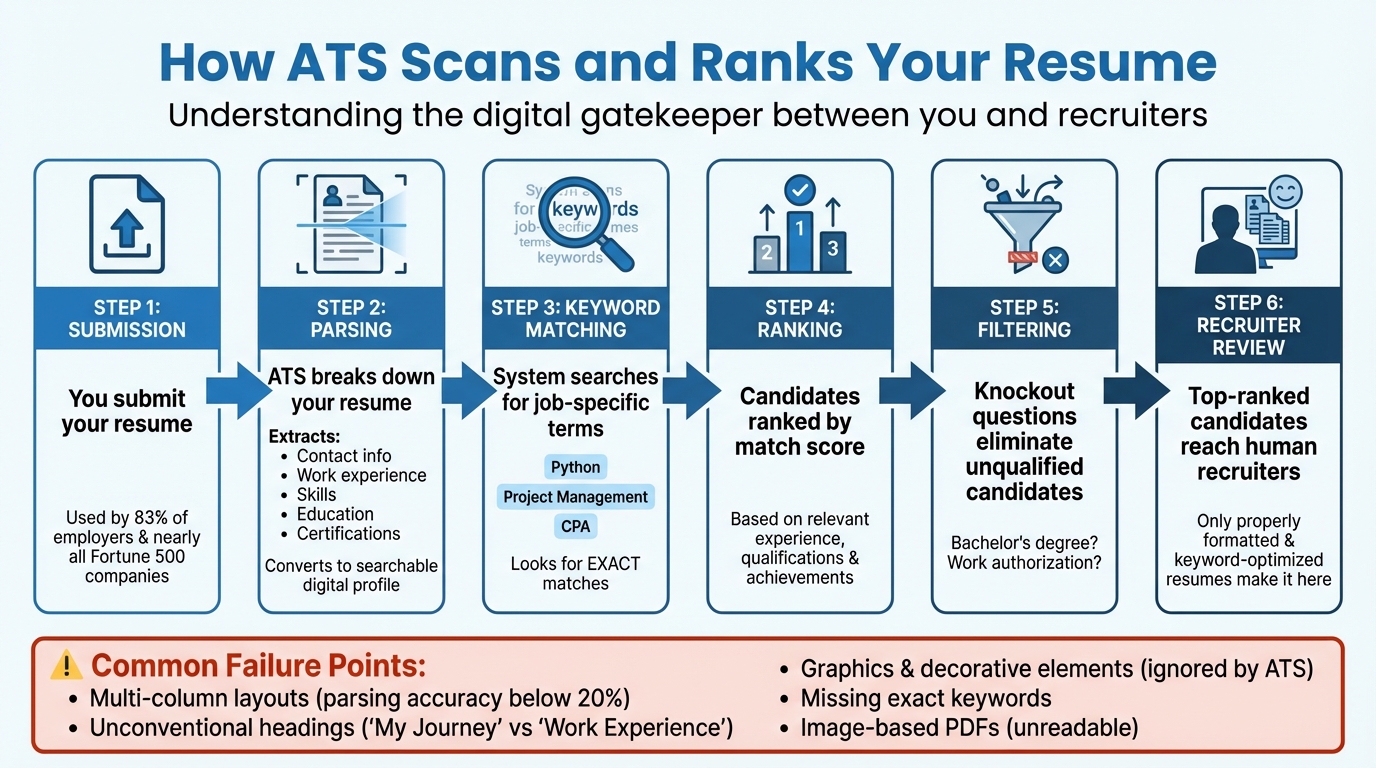
How ATS Scans and Ranks Your Resume: The Complete Process
What ATS Does
An Applicant Tracking System (ATS) acts as a digital gatekeeper between your resume and the recruiter’s desk. When you submit your application, the ATS doesn’t just store your resume - it breaks it down through a process called parsing, which extracts key details.
This parser scans your resume to pinpoint information like your contact details, work experience, skills, education, and certifications. It then converts this data into a searchable digital profile. Recruiters use this database to search for candidates by entering specific keywords from the job description - words like "Python", "Project Management", or "Certified Public Accountant (CPA)." Based on how well your profile matches these keywords, the system ranks you against other candidates.
Some ATS platforms go a step further, evaluating candidates by their relevant experience, qualifications, and achievements. They may also use knockout questions - simple yes/no filters like "Do you have a bachelor’s degree?" or "Are you authorized to work in the U.S.?" - to automatically exclude applicants who don’t meet basic requirements. These features illustrate why many AI-generated resumes struggle to perform well.
"The Applicant Tracking System is the central nervous system of today's recruitment world, and mastering it is no longer optional - it's essential." - Resumly
What ATS Looks For
ATS parsers are highly literal and rely on standard resume formatting to function properly. They expect predictable headings like "Work Experience", "Education", and "Skills." If you use unconventional labels like "My Journey" or "Where I've Been", the system may fail to categorize your information correctly, leaving your profile out of recruiter searches. This is one of the key reasons AI-generated resumes often fall short.
Formatting issues are another common pitfall. Multi-column layouts, for example, confuse ATS parsers, which read horizontally across the page instead of vertically. This can jumble job titles, dates, and descriptions into an unreadable mess. Some highly designed templates have been shown to deliver parsing accuracy below 20%, meaning most of the resume’s content never makes it into the recruiter’s database.
To avoid these issues, stick to single-column layouts, use standard fonts like Arial or Calibri, and save your resume in text-based formats such as .docx or text-based PDFs. Avoid placing contact information in headers or footers, as many systems ignore these sections entirely. Additionally, scanned documents saved as PDFs are treated as images and cannot be read by most ATS platforms. While these design choices might seem plain, they ensure your resume’s content is accurately processed and visible to recruiters - an essential step as we dive into optimization strategies in the next section.
Why ATS Rejects AI-Generated Resumes
AI resume builders often fall short when it comes to passing Applicant Tracking Systems (ATS). The problem isn't automation itself - it's that many AI-powered tools prioritize flashy designs and generic phrasing over clarity and precision. This approach often leaves resumes lacking the specific keywords and structure that ATS systems rely on to screen candidates effectively.
Formatting Problems
One of the biggest hurdles for AI-generated resumes is their formatting. These tools frequently produce layouts that ATS systems struggle to process. In fact, tests on resumes labeled as "ATS-friendly" have shown that platforms like Workday can lose more than half of the content during parsing.
Elements like graphics, logos, and decorative icons are particularly problematic. ATS algorithms simply ignore these visual features, treating them as blank spaces. This means that entire sections of your qualifications might not even make it into the recruiter's database.
"When you have systems on the other end trying to transcribe and annotate these resumes, they often get tripped up on something as simple as a blue background that make it impossible to read." - Amit Bhatia, Co-founder, Datapeople
File format issues add another layer of complexity. Many AI tools export resumes as image-based PDFs or use non-text formats, which ATS systems can't easily process. As Luc Lemerez, Lead Developer at Rezi, puts it:
"PDFs, the universal resume format, were built for printing, not structured data, and ATS stumble without it."
Generic Language
Beyond formatting hiccups, the language used in AI-generated resumes is another major drawback. These tools often rely on templated phrases that lack the specificity required by ATS systems. While they might sprinkle in some industry buzzwords, they frequently miss the mark on tailoring the language to match the job description.
For example, an AI tool might write "global affairs" instead of "international affairs", even when the latter is specifically mentioned in the job posting. Since ATS algorithms often look for exact matches, even small deviations like this can prevent your resume from being flagged as a strong candidate. Additionally, overused soft skills like "team player" or "problem-solving" rarely add value unless they're explicitly requested in the job listing.
Missing Keywords
Perhaps the most critical flaw of AI-generated resumes is their failure to include the precise keywords that ATS systems prioritize. These systems rank candidates by scanning for specific terms - such as certifications, technical skills, or educational credentials. If your resume doesn't include these exact phrases, your application may receive a low match score and never reach a recruiter's desk.
Inaccuracies also play a role. For instance, writing "BES" instead of spelling out "Bachelor of Environmental Science (BES)" or using non-standard job titles can trigger filters that disqualify your application. With over 98% of Fortune 500 companies and about 66% of large employers using ATS software, getting the keywords right is essential to advancing in the hiring process.
How to Fix AI-Generated Resumes for ATS
Avoid the dreaded resume black hole by fine-tuning your AI-generated resume to meet Applicant Tracking System (ATS) standards. Poor formatting and generic language often lead to rejections, so making these adjustments is essential.
Use ATS-Friendly Templates
Start by ensuring your resume layout is ATS-compatible. These systems work best with simple, single-column formats and standard fonts like Arial, Calibri, or Georgia. Steer clear of multi-column designs, sidebars, or decorative elements, as they can confuse ATS parsers and cause important sections to be overlooked.
Stick with traditional section headings such as "Work Experience" and "Skills." Creative alternatives like "My Journey" or "What I Bring to the Table" might sound appealing but can disrupt ATS parsing. Additionally, make sure your contact details are embedded in the main body of the document rather than in headers or footers. For maximum compatibility, save your resume as a .docx file. While PDFs are often acceptable, Word documents remain the safer choice.
To check if your formatting is ATS-friendly, paste your resume into Notepad. If the text appears in a logical order without any garbled characters or missing sections, your resume is likely ready for ATS parsing.
Add Job-Specific Keywords
Generic AI-generated content won’t cut it when ATS software scans for exact keyword matches. Tailor your resume by mirroring the language used in each job description. For example, if a job posting specifies "international affairs", don’t substitute it with "global affairs" - even small differences can lower your match score.
Use the job description as your guide to identify key technical skills, certifications, and tools. Incorporate those exact terms into your resume. Spell out acronyms alongside their abbreviations - for instance, write "Bachelor of Environmental Science (BES)" instead of just "BES" - to ensure the system recognizes your credentials, no matter how they are searched.
Pay close attention to job titles. If your previous role had an unconventional title, consider using a dual format like "Secretary III/Data Analyst" to align more closely with the position you’re targeting. Tools like Jobscan or Teal can help gauge how well your resume matches the job description. Aim for a match score of around 70% - this shows relevance without appearing overly optimized.
Once your resume’s content is aligned with the job description, test it to ensure it’s ready for submission.
Test Your Resume Before Applying
Before sending out your resume, run it through an ATS checker. Free tools like Teal Resume Checker or ResumeGemini’s Compliance Checker can provide a score based on how well your document is likely to parse.
Double-check for accuracy. AI tools might include impressive-sounding details that don’t reflect your actual experience. Remember, even if your resume passes the ATS, a hiring manager will eventually read it, and they’ll quickly spot generic or inaccurate claims.
Proofreading is crucial. Ensure your resume is error-free, meets the job’s requirements for experience, education, and work authorization, and accurately reflects your qualifications. This final step ensures your resume is ready to make it past both the ATS and human reviewers.
Conclusion
AI-generated resumes often stumble when it comes to passing ATS (Applicant Tracking System) screenings. The primary culprits? Overly complex formatting that confuses parsing software, generic phrasing that misses job-specific keywords, and inaccuracies that raise concerns during human review.
To make AI work in your favor, combine its speed with thoughtful human input. Start by selecting ATS-friendly templates - opt for single-column layouts and standard fonts to avoid formatting errors. Then, tailor your resume to each job description by incorporating specific technical skills, certifications, and keywords. Before sending out your application, run your resume through an ATS checker to identify and fix any parsing issues.
The key is striking a balance between AI's efficiency and your personal attention to detail. AI can help identify missing keywords and draft tailored bullet points, but the final review should always be yours. As James Hudson, an HR Executive, advises:
"You're eroding your competitive advantage when you don't manually include those details [metrics and unique highlights]. ... The final product should still be edited and amended by you because only you know your career story."
For those who find this process daunting, services like Scale.jobs offer a practical solution. With features like ATS-compliant resume builders, human-assisted edits, and real-time updates, they provide a streamlined alternative to competitors like LazyApply and Sonara.ai. Starting at $199 for 250 applications, Scale.jobs even includes proof-of-work screenshots and WhatsApp support, ensuring your applications avoid bot-related issues.
While AI can speed up your job search, it can't replace the nuanced, human touch needed for an authentic and ATS-friendly resume. Always test, refine, and personalize your resume before hitting "apply."
FAQs
How do I make sure my resume passes ATS screening?
To help your resume navigate through Applicant Tracking Systems (ATS) effectively, prioritize simple formatting, relevant keywords, and clarity. Stick to a clean, single-column design with standard headings, as ATS software often struggles with complex layouts that include graphics, decorative fonts, or text boxes.
Make sure to incorporate keywords directly from the job description into your resume, seamlessly blending them into your skills and achievements. ATS algorithms are designed to pick up on these terms to identify suitable candidates, so avoid generic language and customize your resume for each specific role. Additionally, maintain consistent formatting throughout - use proper date formats like MM/YYYY and standard section headers such as Experience, Education, and Skills.
By keeping your resume straightforward and tailored, you can increase the likelihood of passing ATS filters and getting noticed by hiring managers.
Why do resumes created with AI tools often get rejected by ATS?
Resumes created using AI tools often struggle to pass Applicant Tracking System (ATS) filters. Why? They tend to suffer from poor formatting, a lack of job-specific keywords, and an overuse of generic language. These issues can confuse ATS software, making it difficult to properly interpret or match the resume to the job description.
To increase your chances of getting through ATS screening, focus on tailoring your resume to each position. Use keywords that align with the job description, stick to a straightforward and clean layout, and steer clear of vague or overly general language. Additionally, running your resume through ATS compatibility tools can help you spot and fix potential issues before submitting your application. This extra step can make a big difference in your job search success.
What formatting mistakes should I avoid to make my resume ATS-friendly?
To ensure your resume makes it through ATS (Applicant Tracking System) software, stick to straightforward formatting. Avoid using elements like columns, text boxes, charts, or decorative icons, as these can confuse the system and may result in important details being skipped or misread. Opt for a clean layout with standard fonts and avoid overly stylized designs.
Use clear and commonly recognized section headings such as Work Experience or Skills, and maintain consistent date formats throughout the document. Keep margins wide enough to ensure readability, and avoid placing critical information, like your contact details, in headers or footers - these sections may not always be processed correctly. It's also essential to save your resume in an ATS-friendly format, such as a plain-text PDF or a Word document, rather than an image file or other non-standard types.
By keeping your resume simple, organized, and free of unnecessary design elements, you’ll greatly improve its chances of passing ATS filters and reaching a recruiter’s desk.