The 5-Minute Resume Audit That Reveals Why You're Not Getting Calls
A 5-minute resume audit to fix formatting, keywords, and achievement bullets so your resume passes ATS and attracts recruiter calls.


Ever wondered why your resume isn’t landing interviews? The issue often lies in how it’s structured and optimized for both humans and Applicant Tracking Systems (ATS). With 75% of resumes filtered out before reaching a recruiter, small mistakes - like missing keywords or poor formatting - can cost you opportunities. This quick 5-minute audit helps identify and fix common issues, ensuring your resume stands out.
Key Takeaways:
- Recruiters spend 6–7 seconds scanning resumes. Make your layout professional and easy to read.
- ATS filters out resumes lacking keywords or with incompatible formatting.
- Highlight measurable achievements (e.g., "Increased sales by 20%") instead of vague descriptions.
- Tailor your resume to each job by aligning it with the job description.
- Use tools like Jobscan or Scale.jobs' ATS Score Checker to test compatibility.
By following this step-by-step guide, you can improve your resume’s chances of passing ATS filters and catching a recruiter’s attention.
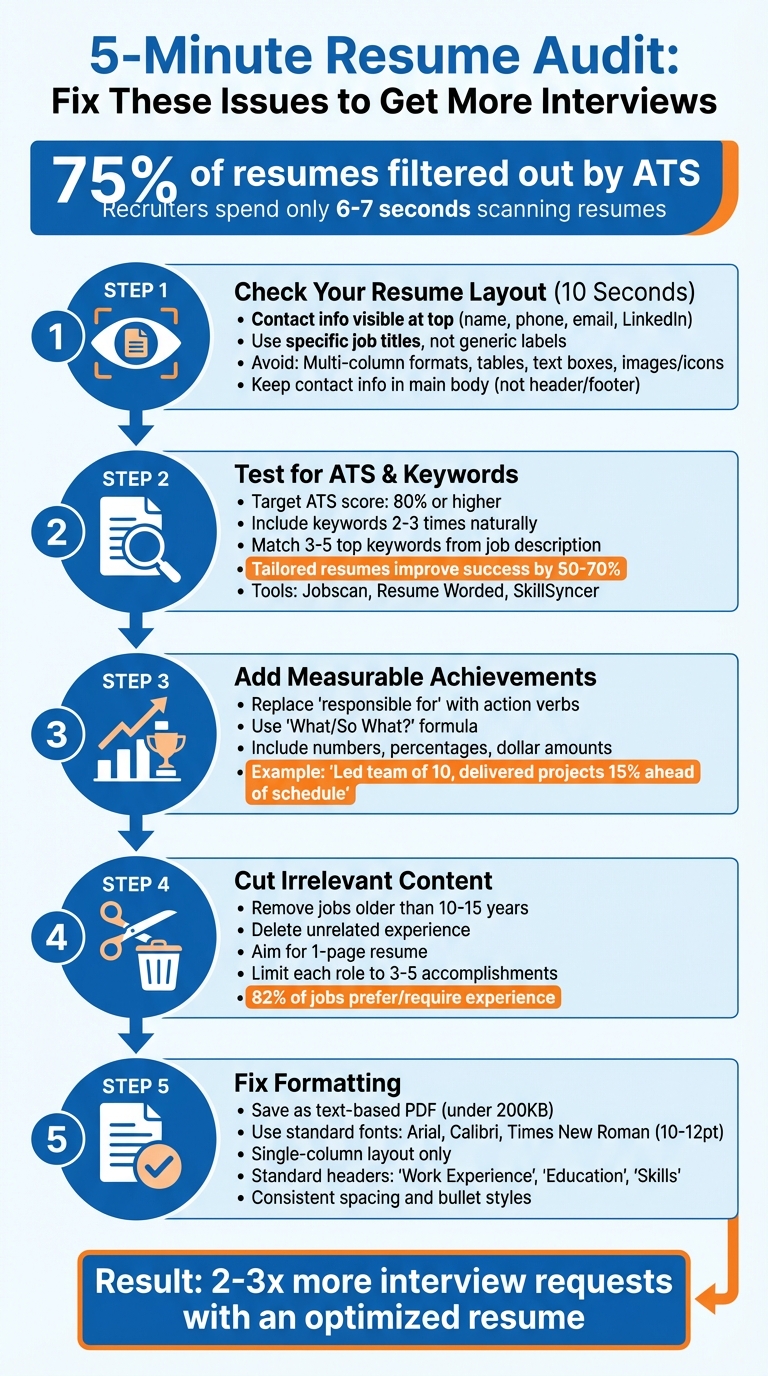
5-Step Resume Audit Checklist to Pass ATS and Get More Interviews
Your Resume Is Getting REJECTED by ATS (Here’s How to FIX IT) + FREE TEMPLATE INSIDE!
Step 1: Check Your Resume Layout in 10 Seconds
Take a moment to open your resume and focus on the top third of the page. Within those first 10 seconds, you should immediately spot your name, phone number, email address, and LinkedIn profile. If this information isn’t front and center, your resume could be in trouble. Recruiters won’t dig through your document to find basic details - they’ll simply move on to the next candidate. A clean, straightforward layout that works with ATS (Applicant Tracking System) software is key to getting past the initial screening.
Consider replacing generic labels with specific, targeted titles like "Software Engineer | Full-Stack Development" or "Marketing Manager | B2B SaaS Growth." This small tweak helps recruiters instantly understand your expertise and focus areas.
"You have only six seconds to make a lasting impression and convince someone you do not belong in the reject pile." - Arslan Ahmad, Founder of Design Gurus
This visual check is just the starting point. The following steps will ensure your resume is ready for ATS scans and keyword optimization.
What Should Be at the Top
Start with a professional email address and include a link to your LinkedIn profile. There’s no need to include your full mailing address; just your city and state will do.
Directly below your contact details, include a brief professional summary. This should be two to three sentences that emphasize your core strengths and what you bring to the role. Keep it concise and tailored to the job you’re applying for. The summary should naturally lead into your skills and experience sections.
Once your header is polished, focus on ensuring the rest of your resume layout avoids common design traps that can interfere with ATS compatibility.
Common Design Errors That Can Hurt Your Resume
ATS software struggles with overly creative layouts, and recruiters often find them difficult to scan. Avoid multi-column formats, as they can confuse the system and disrupt the reading order of your timeline. Similarly, tables and text boxes can cause critical details to be missed entirely.
Steer clear of images, icons, and graphics. Not only are these elements unreadable by ATS, but they also take up space you could use for more relevant content. Stick to standard section headers like "Work Experience" and "Education" instead of unconventional ones like "My Journey" or "Where I've Been." Custom headers can prevent ATS systems from properly categorizing your experience, which may result in your resume being overlooked.
Lastly, don’t place your contact information in the document’s header or footer. Many ATS platforms, including Workday, ignore these sections, which means your details could be missed entirely. Keep everything in the main body of the document for maximum visibility.
Step 2: Test Your Resume for ATS and Keywords
After ensuring your resume's layout is clean and professional, it's time to focus on its content. Applicant Tracking Systems (ATS) play a critical role in modern hiring, with up to 75% of resumes being filtered out before they even reach a recruiter. These systems scan resumes for specific keywords and phrases directly pulled from job descriptions. If your resume doesn’t reflect the language used in the job posting, it may not make it through the initial screening.
Here’s a quick solution: copy the job description into a document and identify recurring skills, tools, and qualifications. Pay attention to hard skills like "Python", "Salesforce", or "project management", as well as soft skills such as "leadership" or "cross-functional collaboration." Focus on the top 3–5 keywords that appear most frequently across the job requirements and responsibilities.
Integrate these keywords naturally into your resume. For example, instead of listing "project management" as a standalone skill, you could write: "Applied project management and agile methodologies to lead a team of 8, reducing delivery time by 15%." Include each keyword 2–3 times across your professional summary, experience section, and skills list. This approach ensures your resume meets ATS standards while remaining appealing to human recruiters.
How to Match Job Description Keywords
To identify the right keywords, review three to five job postings for similar roles. Note the terms that consistently appear - these are the industry-specific keywords recruiters expect. For instance, if you're applying for marketing positions and frequently see "SEO", "Google Analytics", and "content strategy", make sure these terms are included in your resume.
Avoid overloading your resume with keywords. Phrases like "experienced project manager with project management skills who managed projects" can come across as forced and raise red flags for both ATS and human reviewers. Instead, support each keyword with measurable achievements and real-life examples that demonstrate your expertise and impact.
If you’re applying for multiple types of roles, consider creating separate versions of your resume tailored to each. A generic resume that tries to cover everything often performs poorly in ATS scans. Tailored resumes, on the other hand, can improve your ATS success rate by 50–70% and potentially double or triple your interview requests.
Once you’ve incorporated the relevant keywords, it’s time to test your resume’s ATS compatibility.
Use a Free ATS Scanner
Free tools like Jobscan and Resume Worded's Resume Optimizer can help you evaluate how well your resume aligns with a specific job posting. Simply upload your resume and the job description to receive a match score. Aim for a score of 80% or higher. Scores below this threshold often indicate missing keywords or formatting issues that could confuse ATS systems.
These tools also highlight missing keywords, flag problematic section headers, and identify formatting errors, such as contact details hidden in headers or footers. Other free options like SkillSyncer and KudosWall provide compatibility scores between 0 and 100. If you’re browsing job postings online, the Jobalytics Chrome extension can analyze postings in real-time and suggest keywords to include in your resume.
For a more hands-on option, scale.jobs offers a free ATS Score Checker that evaluates your resume based on standard parsing rules. If you’re applying to dozens of roles each week and need deeper customization, consider using professional resume writing services to create ATS-optimized documents tailored to your industry. However, most job seekers can achieve excellent results using free scanners and the keyword-matching tips outlined here.
To test your resume quickly, paste it into tools like ATSFriendly or mployee.me, along with a recent job description. Review the feedback, make adjustments, and re-scan until your score reaches 80%. This simple step can dramatically improve your chances of landing in the "interview" pile instead of being filtered out.
With your resume keywords in place, the next step is to ensure your achievements clearly showcase your measurable impact.
Step 3: Review Your Achievements and Numbers
When it comes to resumes, recruiters give them just a few seconds of attention. If your bullet points resemble a job description rather than showcasing results, you’re likely to miss out. For instance, compare "managed a team" with "led a cross-functional team of 10 to deliver projects 15% ahead of schedule." The latter makes an immediate impact, turning a potential rejection into a callback. Unlike automated tools like AI resume builders or Jobscan that simply scan text, scale.jobs uses expert reviewers to transform your bullet points into measurable achievements.
Take a close look at your resume and evaluate every bullet point. Eliminate generic phrases like "responsible for", "tasked with", or "handled." These terms fail to convey what you accomplished or how effectively you performed. Instead, replace them with action-oriented, measurable outcomes. Use specific metrics - numbers, percentages, or dollar amounts - to demonstrate the value you brought to your role.
Add Numbers to Every Achievement
Start each bullet point with a strong action verb and follow it with a measurable result. For example, instead of writing "Worked on software development", say, "Developed a new API that reduced system latency by 30%." Similarly, replace "Helped with budget planning" with "Managed a $2M annual budget, identifying $200K in cost savings."
A helpful approach is the "What? / So What?" formula. Begin by identifying the skill or task you performed, describe the action you took, and then highlight the quantifiable benefit. For instance, "Streamlined onboarding process, cutting new-hire training time from 6 weeks to 4 weeks and improving retention by 12%." This structure clearly shows recruiters both your actions and their impact.
Choose action verbs that emphasize your contributions. For leadership roles, use words like Spearheaded, Orchestrated, or Championed. If you’re highlighting efficiency improvements, opt for verbs such as Streamlined, Optimized, or Minimized. For technical roles, consider terms like Architected, Automated, or Deployed. Avoid overused buzzwords that recruiters tend to overlook.
Replace Vague Job Descriptions
Once you've focused on showcasing achievements, revisit any remaining vague descriptions. Highlighting concrete metrics is a key strength of scale.jobs, which combines human expertise with ATS optimization to give your resume an edge.
| Avoid | Use |
|---|---|
| "Responsible for managing a team" | "Led a cross-functional team of 10 to deliver projects 15% ahead of schedule" |
| "Handled customer complaints" | "Resolved 50+ daily customer inquiries, maintaining a 98% satisfaction rating" |
| "Helped with budget planning" | "Managed a $2M annual budget, identifying $200K in cost savings" |
| "Worked on software development" | "Developed a new API that reduced system latency by 30%" |
If you don’t have exact numbers for older roles, use reasonable estimates. For example, "Supported a team of approximately 15" is far better than "responsible for team support." If you’re unsure how to transform vague descriptions into impactful achievements, professional resume writers can help craft compelling, results-driven statements that appeal to both ATS systems and recruiters.
Before moving to Step 4, ensure every bullet point begins with an action verb and includes a measurable result. This step will set the stage for trimming irrelevant content and refining your resume’s length.
Step 4: Cut Irrelevant Content and Reduce Length
Recruiters typically spend just 6 seconds scanning a resume. That means every unnecessary detail can distract from your key qualifications. This step focuses on streamlining your resume by cutting out anything that doesn't directly support your suitability for the role.
Remove Old or Unrelated Experience
Follow the 10–15 Year Rule: Remove jobs that are over 10–15 years old unless they demonstrate a clear progression in responsibility or include skills critical to the role you're targeting. For seasoned professionals, the focus should be on recent, high-impact achievements rather than early-career roles that may no longer reflect your expertise.
When it comes to unrelated experience, ask yourself: Does this job align with the industry you're applying to? Does it highlight transferable skills like leadership, communication, or problem-solving? If the answer is no, it’s time to delete it. As Cory Streiff from Zety puts it:
"A resume isn't an autobiography... Think of it as your greatest hits album, a list of relevant accomplishments and achievements designed to wow the HR manager."
If you're transitioning to a new industry, avoid using jargon or terminology specific to your previous field. Instead, focus on universal skills like project management, teamwork, or process improvement.
For entry-level candidates, remember that 82% of job openings prefer or require prior experience. While retail or service jobs may not directly relate to your target role, they can demonstrate qualities like reliability and a strong work ethic. Place these roles in an "Other Experience" section, summarizing them without detailed bullet points. This approach prevents gaps in your work history without cluttering your resume.
Finally, aim to fit your resume on one page for a cleaner, more focused presentation.
Fit Your Resume on One Page
For early and mid-career professionals, a one-page resume is more than just a recommendation - it’s a way to stand out. A concise format forces you to highlight your most impressive achievements, keeping the recruiter’s attention where it matters. Remove any bullet points that lack measurable impact or relevance to the job.
Here are some tips to maximize space without sacrificing clarity:
- Adjust margins to 0.5 inches.
- Tighten line spacing.
- Eliminate excess white space between sections.
- Use standard fonts like Arial, Calibri, or Times New Roman at 10–11 point size.
- Limit each role to three to five key accomplishments.
Once your content is streamlined, you can focus on optimizing formatting to improve your resume's performance with applicant tracking systems (ATS).
Need help fine-tuning your resume? Scale.jobs offers expert resume editing services that blend human expertise with ATS optimization. With tools like professional resume writers, you’ll get a polished resume that highlights your strengths and aligns with the job you want.
Next, we’ll cover how to fine-tune your formatting to ensure your resume passes automated screening systems.
Step 5: Fix Formatting Problems
Formatting issues can make your resume hard to read for both recruiters and Applicant Tracking Systems (ATS). This step ensures your document remains clear and compatible with automated systems, so no critical details get lost.
Save Your Resume as a PDF
Always save your resume as a PDF to lock in the layout, fonts, and spacing exactly as intended. Word documents can shift formatting depending on the software version or device used to open them.
That said, not all PDFs work seamlessly with ATS platforms. PDFs with images, text boxes, or embedded graphics can cause parsing errors. To avoid this, create your resume using a standard tool like Microsoft Word or Google Docs, then export it as a text-based PDF. This ensures the content is machine-readable. Keep the file size under 200KB to prevent upload issues on application portals.
If a job listing specifically asks for a Word document, provide a .docx file. Otherwise, stick with a PDF for consistent formatting across systems.
Use Standard Fonts and Maintain a Clean Layout
Choose fonts like Arial, Calibri, Times New Roman, or Helvetica in a size between 10 and 12 points. These fonts are easy to read and widely supported by ATS software. Avoid decorative fonts that may not render properly or confuse automated systems.
Stick to a single-column layout with clear section headers such as "Work Experience", "Education", and "Skills." Avoid using tables, text boxes, or multi-column designs, as these can cause ATS software to misread or skip important content. Place your contact information directly in the document body instead of a header or footer.
Ensure consistency throughout your resume. Use the same bullet style, heading size, and spacing in every section. This not only improves readability but also demonstrates your attention to detail.
Once your formatting is polished and ATS-friendly, you're ready to move on to the final steps that will help your resume stand out.
What to Do After Your 5-Minute Audit
You've pinpointed the areas where your resume needs improvement. Now it's time to act on those findings with these quick updates:
- Refresh your contact information: Ensure your phone number, email, and LinkedIn profile are current.
- Match keywords to the job description: Use the same language employers use to describe their ideal candidate.
- Highlight measurable achievements: Numbers stand out - include metrics to show the impact of your work.
- Cut irrelevant experience: Focus on roles and skills that align with the job you’re applying for.
- Save as a PDF with standard fonts: This ensures your formatting stays intact across devices and ATS systems.
These straightforward fixes address the problems uncovered during your audit and prepare your resume for better results in your job search.
Why These Quick Fixes Make a Difference
Making these changes isn’t just about cleaning up your resume - it’s about making it more effective. Recruiters often spend only a few seconds reviewing each resume, and Applicant Tracking Systems (ATS) are programmed to prioritize applications that closely match the job description. By aligning your resume with ATS requirements and recruiter expectations, you increase your chances of moving to the next stage in the hiring process. A resume that’s keyword-optimized, focused on measurable results, and formatted neatly shows hiring managers that you’re detail-oriented and ready to deliver results.
Leverage Free Tools for Continuous Refinement
Once you’ve addressed the basics, free tools can help you refine your resume even further. For example:
- SkillSyncer: Compares your resume to job descriptions and identifies missing keywords.
- KudosWall ATS Checker: Provides a score from 0 to 100, along with suggestions for keyword and formatting improvements.
- ResumeWorded Scanner: Reviews your resume against 25 criteria, including ATS compatibility and overall impact.
While tools like jobscan.co rely solely on automation, Scale.jobs takes it a step further by combining ATS optimization with human insights for practical feedback. Their free Resume ATS Checker highlights keyword gaps, formatting issues, and compatibility with ATS systems. Plus, you can use their Cover Letter Generator and Job Applications Tracker to streamline your application process.
For those looking to save time and ensure a professional edge, professional resume writing services can help. These services include ATS optimization, LinkedIn profile optimization, and tailored strategies to make your job search more effective. By repeating scans for different job descriptions, you can track your progress and ensure every application stands out.
FAQs
How can I check if my PDF resume is ATS-readable?
To make sure your PDF resume is compatible with ATS (Applicant Tracking Systems), stick to a clean, straightforward format. Avoid using tables, graphics, or multi-column layouts, as these can confuse the system. Check that your text is selectable - this ensures it’s not saved as an image - by opening the file in a text editor to confirm.
Incorporate job-specific keywords naturally throughout your resume, but don’t go overboard. To double-check compatibility, run your resume through ATS testing tools or scanners to spot any potential problems. If the PDF doesn’t pass, consider switching to a Word document or using an ATS-friendly template to improve your chances of success.
For extra help, tools like an AI resume builder can simplify the process and ensure your resume meets ATS standards.
What if I can’t quantify my work with exact numbers?
When exact numbers aren’t available, focus on telling your story through qualitative details. Emphasize your skills, responsibilities, and achievements that highlight your contributions - like resolving challenges, managing teams, or streamlining workflows. While specific metrics can be helpful, they’re not always essential. What truly counts is showing how you made a difference and added value to your role.
When is a two-page resume better than one page?
When you have substantial relevant experience, multiple roles, or certifications that don’t fit on a single page, a two-page resume can be more effective. This is particularly important for senior-level or specialized positions, where showcasing detailed accomplishments and skills is critical. Make sure to use the additional space wisely by highlighting only the most relevant and impactful information.